AI coding tools have quickly become part of the modern software development workflow. What began as simple code completion has evolved into AI-powered assistants that can generate code, explain complex systems, write tests, review pull requests, and help developers navigate large codebases.
While these tools can significantly boost productivity, they are not equally effective for every task. Their value depends on how they're used, the complexity of the project, and the developer's ability to validate the output. This guide explores the major categories of AI coding tools, the leading platforms on the market, and the strengths and limitations developers should understand before relying on them.
Key Takeaways
AI coding tools can accelerate development by assisting with code generation, testing, debugging, documentation, and code reviews
Different tools excel at different tasks, from code completion and test creation to security scanning and technical debt management
The most effective use cases involve repetitive, well-defined work such as boilerplate code, test scaffolding, documentation, and pull request summaries
AI tools improve productivity when paired with human oversight, but developers still need to validate outputs and understand the code they ship
What AI Tools for Developers Actually Do

The category broadly covers three things: code generation and completion, debugging and testing, and documentation. Within each, there's meaningful variation in how well different tools handle the work.
Code generation and completion tools take context from what you're writing, comments, function signatures, and surrounding code, and suggest what comes next. The better ones understand intent reasonably well. The worst ones produce plausible-looking code that doesn't quite do what you need and requires more editing than writing from scratch would have.
Debugging and testing tools analyze code for errors, security vulnerabilities, and test coverage gaps. Several can generate unit tests automatically based on existing code, which saves real time on a task most developers find tedious.
Documentation tools auto-generate docstrings, inline comments, and API documentation from code context. Quality varies significantly depending on how well-written the underlying code is; garbage in, garbage out applies here.
Overreliance is a genuine concern. Developers who lean heavily on AI completion without understanding what's being generated tend to produce code that works until it doesn't, with limited ability to debug it when things go wrong. The tools are most valuable when used by people who could write the code themselves and are using AI to go faster.
Code Generation
GitHub Copilot is the most widely used AI coding assistant. Developed by GitHub, OpenAI, and Microsoft, it integrates directly into VS Code and several other editors, offering real-time completions based on comments and surrounding code context. It handles common patterns well and is particularly useful for boilerplate, repetitive structures, and working in unfamiliar libraries. It offers a free tier with limited monthly completions, while its paid Individual subscription starts at $10/month, alongside team and enterprise plans.
OpenAI Codex is an agentic software engineering assistant integrated directly into the ChatGPT desktop app, the terminal, and popular IDEs. Rebuilt as an autonomous coding agent rather than a simple autocomplete model, it can execute multi-step developer tasks, such as refactoring large file structures, writing unit tests, and running terminal commands, within isolated sandboxed environments. The tool is included for ChatGPT Plus, Pro, and Enterprise subscribers, with pay-as-you-go pricing available for API keys.
Qodo (formerly CodiumAI) leans heavily into automated test generation and code suggestions. It is designed to generate comprehensive unit tests and code completions across a range of AI models, making it highly effective for closing coverage gaps.
IntelliCode integrates with Visual Studio and VS Code and provides personalized code suggestions based on patterns from your own coding history. The recommendations improve over time as it learns your habits. Free inside VS Code, which makes it one of the easier additions to an existing setup.
Debugging and Testing
Tabnine is an AI code assistant that uses proprietary, privately-trained models to learn your coding style over time, while also supporting integration with leading LLMs for context-aware chat suggestions. It includes security and compliance features, which make it a reasonable choice for teams with specific compliance requirements. Worth noting: there's a real learning curve getting it configured well, and integration with some existing setups can be friction-heavy. $12/month per user.
Documentation
Mintlify Writer auto-generates code documentation from context, docstrings, function descriptions, and explanations of complex structures. It reduces the manual burden of keeping documentation current, which is one of the tasks that tends to slip when teams are moving fast. Two caveats worth knowing: the starting price is high relative to similar tools, and the output quality depends heavily on the code itself. Poorly written code produces vague documentation. Manual editing is usually still required.
Code Review and Collaboration
WhatTheDiff automates pull request summaries and code review suggestions. It generates descriptions of what changed in a PR and delivers weekly reports summarizing significant activity across repositories. Useful for keeping distributed teams aligned. Limitations include limited support for less common languages and heavier token usage than some alternatives. Free for up to 10 pull requests.
Stepsize AI is specifically for managing technical debt. It integrates with Jira and Linear to link debt tracking with issue tracking, making it easier to prioritize what actually needs fixing versus what can wait. For teams where technical debt has become a real drag on velocity, it surfaces the problem in a way that's harder to ignore. Paid subscription.
Web Development
Uizard lets non-designers create web and mobile app prototypes using a drag-and-drop editor. It can turn hand-drawn sketches into interactive digital prototypes, which makes early-stage design iteration faster and more accessible. Free tier available for individuals and small teams.
The Wix AI Website Builder generates customized websites through an interactive conversational assistant that learns about your business goals and design preferences. It's aimed at people with limited technical expertise who need a professional-looking site without writing code. For developers, it's less relevant, but useful when helping clients or non-technical stakeholders get something up quickly. Free and paid plans.
Bug Tracking and Security
Bugasura handles bug consolidation, links similar issues automatically, captures device and browser context, and suggests issue descriptions. It reduces the administrative overhead of managing a bug backlog. Limitations: there's a learning curve, it can be slow at times, and the filtering and customization options have some gaps. Free for small teams.
Snyk scans code and dependencies for security vulnerabilities using its proprietary DeepCode AI engine, providing real-time feedback directly within the development workflow. It also handles container scanning, which is particularly useful for teams deploying in containerized environments. Snyk integrates into the development workflow directly, providing vulnerability feedback in real time rather than as a periodic audit. Free and paid plans.
Quick Reference
Tool | Primary Use | Pricing |
GitHub Copilot | Code completion, VS Code integration | Paid |
OpenAI Codex | Natural language to code, multi-language | Free for small usage |
Qodo | Test generation, code suggestions | Free + paid |
Tabnine | Context-aware completion, security/compliance | $12/mo/user |
Codium AI | Automated unit test generation | Free + paid |
DeepCode AI | Security-first code analysis | Free + paid |
Mintlify Writer | Auto-generated documentation | High starting price |
IntelliCode | Personalized code suggestions | Free |
WhatTheDiff | PR summaries, code review automation | Free up to 10 PRs |
Stepsize AI | Technical debt management | Paid |
Uizard | Prototype creation from sketches | Free + paid |
Wix ADI | AI-generated websites | Free + paid |
Bugasura | Bug consolidation and tracking | Free for small teams |
Snyk | Vulnerability scanning, container security | Free + paid |
What to Take From This
These tools are useful. None of them replaces the need to understand what you're building. The highest-value use cases tend to be the ones where the work is repetitive or well-defined, such as boilerplate generation, test scaffolding, documentation, PR summaries, rather than the novel architectural and logic problems that are the hard part of software development anyway.
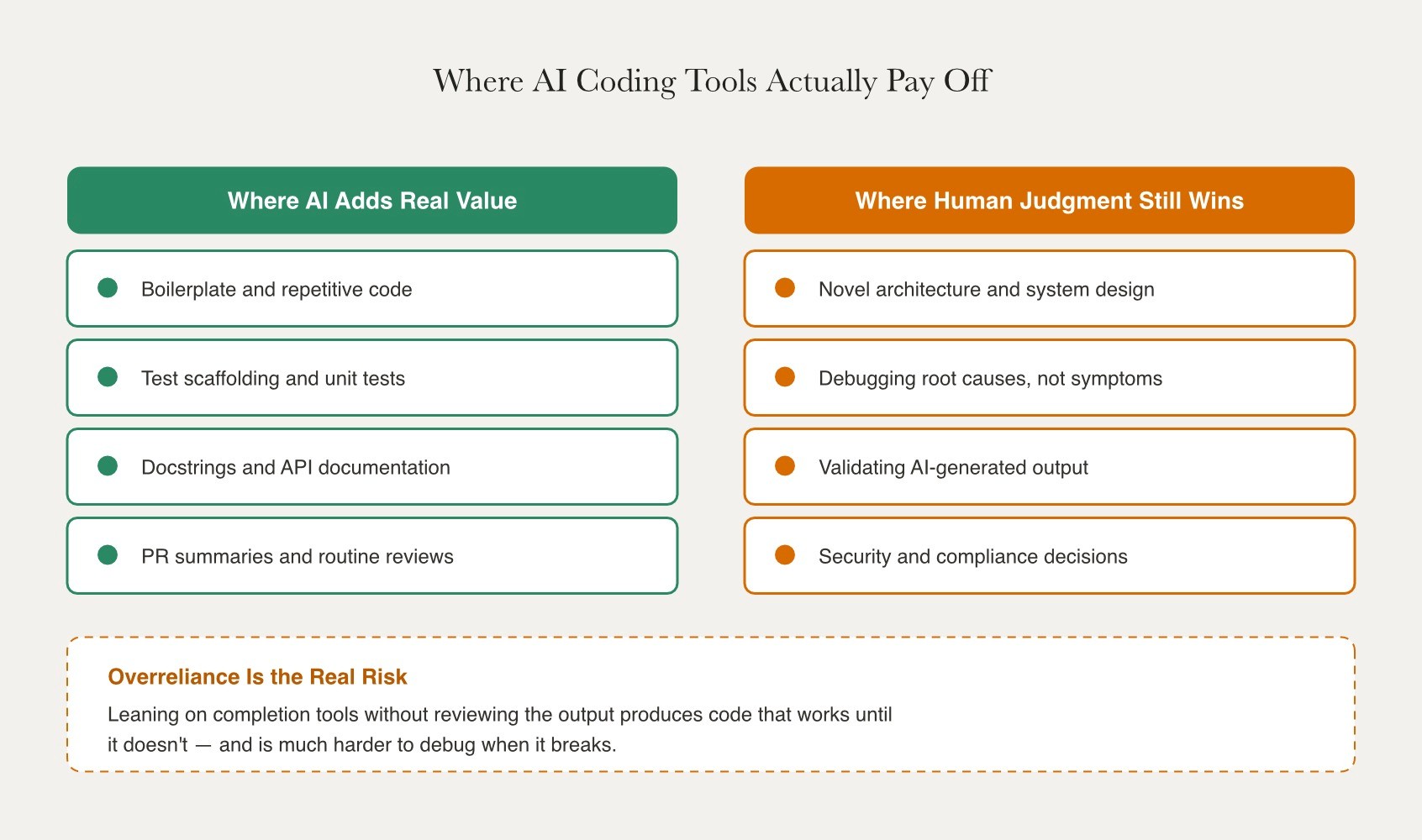
The risk of skill erosion is real and worth taking seriously. Developers who use completion tools without critically reviewing the output end up with codebases that are harder to maintain and debug. Used well, these tools buy back time for the harder problems. Used carelessly, they just move the debt around.
Fonzi and AI Developer Hiring
As AI coding assistants become standard tools across software teams, companies are increasingly looking for developers who can effectively use AI to improve productivity while maintaining strong engineering fundamentals. Knowing how to work with tools like GitHub Copilot, Codex, or AI-powered testing platforms is becoming a valuable skill. However, employers still need engineers who can validate outputs, make architectural decisions, and ship reliable software.
Fonzi helps connect software engineers with companies hiring for modern development roles through Match Day, where candidates can engage directly with employers actively recruiting technical talent. Whether your background is in backend engineering, AI infrastructure, full-stack development, or developer tooling, Match Day helps connect engineers with teams seeking practical experience with today's AI-driven software development workflows.
Summary
AI coding tools have become valuable productivity aids for developers, helping with code generation, testing, debugging, documentation, security scanning, and code reviews. Tools such as GitHub Copilot, OpenAI Codex, and Snyk automate repetitive tasks, accelerate development, and improve efficiency across modern software teams. However, these tools work best when paired with strong engineering judgment. Their greatest value lies in handling boilerplate code, test generation, documentation, and routine reviews, while developers remain responsible for architecture, debugging, security, and validating outputs. Used thoughtfully, AI tools help engineers spend more time solving complex problems rather than repetitive ones.
FAQ
What are the primary benefits of using AI tools in software development?
How can AI tools help in code generation?
What are some common use cases for AI tools in software development?
Are there any risks associated with overreliance on AI tools?
How do AI-powered bug tracking tools improve software quality?