Feature Flag Best Practices: Naming, Testing, Cleanup
By Shye Uy
Feature flag best practices are the rules that stop flags from piling up as technical debt, which happens by default because adding a flag takes a single line of code and removing one is nobody's assigned job. The practices that keep a flag system healthy are about what happens after a flag is created: who owns it, what kind of flag it is, when it expires, and how it gets deleted.
Naming, testing and cleanup standards work best when they serve the flag lifecycle instead of being treated as separate hygiene rules.
Key Takeaways
- Release flags, experiment flags, ops flags and permission flags have very different lifespans, so a single policy for all of them either deletes long-lived controls too early or lets temporary flags linger.
- A flag name that encodes its type, owning team and intent tells anyone reading the code how long the flag should live and who to ask before removing it.
- Testing every flag combination is unnecessary; test the configuration you expect in production, the fallback with new flags off, and both paths of each flag in isolation.
- Kill switches are the one category of operational flag designed to live indefinitely, which is why they need explicit ownership instead of an expiry date.
- Flag debt stays near zero when removal is part of the definition of done, every temporary flag carries an expiry date, and stale flags trigger alerts or failing checks.
Feature Flag Types and Their Lifespans
The most useful feature flag best practice is to classify every flag by type when it is created, because the type decides how long the flag should live and who is responsible for it. The four-category taxonomy used here follows Pete Hodgson's Feature Toggles (aka Feature Flags) on martinfowler.com, which sorts flags along two dimensions: how long the flag lives and how dynamic the toggling decision must be.
On the question of feature toggle vs feature flag, there is no technical difference. Hodgson treats feature toggles, feature flags, feature bits and feature flippers as synonyms for the same set of techniques.
Release, experiment, ops and permission flags
Release flags. Feature flag driven development uses release flags to keep unfinished features inactive in production while teams continue merging changes to trunk. Hodgson describes release toggles as transitionary by nature and says they should generally not stay much longer than a week or two, although product-driven release toggles may need longer.
Experiment flags. An experiment flag assigns each user to a cohort and routes them consistently down one code path for A/B or multivariate testing. According to Hodgson, an experiment flag needs to stay in place long enough to produce statistically significant results, which can mean hours or weeks, and running it longer is unlikely to help because other system changes start to invalidate the result.
Ops flags and kill switches. An ops flag controls operational behavior, such as disabling a new feature with unclear performance implications. Hodgson notes that most ops flags should be retired once the team trusts the feature in production, but a small number of long-lived kill switches, flags that let operators gracefully degrade non-vital functionality under heavy load, may stay almost indefinitely.
Permission flags. A permission flag changes which features specific users receive, such as premium features for paying customers or alpha features for internal users. Because entitlements outlast any single release, Hodgson says a permissioning toggle can live for multiple years.
Recommended lifespans by flag type
The lifespans below are recommendations this article draws from Hodgson's descriptions of each category. They are guidance for setting team standards, not industry measurements.
Flag type | Recommended lifespan | Who owns it | When to remove it |
|---|---|---|---|
Release flag | Generally one to two weeks in total; longer when product release timing requires it | The engineering team that built the feature | As soon as the feature is at 100% and stable, along with the old code path |
Experiment flag | Hours to a few weeks, long enough for a significant result | The product or growth owner running the experiment, with an engineering owner for removal | When the experiment reaches a decision, keeping only the winning path |
Ops flag (temporary) | Until the new feature is proven stable in production | The service's on-call or platform team | Once operational confidence is established |
Kill switch (long-lived ops flag) | Indefinite, reviewed on a fixed schedule | The service's on-call or platform team | When the component it protects is retired or no longer needs a degradation path |
Permission flag | Months to years | The product owner for the entitlement, with an engineering owner for the code | When the entitlement changes or the feature becomes available to every user |
Treating these types the same way causes predictable damage. A team that applies short expiry dates to everything will delete kill switches it needs during an incident, and a team that applies no expiry dates will accumulate release flags that nobody remembers. Hodgson also recommends managing each category differently even when the same tooling controls them, noting that a flag's configuration location and its manager can change as it moves from a release flag to an experiment flag to an ops flag.
Feature Flag Naming Convention That Scales
A good feature flag naming convention encodes three things in the name itself: the flag's type, the team that owns it, and what the flag does. When those three facts are in the name, anyone who finds the flag in code or in a dashboard knows how long it should live and who to ask before touching it.
Why flag names must stay unique across microservices
Unleash's 11 best practices for building and scaling feature flag systems recommends that every flag have a unique name across the whole system. The reason is lifecycle-related: if an old flag name is reused, stale references still sitting in code can be accidentally re-enabled. Unleash's companion guide, Feature flag management: Best practices, acknowledges that flag references are rarely all removed when a flag is archived, and recommends enforcing a naming pattern at flag creation to prevent this.
Uniqueness matters more with feature flags in microservices. Unleash points out that monoliths split into services and services merge over time, so a name scoped to a single application can collide or become ambiguous after a reorganization. A globally unique name stays meaningful wherever the code ends up.
Name patterns that encode type, owner and intent
The patterns below are structures a team can adopt and adapt. The segments in angle brackets are placeholders for your own values.
- Type, team, intent. <type>.<team>.<intent>, for example a pattern like release.<team>.<feature-name> or ops.<team>.<component>-kill-switch. The type prefix lets tooling sort flags by expected lifespan.
- Type, team, ticket, intent. <type>.<team>.<ticket-id>-<intent>. Adding the issue tracker ID links the flag to the work item that should also track its removal. Unleash's own example of a unique name references both the project and a related ticket.
- Type and intent with an expiry hint. <type>.<intent>.<yyyy-mm> for temporary flags. The date segment makes an overdue flag visible during code review without opening any tool.
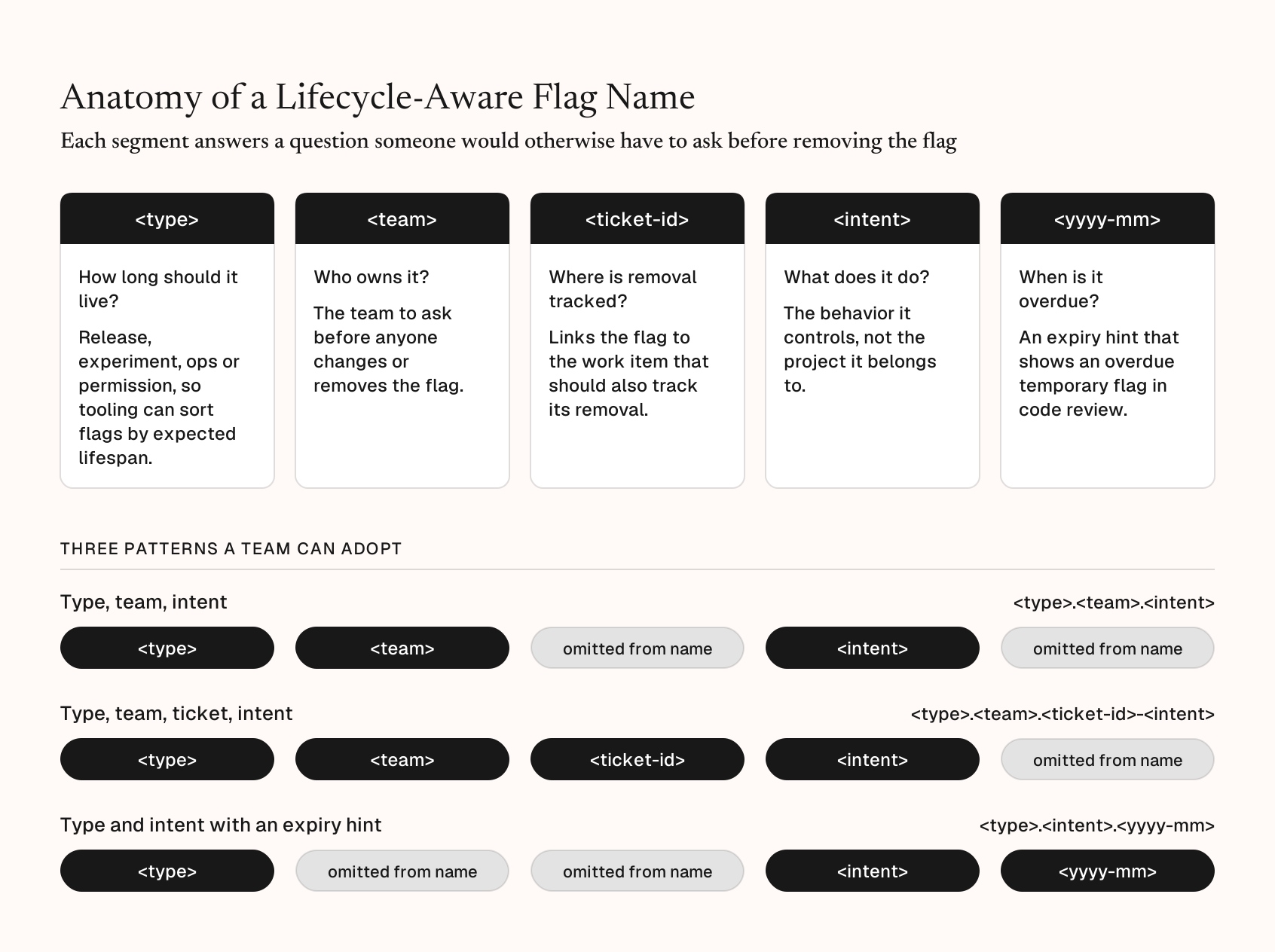
Whichever pattern a team picks, the intent segment should describe what the flag does rather than the project it belongs to. Hodgson's article shows the problem with broad names: a flag called next-gen-ecomm that controls a specific order-cancellation feature couples unrelated decisions to one magic string, so the team cannot change the scope of one feature without affecting the others.
Store metadata alongside the name
A name can only carry so much. Hodgson recommends adding a human-readable description to each toggle in structured configuration, and notes that some teams also record a creation date, a primary developer contact and an expiration date for short-lived toggles. Unleash recommends assigning an owner and an expiration date when the flag is created. Together, the name and the metadata give every flag what the lifecycle needs from day one: a type, an owner, an expiry and a clear description of what removal will change.
Feature Flag Testing Without an Exploding Test Matrix
Feature flag testing does not require testing every combination of flags. Hodgson's article explains that each flag doubles at least some of the testing burden and multiple flags create a combinatorial explosion of possible states, but it argues that testing every combination is unnecessary because flags rarely interact and releases rarely change more than one flag's configuration at once.
Which flag combinations to test
Hodgson recommends a short list of configurations for each release candidate:
- The expected production configuration. The current production flag state plus any flags you intend to turn on in this release.
- The fallback configuration. The same state with the flags you intend to release turned off, so a rollback is known to work.
- All flags on. Some teams also run tests with every flag on to catch regressions that would surface in a future release.
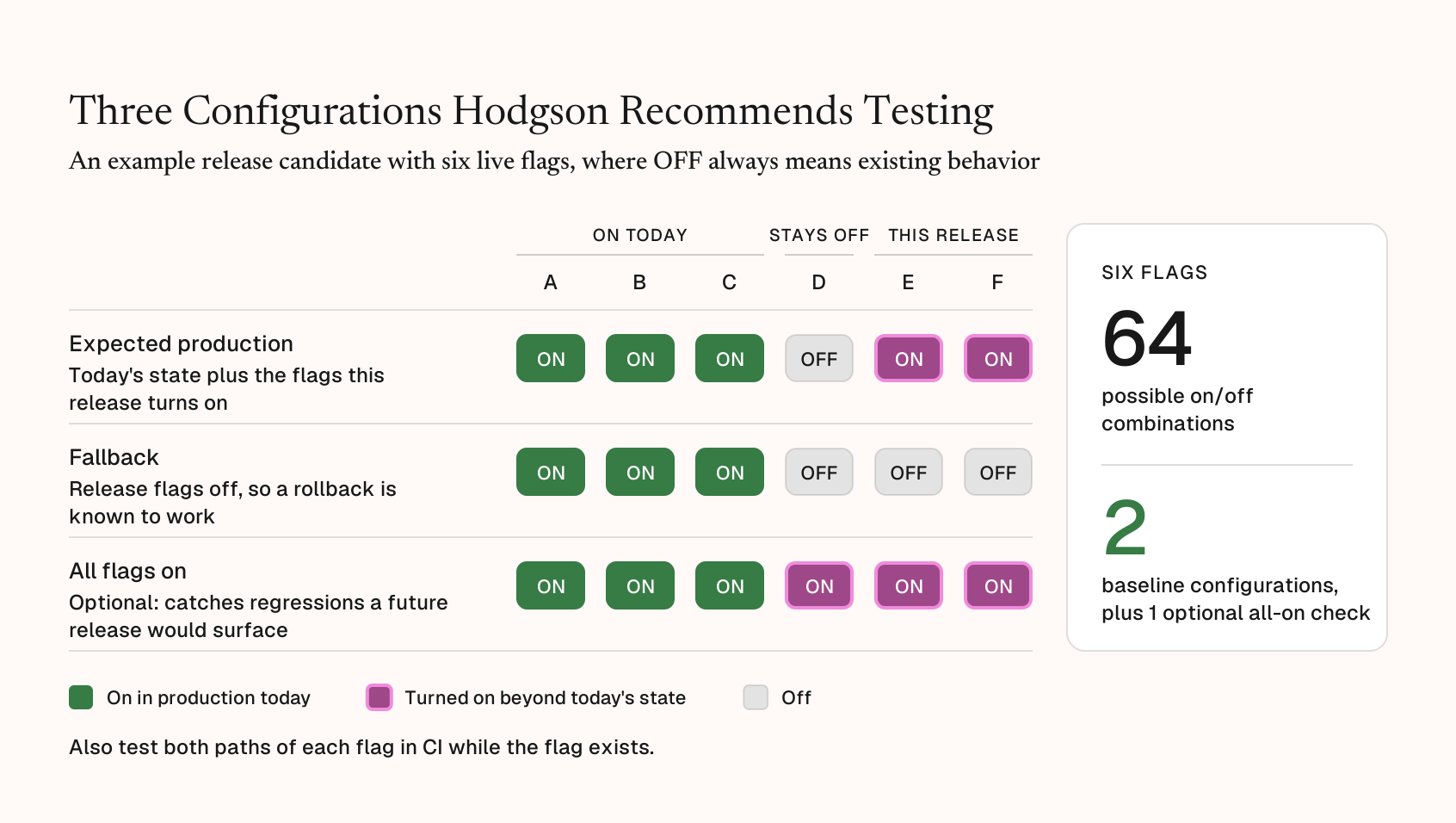
This approach depends on one naming-adjacent convention: a flag's off state should mean existing or legacy behavior and its on state should mean new behavior. Hodgson notes that the recommended test set only makes sense if the team holds to that convention consistently.
Test both paths of each flag in CI
Every flag that can be flipped in production has two code paths, and both need automated coverage while the flag exists. Hodgson's example tests the same behavior with the flag forced off and forced on through a toggle router that tests can configure directly. Unleash's guidance on testing both code paths while a flag is active, and removing the flag and old path once rollout finishes, follows the same logic: two paths are a temporary cost, not a permanent one.
The cleanest way to make both paths testable is to keep flag evaluation out of the code being tested. Hodgson describes two techniques. Decoupling decision points from decision logic puts every flag check behind a named decision method, so the reason for a toggle can change without touching every call site. Inversion of decision goes further by injecting the decision into a component at construction time, so the component has no knowledge of the flag system and tests simply pass in true or false. Unleash makes the same recommendation for backend logic: evaluate the flag externally and inject the result, or provide two separate implementations.
Keep the flag test matrix small
The size of the test matrix is a direct function of how many flags are live, which is why testing strategy and cleanup are the same problem. Three practices keep it small:
- Prefer static configuration where the flag type allows it. Hodgson notes that managing toggle configuration in source control greatly reduces the testing burden, because a flag's state is baked into the release instead of changing independently of it.
- Avoid nested flags. Unleash warns against parent-child flag hierarchies with their own targeting rules, because when both parent and child are set to a 50% rollout, it becomes unclear whether 50% or 25% of users see the feature.
- Evaluate once per request. In distributed systems, Unleash recommends evaluating a flag once at the start of a request and passing the result to downstream services, so different services do not evaluate the same flag differently mid-request.
For teams that need to flip flags during automated tests without redeploying, Hodgson suggests an endpoint for dynamic in-memory reconfiguration, with a warning that this facility should only be used by automated tests and possibly for manual exploratory testing, never as a general production control mechanism.
Progressive Rollouts and Kill Switches
A progressive rollout exposes a new code path to a growing share of users while the team watches production metrics, and a kill switch is a flag that turns a code path off quickly when something goes wrong. Both are production uses of flags, and both carry lifecycle rules: a rollout flag should be deleted when it reaches full exposure, while a kill switch is one of the few flags meant to stay.
Running a progressive rollout
Hodgson's article describes a canary release built on flag infrastructure: the team creates a cohort from a random 1% sample of users, for example using a modulo of user ID, keeps that cohort consistently on the new path while the other 99% stay on the old one, and monitors key business metrics for both groups before turning the feature on for everyone. He contrasts this with a "Champagne Brunch," in which a feature is exposed first to a specific set of internal or beta users rather than a random sample.
Consistency is the non-negotiable part. Unleash's best-practices guide states that percentage-based rollouts must give the same user the same experience every time, and recommends hashing a stable identifier such as a user ID to assign users to groups, segmenting users by attributes such as location or subscription type, logging which users are in which group, and considering automation that disables a misbehaving feature. Unleash also advises targeting groups by user attributes managed in another system instead of storing large lists of individual user IDs in flag configuration, which slows evaluation and becomes hard to maintain.
A rollout flag is still a release flag. Once the feature reaches 100% and is stable, Unleash's guidance is to remove the flag from code, archive it, and delete the old code path it replaced. Leaving the flag at 100% indefinitely turns a finished rollout into permanent debt.
Designing kill switches
Unleash describes kill switches as inverted feature flags that let a team gracefully disable parts of a system with known weak spots, and lists them, along with internal debugging and tracing flags, as valid exceptions to its rule that flags should be short-lived. Hodgson gives the operational version: long-lived ops toggles that disable non-vital functionality, such as an expensive recommendations panel, when the system is under heavy load, and describes these as a manually managed circuit breaker.
Three properties separate a usable kill switch from a decorative one:
- It changes at runtime. Hodgson stresses that ops toggles need to be reconfigured extremely quickly, and that requiring a new release to flip one defeats the purpose. Unleash makes the same distinction more bluntly: if a flag needs an application restart to change, it is configuration, not a feature flag.
- It survives a flag system outage. Unleash recommends that applications have no hard dependency on the flag service, using locally cached configuration and sensible defaults so evaluation continues if the service is unavailable. A kill switch that only works while the flag service is healthy will fail during the incidents most likely to need it.
- It is described for the person flipping it. Hodgson's example contrasts an ops toggle named only basic-rec-algo with a description explaining that it uses a simpler, faster recommendation algorithm that puts less load on backend systems but is less accurate. During an outage, the on-call engineer needs the second version.
Because kill switches are meant to persist, they do not get an expiry date. They get an owner and a scheduled review instead, so the team confirms the switch still works and the component it protects still exists. Unleash also recommends access controls, audit logs and, where required, approval workflows for production flag changes, which matter most for the flags that can change production behavior instantly.
Feature Flag Cleanup: Keeping Flag Debt Near Zero
Flag debt is the accumulated cost of flags that have outlived their purpose: dead code paths, extra test cases and conditional logic that every engineer has to reason around. Keeping it near zero depends on making removal a scheduled, owned piece of work rather than something a team gets to when it has time.
Why flags are not removed on their own
Hodgson describes flags as inventory with a carrying cost: they are cheap to create, so many get created, and each one adds abstractions, conditional logic and testing burden. He points to Knight Capital Group's trading incident as a cautionary example of what can go wrong when feature flags are not managed correctly, among other failures.
Uber's engineering post Introducing Piranha: An Open Source Tool to Automatically Delete Stale Code documents the same pattern inside a large mobile codebase. Uber considers a flag stale once its feature is rolled out to 100% or its experiment is fully rolled back, and says the cleanup step of disabling the flag and deleting its code was not always done in practice. The post lists the costs that followed: developers reasoning about obsolete control flow, unreachable code that could still execute after a flag backend error, test coverage maintained for unnecessary paths, and longer build and test times. It also names ownership as a core obstacle, because a flag's author may have moved to another team or left the company by the time the flag goes stale.
Expiry dates and ownership from day one
The fix starts at creation. Unleash recommends setting an expiration date and assigning an owner when a flag is created, and using tooling that alerts on expired flags. Hodgson describes several approaches teams use: adding a removal task to the backlog whenever a release flag is introduced, putting expiration dates on toggles, and placing a limit on the total number of flags a system may have, so that adding a new flag first requires removing an old one.
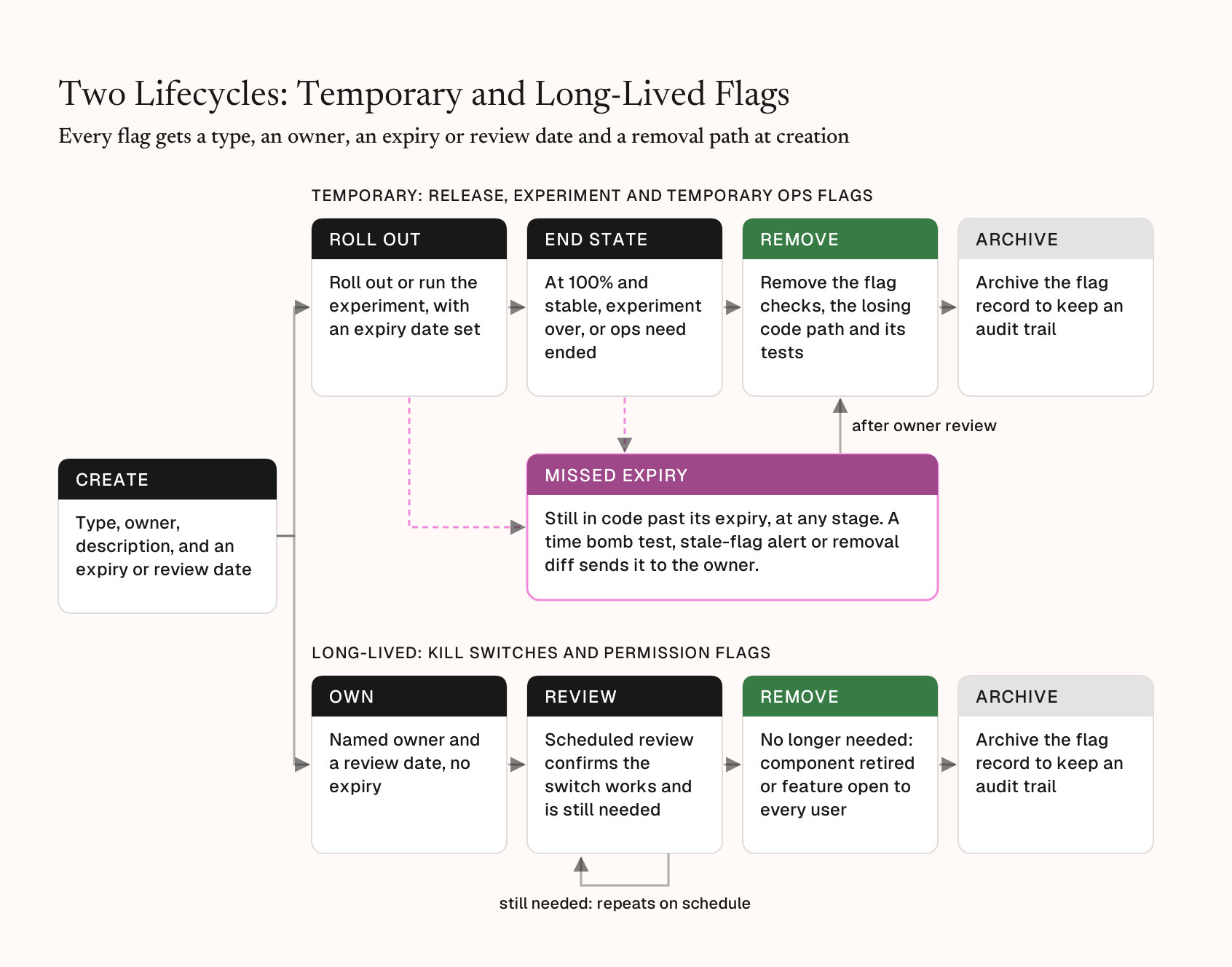
Expiry dates should follow the flag type. Release and experiment flags get a short, concrete date. Temporary ops flags get a date tied to the stability milestone. Kill switches and permission flags get a review date instead of an expiry, so the team re-confirms the owner and purpose on a schedule rather than deleting a flag it still needs.
Time bombs, alerts and automated removal
Three layers of automation catch flags that slip past the process:
- Time bombs in tests. Hodgson describes teams that create "time bombs" which fail a test, or even refuse to start the application, if a flag still exists after its expiration date. This turns an overdue flag into a broken build that someone has to address.
- Lifecycle tracking and alerts. Unleash's guide Feature flag management: Best practices describes flag lifecycle stages from define through develop, production, cleanup and archived, and suggests that flags stuck in the cleanup stage signal accumulating technical debt.
- Automated removal diffs. Uber's Piranha pipeline runs weekly, queries the flag management system for stale flags, and generates a code change that deletes each stale flag and its dead code path, assigning it to the flag's original author for review. Uber's heuristic treats a flag as stale when it has been unmodified for more than a team-configured period, with 8 weeks given as an example, and a reminder bot follows up on open cleanup tasks. In March 2020, Uber reported that it had used Piranha to remove around 2,000 stale feature flags and their related code.
The Piranha case also shows why the lifecycle metadata matters: an automated tool can only assign a removal to an owner if the owner is recorded, and it can only judge staleness if it knows whether a flag is a temporary rollout or a deliberate kill switch.
Make removal part of the definition of done
A feature behind a release flag is not finished when it reaches 100% of users. It is finished when the flag and the losing code path are deleted, the tests for the removed path are gone, and the flag is archived. Unleash recommends treating flag removal like any other technical debt in sprint planning and archiving flags after removal to keep an audit trail, and Uber's definition of cleanup includes deleting the now-unreachable alternative implementation and its tests. Writing that into the team's definition of done is what turns the lifecycle from a guideline into a habit.
Feature Flag Best Practices: What to Do Next
Feature flags become debt by default because creating one is easy and removing one belongs to no one. The feature flag best practices that hold up are lifecycle practices: give every flag a type, an owner, an expiry or review date and a removal path the day it is created, then let naming, testing and cleanup enforce that lifecycle. Release flags, progressive rollouts included, and experiment flags should be deleted along with the old code path once they finish. Kill switches and permission flags are the exception and get a named owner and a scheduled review instead of an expiry date.
Automation makes the lifecycle stick. Uber reported in March 2020 that its Piranha tool had removed around 2,000 stale feature flags and their related code. If you are an engineer who wants to bring that same flag discipline to an AI startup, sign up on Fonzi.
FAQ
What is the difference between a feature toggle and a feature flag?
There is none. Pete Hodgson's article on martinfowler.com treats feature toggles, feature flags, feature bits and feature flippers as synonyms for the same technique.
How long should a release flag stay in the code?
Hodgson says release toggles should generally not stay much longer than a week or two, although product-driven release toggles may need longer; a practical standard is to remove the flag and the old code path once the feature is fully rolled out and stable.
Should kill switches have an expiry date?
No, because kill switches are meant to stay available for incidents; give them a named owner and a scheduled review instead, and remove them only when the component they protect is retired.
Do I need to test every combination of feature flags?
No. Hodgson recommends testing the expected production configuration, the fallback with newly released flags off, and optionally all flags on, provided the off state always means existing behavior.
How do I find stale feature flags in a large codebase?
Record an owner and expiry date for every flag, then add automation such as tests that fail after a flag's expiry date or a scheduled job that surfaces flags left unmodified for a long period; Uber's open source Piranha tool goes further by generating code changes that delete stale flags and assigning them to the flag's author.