Feature Flags vs Feature Branches: Which to Use When
By Shye Uy
Feature flags and feature branches solve the same problem (unfinished work sharing a codebase with finished work) by isolating different things. A branch keeps incomplete code out of the mainline until it merges, while a flag lets incomplete code live in the mainline and keeps its behavior switched off at runtime. Each choice moves risk somewhere else, and the useful question is where your team would rather pay for it. Long-lived branches pay with late, larger merges, and flags pay with conditional code and stale toggles, which is why teams practicing trunk-based development commonly pair branches that last a day or two with release flags.
Key Takeaways
- Feature branches isolate code in version control, while feature flags isolate behavior at runtime inside a single deployable artifact.
- Long-lived feature branches trade isolation for delayed integration, which makes merges larger, surfaces conflicts later and makes refactoring harder.
- Feature flags trade merge pain for runtime complexity: conditional code paths, a larger test matrix and flags that outlive their purpose.
- Trunk-based development commonly pairs short-lived branches with release flags, so code integrates daily while unfinished features stay dark.
- A branch is still the right tool for work that is meant to be thrown away and for changes too invasive to hide behind a flag or an abstraction.
- The right mix depends on release cadence, team size and how much you trust your automated tests to keep the mainline healthy.
Feature Flagging vs Feature Branching: What Each Isolates
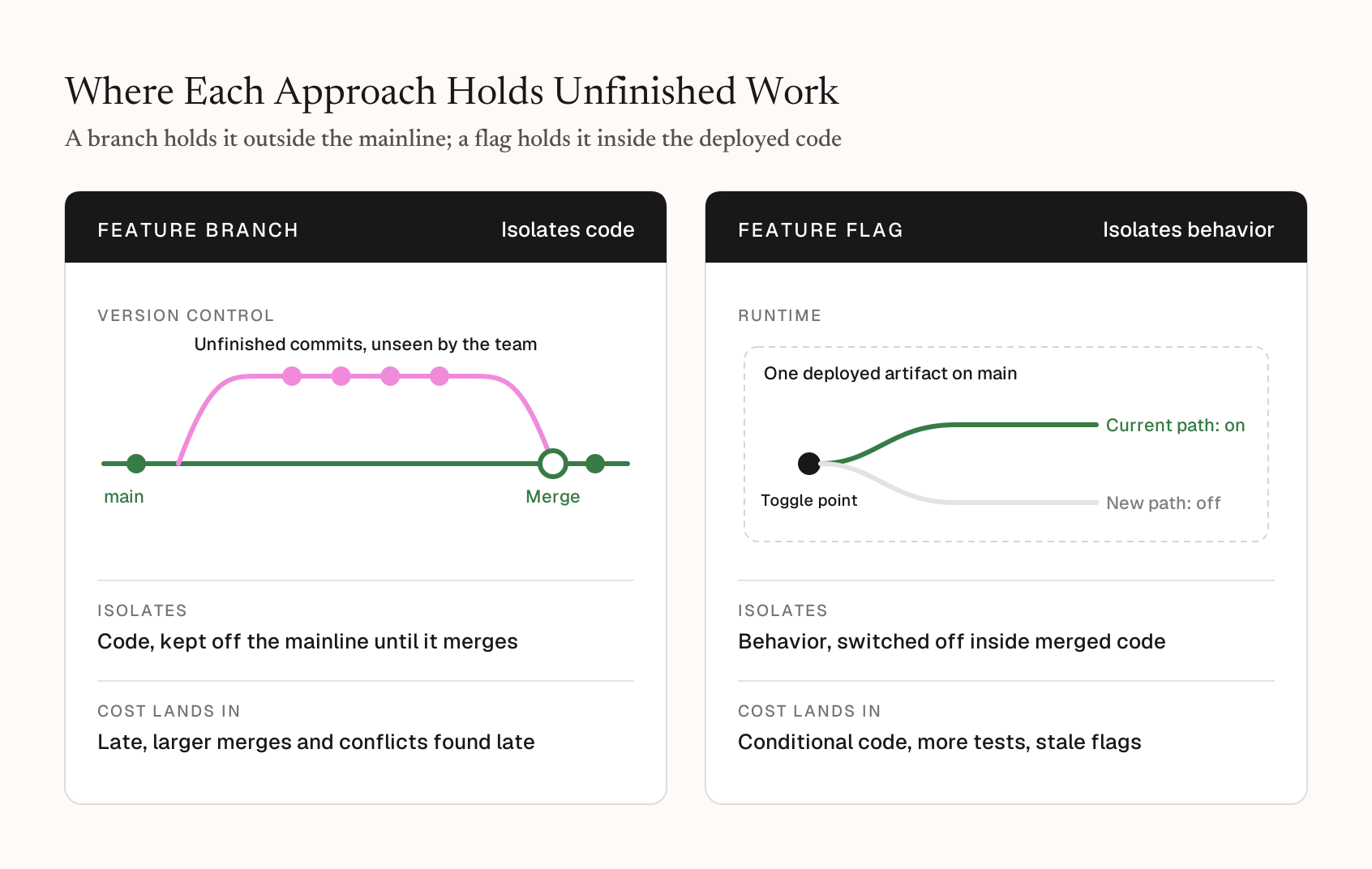
The difference between feature flags and feature branches is what each one isolates: a feature branch isolates code from the shared mainline in version control, and a feature flag isolates behavior inside code that has already been merged. Both exist to keep half-built work from affecting everyone else, but they act at different layers, so they carry different costs.
Feature branches isolate code
A feature branch is a separate line of commits that holds all the work for one feature until it is complete. In Patterns for Managing Source Code Branches, Martin Fowler defines feature branching as putting all work for a feature on its own branch and integrating it into mainline when the feature is complete. Until that merge, other developers do not see the code, and the mainline cannot break because of it. Fowler quotes Kent Beck's framing of the trade: branching gives individuals "the illusion of frozen time," and the price comes due when the work is merged.
Fowler also separates two kinds of merge conflict. A textual conflict is one the version control system can detect, such as two people renaming the same variable differently. A semantic conflict merges cleanly as text but still breaks the system, such as one developer renaming a function while another adds a call to it under the old name. Branch isolation hides both kinds until integration.
Feature flags isolate behavior at runtime
A feature flag (also called a feature toggle) is a runtime switch that decides which code path executes, so new code can ship to production without being turned on. In Feature Toggles (aka Feature Flags), Pete Hodgson describes the core capability as shipping "alternative codepaths within one deployable unit" and choosing between them at runtime. The code is integrated, built and deployed with everything else; only its effect on users is held back.
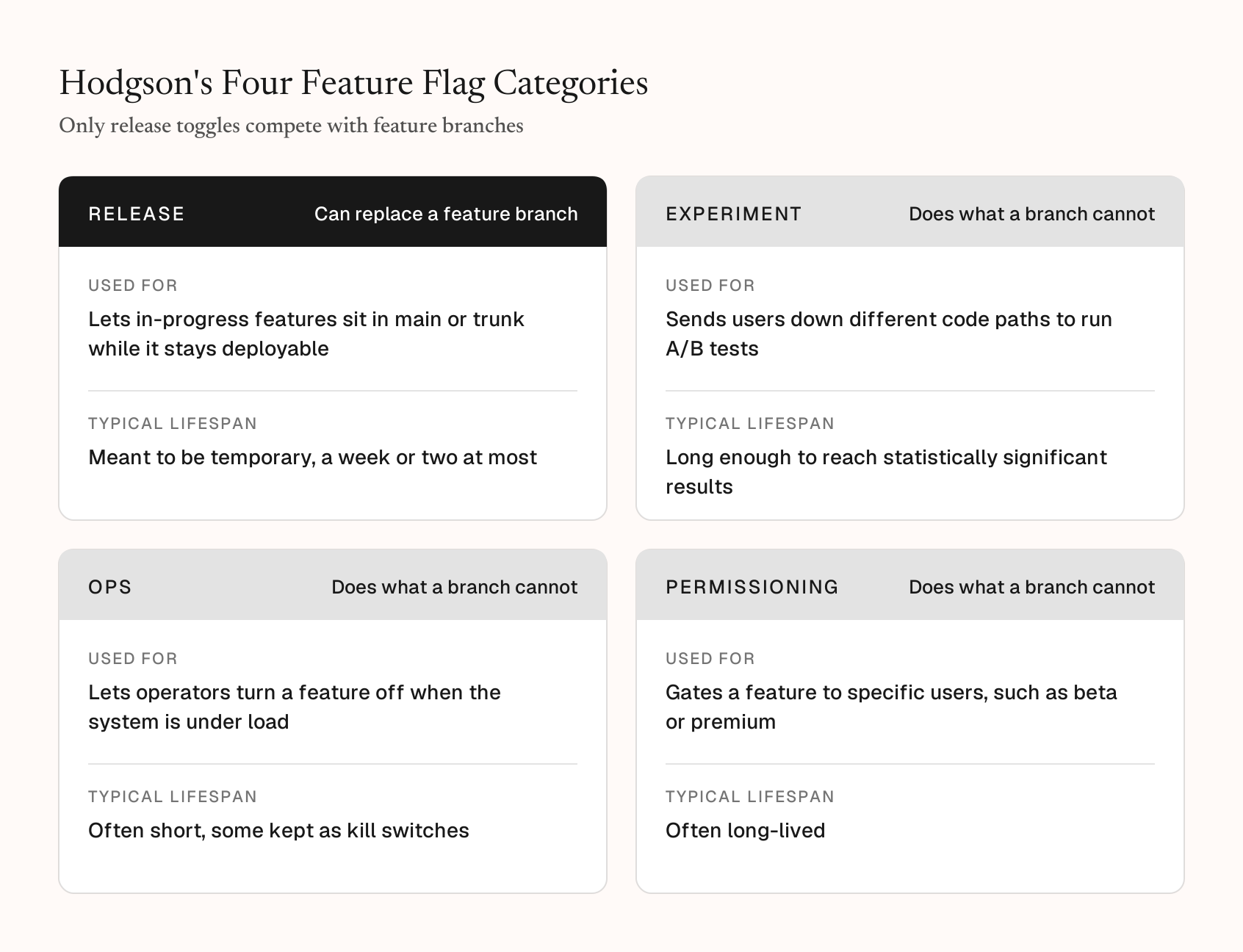
Hodgson sorts flags into four categories, and the distinction matters for this comparison. Release toggles let in-progress features be checked into a shared branch such as main or trunk while that branch stays deployable, and they are the category that competes directly with feature branches. Experiment toggles run A/B tests, ops toggles let operators disable features under load, and permissioning toggles gate features for specific users. Only release toggles replace a branch; the other three do things a branch cannot do at all.
Flags are not the only way to hide unfinished code
Fowler notes that a partially built feature can often be hidden without a flag. Code that is never called in production, such as a discount path for a coupon code that is not yet in the valid list, is already dark. Wiring up the user interface last, a technique he calls the Keystone Interface, keeps a backend feature unreachable until the final step. For changes to existing behavior, Branch By Abstraction introduces an abstraction layer in the mainline so the old and new implementations can coexist. Fowler reserves flags for cases where there is no easy way to hide the partial feature.
The Real Cost of Long-Lived Feature Branches
The cost of a long-lived feature branch is deferred integration: the longer a branch runs without merging, the larger the eventual merge, the later conflicts surface, and the harder it becomes to refactor shared code. Fowler sums up the pattern with an old line about falling from a tall building: the fall does not hurt, the landing does. Branching is easy and merging is the hard part.
Merges grow with time apart
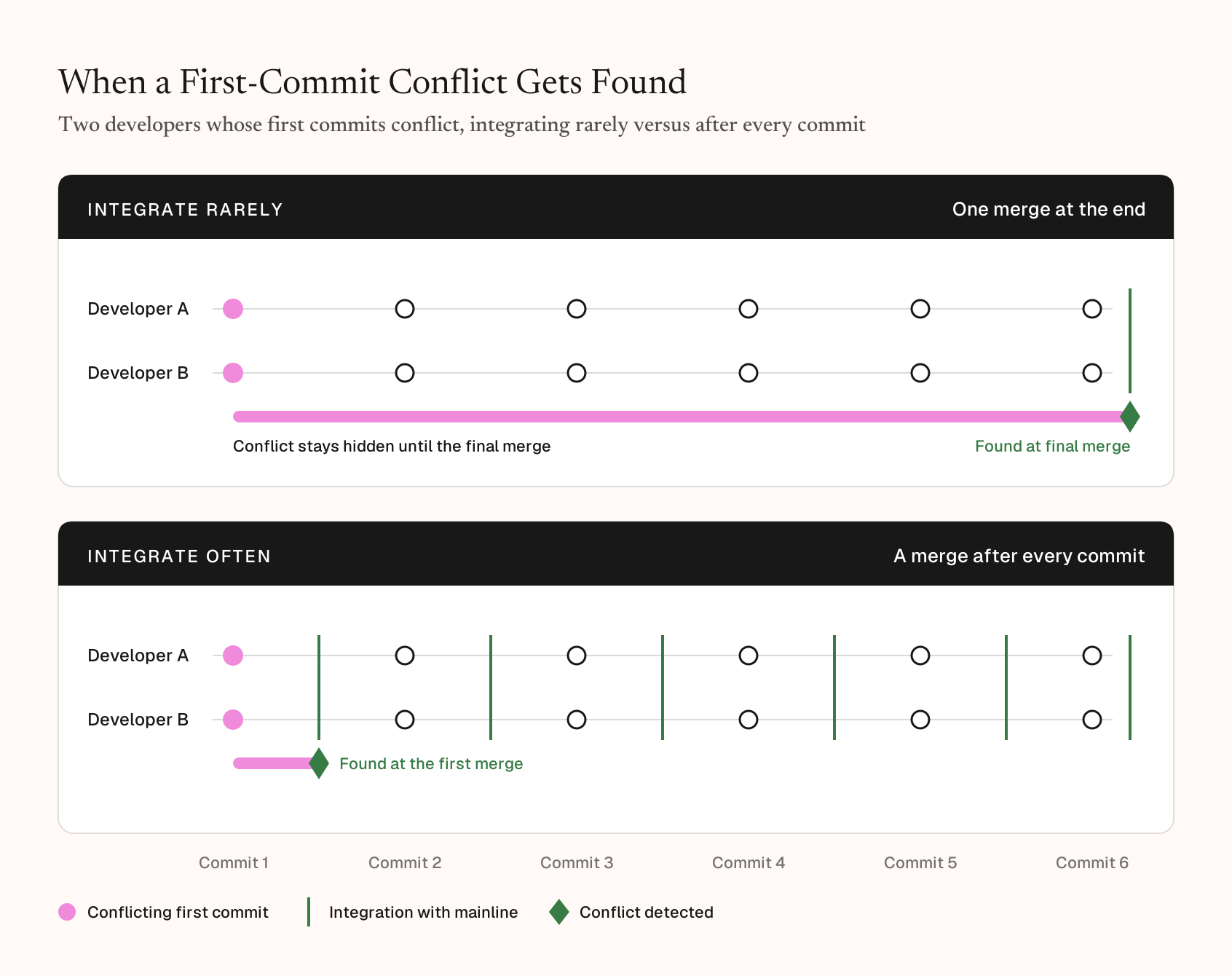
Fowler's branching patterns article walks through two developers who each make a run of local commits before integrating. The first to push has an easy merge; the second has to reconcile everything both of them wrote since they last synced. When the same two developers integrate after every commit, each merge involves only a commit or two. He also points to an observation from Jonny LeRoy that branches diverge faster than most diagrams suggest, so time apart compounds rather than adding linearly.
The larger problem is uncertainty, not effort. Fowler notes that most big merges go smoothly, but occasionally one goes very badly, and that unpredictable tail is what teams remember. He contrasts a steady ten extra minutes per integration with a one-in-fifty chance of losing six hours to a broken merge, and argues the second feels worse even when the total effort is lower.
Conflicts are found late
On a long-lived branch, a conflict created on the first day is not detected until the branch merges. In Fowler's comparison, two developers whose very first commits conflict do not find out until the final merge if they integrate rarely, but find out at the first merge if they integrate often. Semantic conflicts make this worse, because a clean textual merge can still hide a broken call or an outdated assumption. Fowler describes one case where a developer moved tax handling out of a billing calculation while another wrote a feature assuming billing still handled tax, and only integration and a good test suite would expose it.
Integration fear discourages refactoring
Painful merges change how teams work. Fowler describes integration fear as a feedback loop: teams that suffer painful merges integrate less often, which makes the next merge worse. They also stop refactoring, because renaming or moving shared code creates conflicts for everyone on other branches. He argues that the deterrent effect on refactoring "may be" the biggest problem with feature branching, larger than the merges themselves, since a codebase that cannot be refactored steadily gets harder to change. Feature branching also discourages changes outside the feature's scope, so small improvements to surrounding code tend not to happen.
Fowler's response is captured in the slogan "if it hurts, do it more often": smaller, more frequent integrations reduce both the work and the risk of each merge.
The Real Cost of Feature Flags
The cost of feature flags is runtime complexity: every flag adds a conditional code path, multiplies the configurations that need testing, and stays in the codebase until someone removes it. Hodgson's Feature Toggles (aka Feature Flags) is direct about this, stating that toggles "introduce complexity" and describing them as inventory with a carrying cost.
Conditional code paths spread
A flag is implemented as a toggle point, a place in the code that asks which path to take. Hodgson observes that flags "seem to beget rather messy Toggle Point code" and that toggle points tend to proliferate across a codebase. A simple if/else check is acceptable for a release toggle that will be removed within days, but he advises against scattering conditionals for anything long-lived, recommending patterns such as separating the decision point from the decision logic and using a Strategy pattern instead. That design work is a cost a branch never asks for, because a branch keeps the old and new code in separate commits rather than side by side in one file.
The test matrix grows
A flagged artifact has to be validated in more than one state, because the pipeline cannot know whether the flag will be on or off in production. Hodgson notes that a single toggle means doubling at least some testing, and multiple toggles produce "a combinatoric explosion of possible toggle states." He argues the problem is smaller in practice than it looks, since flags rarely interact and a release rarely changes more than one, and recommends testing the expected production configuration, the fallback with new flags off, and an all-on configuration. That still means more test runs than a branch-based workflow, where the merged code has one behavior.
Stale flags and dormant code
Flags are cheap to add and easy to forget, so they accumulate. Hodgson notes that release toggles should generally not stay much longer than a week or two, yet teams create flags faster than they retire them. The extreme case is the one Hodgson cites, Knight Capital. According to the SEC's findings, Knight left code for a feature it had stopped using in 2003 on its production servers, then repurposed the flag that used to activate that code for new functionality. When one of eight servers missed the new deployment, orders carrying the reused flag triggered the old code, and Knight lost more than $460 million in about 45 minutes. The SEC also faulted deployment review, monitoring and risk controls, so the flag was one failure among several, but it shows what a dormant code path behind a live flag can do.
Practitioners disagree on dormant code risk
Practitioners do not agree on how serious the risk of shipping unfinished code is. Fowler's branching patterns article acknowledges that with flags the feature's code is still in the product even when it is switched off, and that keeping a feature's commits together on a branch allows a late decision about whether to include it in a release. He also argues that concerns about dormant code "are often overblown," while noting that teams doing Continuous Integration need a strong testing regimen. Teams that cannot keep the mainline healthy, he concedes, are better served by feature branches and release branches that stabilize code before it ships.
Feature Flags vs Git Flow and Trunk-Based Development
Git flow relies on feature branches and release branches to isolate unfinished work, GitHub flow relies on feature branches merged into a release-ready main, and trunk-based development relies on very short branches plus feature flags. Each workflow puts the isolation in a different place, so the flags-versus-branches question is partly answered by the workflow a team has already chosen. The differences between Git flow and GitHub flow themselves are covered in GitHub Flow vs Git Flow; this section looks only at where flags fit in each.
Git flow: branches carry the isolation
Git flow, described by Vincent Driessen in A successful Git branching model, uses two permanent branches (master for production-ready code and develop for integration) plus supporting feature, release and hotfix branches. A feature branch exists as long as the feature is in development and is then merged into develop or discarded. Fowler notes in his branching patterns article that Git flow says nothing about how long feature branches should live, so it does not set an integration frequency, and that its release branches imply a mainline that is not always release-ready.
In this model a flag is rarely needed to hide unfinished work, because unfinished work does not reach develop. Driessen's own note of reflection, added to the post later, says the model was designed for explicitly versioned software and for supporting multiple versions in the wild. For teams doing continuous delivery of web apps, he suggests a simpler workflow such as GitHub flow "instead of trying to shoehorn git-flow into your team."
GitHub flow: short branches, release-ready main
GitHub flow keeps one mainline and feature branches, and drops release and hotfix branches. Fowler describes it as assuming a single version in production with high-frequency integration onto a release-ready mainline, with pull requests serving as the review step before a feature branch merges. Feature branches in GitHub flow can be a single line of code or run for a couple of weeks, and the process is meant to work the same either way.
That range is where flags enter. When a GitHub flow branch stays small, it merges before it can drift far. When a feature needs weeks, a team can either keep a long branch open, and accept the merge costs described above, or merge partial work to main behind a release flag so the branch stays short.
Trunk-based development: short branches plus flags
Trunk-based development is a branching model in which developers collaborate on a single branch, the trunk or main, and avoid long-lived development branches. Paul Hammant's trunkbaseddevelopment.com frames it as committing to trunk often enough to satisfy the Continuous Integration requirement that every team member commits at least once every 24 hours. Very small teams commit straight to trunk; larger teams use short-lived feature branches for code review and CI checks, with two firm rules: a branch should last no more than a couple of days, and only one developer (or one pair) should work on it.
Flags are how trunk-based teams keep longer work on that schedule. The site tells teams to use branch by abstraction for longer changes and feature flags in day-to-day development so they can hedge on the order of releases. Hodgson's article describes release toggles in the same terms: flags used to enable trunk-based development for teams practicing Continuous Delivery, letting in-progress features be checked into main or trunk while it stays deployable. Fowler adds that the difference between feature branching and Continuous Integration is not whether a feature branch exists but when developers integrate with mainline, which is why trunk-based development still uses branches, just very short ones.
Choosing a Feature Flag Branching Strategy
A feature flag branching strategy is the combination of branch lifetime and flag use a team settles on, and the common pattern among teams practicing trunk-based development is short-lived branches merged to main with incomplete work behind a release flag. That combination keeps integration continuous while keeping unfinished behavior away from users. Whether it fits your team depends on release cadence, team size and how much the test suite can be trusted.
Short-lived branches plus release flags
In the combined approach, each change lives on a branch for a day or two, goes through review and CI, and merges to main whether or not the feature it belongs to is finished. Work that would expose half a feature is wrapped in a release toggle that stays off in production until the feature is complete. The branch provides a review boundary and a place for CI to run before code lands; the flag provides the isolation that a long-lived branch used to provide.
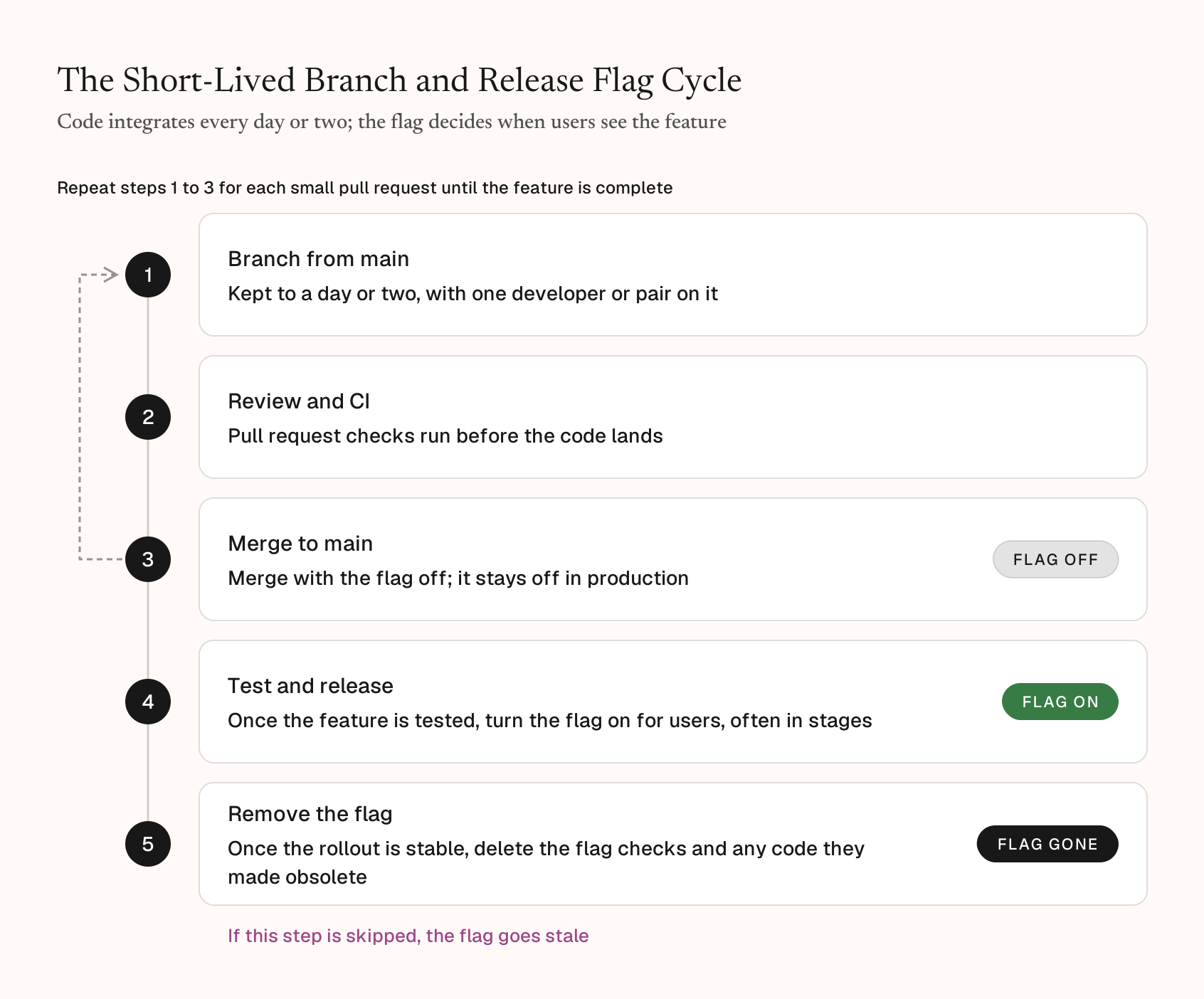
The trunkbaseddevelopment.com short-lived branch guidance also warns against a common mistake: treating one pull request as one story. It suggests splitting a story into several small pull requests, such as a refactoring, then a piece of new functionality, then another refactoring, each merged to trunk on its own. Before reaching for a flag, it is worth checking whether the work can be hidden without one. Fowler points out in his branching patterns article that unreachable code and a Keystone Interface wired up last are often enough, and every flag avoided is one less flag to remove later.
Test coverage, team size and release cadence
Test coverage often decides the mix. Continuous Integration depends on what Fowler calls Self Testing Code, a suite comprehensive enough that passing tests give confidence the mainline is healthy, and he says the first stage of that suite should usually run in no more than ten minutes. Without it, merging partial work every day spreads risk instead of reducing it, and Fowler concedes that feature branching suits teams that do not enforce a healthy mainline and need release branches to stabilize code.
Team size shapes how changes reach trunk. Hammant's site puts the crossover for teams writing code without AI coding agents at about 15 people: up to that size, committing straight to trunk can work, and from 16 upward a team is more productive with short-lived branches and CI verifying them before they land. The same page notes that teams using coding agents should count concurrent writers and peak commit frequency instead of headcount, since agents raise the commit rate per person.
Release cadence decides whether release branches are needed at all. Driessen's note says Git flow still fits explicitly versioned software and teams supporting several versions at once, while Fowler notes that the best teams shipping a single production version can often release straight from mainline.
Feature flags vs branching decision guide
Release cadence | Team size | Test coverage | Deployment frequency | Approach that fits |
|---|---|---|---|---|
Continuous deployment of a single production version | Up to about 15 developers | Fast commit suite gates every change | Many times a day | Commit straight to trunk; release flags for unfinished features |
Continuous delivery of a single production version | 16 or more developers, or a high commit rate | Automated checks run on every pull request | Daily or more often | Short-lived branches (no more than about two days) merged to main; release flags for unfinished features |
Scheduled releases, such as release trains or app store review cycles | Any | Good automated coverage on main | On a fixed schedule | Short-lived branches into main and a release branch cut on schedule; flags keep unfinished features dark at the cut |
Versioned software with several versions supported in the field | Any | Varies by release line | Per version | Git flow style feature and release branches; flags optional |
Mainline not reliably releasable | Any | Slow or incomplete test suite | Infrequent | Feature branches plus a release branch to stabilize, while investing in tests so integration can become more frequent |
Feature branch vs feature flag: when a branch is still the right call
Some work belongs on a branch even in a trunk-based team. Fowler describes an Experimental Branch for code that is expected to be thrown away, such as trying a replacement library or comparing two approaches to a feature over a couple of days. Because the code is not meant to merge, normal habits like full test coverage can relax, and the branch can be tagged and deleted when the experiment ends. Putting that work behind a flag in main would add toggle points and tests for code nobody plans to keep.
The second case is a change too invasive to hide. Fowler's Future Branch pattern covers a single branch for a change that is "too invasive to be handled with other approaches," such as a deep architectural change. He calls it rare and "a last resort," to be used only when Branch By Abstraction cannot do the job, and advises keeping even that branch as short as possible. Fowler also notes that feature branching fits open source projects where maintainers do not know contributors and cannot be sure a contribution will ever be finished, a context where waiting for a complete branch makes sense.
Fowler's broader advice applies to every case: whenever you consider a branch, work out how you are going to merge it, and treat a difficult merge as a sign of a deeper process or architecture problem worth fixing.
Feature Flags vs Feature Branches: Which to Use
Feature branches and feature flags both manage unfinished work: long-lived branches pay for isolation with late, risky merges, and flags pay for continuous integration with runtime complexity and flag debt. Teams practicing trunk-based development commonly combine branches that live a day or two with release flags, and the right balance for your team follows from your release cadence, team size and test coverage. Git flow style feature and release branches still fit versioned software with several versions supported at once, and a branch remains the right call for throwaway experiments and for changes too invasive to hide behind Branch By Abstraction. If you own release processes and want to own them at an AI startup, sign up on Fonzi.
FAQ
How long can a feature branch live before it counts as long-lived?
The trunkbaseddevelopment.com guidance sets the limit at about two days, after which a branch risks becoming a long-lived feature branch. Fowler's Continuous Integration rule of thumb is stricter: never have more than a day's work sitting unintegrated.
Can I use feature flags with Git flow?
You can, but Git flow already isolates unfinished work on feature branches, so flags add the most value there as experiment, ops or permissioning toggles rather than as a replacement for branches. Release flags matter more when a team shortens its branches and merges partial work.
Do feature flags replace code review on pull requests?
No, they solve a different problem: a flag hides unfinished behavior at runtime, while a short-lived branch and pull request give reviewers and CI a checkpoint before code lands. Trunk-based teams above a small size commonly use both.
What should I do instead of a long-lived branch for a large refactor?
Branch by abstraction lets old and new implementations coexist in main behind an abstraction layer, so the refactor merges in small steps. Fowler reserves a single long-running branch for changes too invasive for that technique, and calls it a last resort.
Is shipping disabled code behind a flag a risk?
It can be, since the code is in the product even when switched off, and dormant code behind a reused flag contributed to Knight Capital's 2012 loss. Fowler considers concerns about disabled feature code often exaggerated, while emphasizing that Continuous Integration requires rigorous testing.