What Is Rubber Duck Debugging?
By
Ethan Fahey
•
Rubber duck debugging is a deceptively simple but highly effective technique for finding bugs and clarifying logic by talking through code out loud. The idea is straightforward: explain your code line by line to an inanimate object, traditionally a rubber duck, which forces you to slow down, break complex logic into smaller pieces, and uncover assumptions or mistakes that are easy to miss during silent debugging. Whether people call it rubber duck debugging, rubberducking, or duck debugging, the core practice stays the same: verbalizing the problem often exposes gaps in reasoning faster than staring at the screen alone.
The technique remains popular across individual developers, startup teams, and large engineering organizations because it improves clarity without always requiring another engineer to step in. It is especially useful in modern software environments where distributed systems, AI workflows, and infrastructure layers can become difficult to reason about mentally. For recruiters and engineering leaders, strong debugging habits are often a better indicator of long-term engineering effectiveness than memorized interview answers. Platforms like Fonzi increasingly reflect this by helping companies evaluate candidates through practical problem-solving signals and real engineering workflows rather than relying only on theoretical assessments.
Key Takeaways
Rubber duck debugging is the practice of explaining code problems out loud to a rubber duck or other inanimate object to uncover bugs and flawed assumptions.
Speaking through code step by step forces developers to slow down, articulate each logical step, and notice gaps that remain invisible during silent reading.
The technique was popularized in the 1999 book “The Pragmatic Programmer” by Andrew Hunt and David Thomas and has since become a standard practice in software teams worldwide.
Rubber ducking works best when a developer feels stuck, overwhelmed, or unsure where a bug originates, particularly for logic errors and misunderstood requirements.
The Origins and History of Rubber Duck Debugging
The rubber duck debugging method originated from a story in the 1999 book “The Pragmatic Programmer” by Andrew Hunt and David Thomas. In the story, a programmer carries around a rubber duck and explains their code line by line to it when debugging. This anecdote resonated with developers because it captured something genuine about how articulating problems leads to solutions.
Similar techniques existed before 1999, but this book gave the practice a memorable name and vivid image that spread through developer culture. During the early 2000s, references to rubber duck debugging appeared on mailing lists, Stack Overflow discussions, and blog posts, cementing it as a recognized term in software engineering.
By the 2010s, rubber ducks started appearing on office desks, at hackathons, and as conference swag. What might sound silly on the surface has become widely adopted in the programming community due to its effectiveness in helping programmers identify bugs and understand their code better.
Why Rubber Duck Debugging Works: The Psychology Behind It
Rubber duck debugging encourages programmers to verbalize their thought process, which can lead to uncovering the root cause of issues or gaining new insights to solve problems. This section explains the cognitive and psychological reasons why rubber ducking helps developers find bugs more reliably than silent code review.
When you vocalize your thought process, you force yourself to slow down and process each step of your logic instead of skipping over details in your head. The act of teaching or explaining a concept to someone else, even an inanimate object, can deepen your understanding and help you solve problems more effectively. By verbalizing the code’s intended logic, programmers often catch flaws, inconsistencies, or assumptions they previously overlooked.
Verbalizing the gap between what the code is supposed to do and what it actually does frequently triggers an “aha!” moment. The practice of rubber duck debugging forces programmers to break down their code into smaller, more digestible pieces, allowing them to examine their logic from a fresh perspective.
How Speaking Out Loud Helps You Find Bugs
The duck itself is not magical. It serves as a psychological trigger that changes how your brain processes information. The “production effect” from cognitive psychology suggests that speaking text aloud significantly improves the ability to store and retain information in long-term memory.
Turning code into plain language forces the programmer to express each step explicitly. Hidden assumptions become visible because they cannot be glossed over in speech the way they can in silent thought. Explaining concepts to an inanimate object forces individuals to break down their thoughts into smaller, more digestible pieces, which can lead to new insights and a deeper understanding of the material.
Consider a developer explaining a function to a rubber duck: “This loop should run 10 times.” Mid-sentence, they notice the loop condition uses less-than instead of less-than-or-equal, meaning the loop only runs 9 iterations. The bug was not found by reading. It was found by sequential verbalization.
Verbalizing thoughts while explaining problems to an inanimate object can enhance cognitive abilities related to memory, attention, and comprehension. This is why the technique works across all programming languages and team sizes.
The Role of Focus and Reduced Social Pressure
A rubber duck offers the benefits of an audience without the pressure of interrupting a co-worker or feeling judged. Some developers feel more comfortable trying messy ideas on a rubber duck before approaching a senior engineer or team lead.
This approach reduces context switching for teammates, since many questions get resolved before anyone needs to jump into a pairing session. The duck keeps attention anchored on the problem-solving process, reducing distractions and encouraging sustained focus on a single issue.
How To Use the Rubber Duck Debugging Method Step by Step
This section provides a practical, repeatable process for rubber duck debugging that developers can use immediately. The steps work with a classic yellow rubber duck, a figurine, a toy, a sticky note doodle, or any other inanimate object that serves as a silent listener.
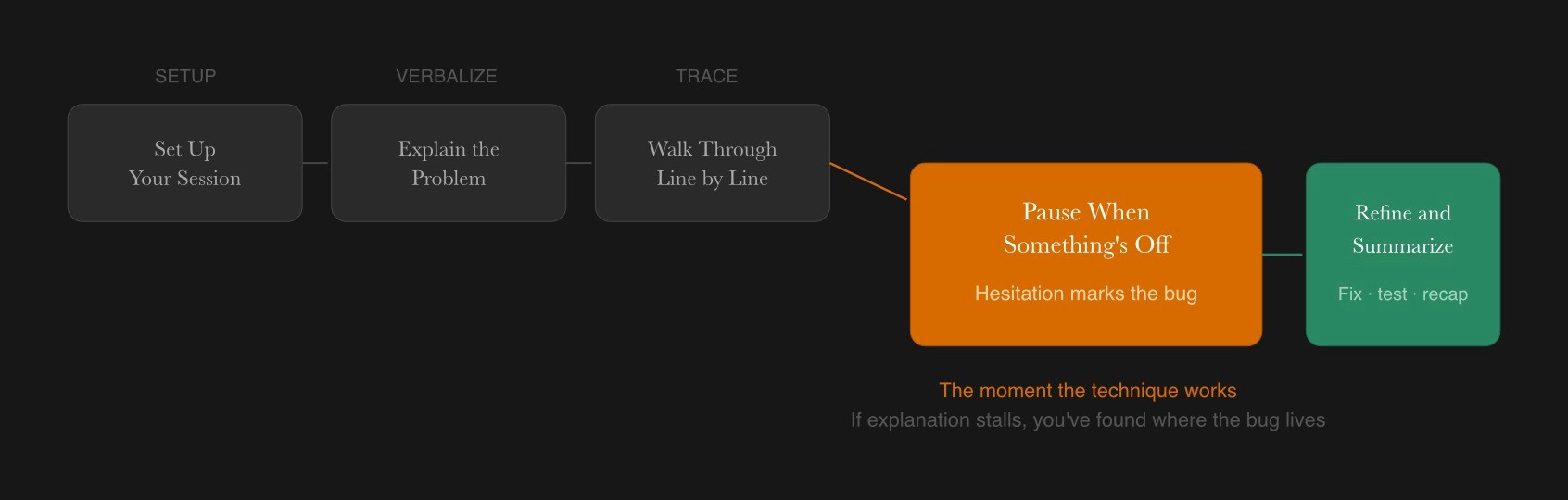
Step 1: Set Up Your Rubber Duck Session
Place your rubber duck somewhere visible near your screen to create a focused debugging setup. Close irrelevant tabs, silence notifications, and identify the specific bug or unexpected behavior you want to debug. Open the relevant files, test cases, and logs so you can reference them as you speak to your duck.
Step 2: Explain the Problem in Plain Language
Start by telling the rubber duck what the code is supposed to do in simple, non-technical terms. Effective implementation of rubber duck debugging involves assuming the duck knows nothing and articulating the intended logic versus reality. State clearly what the code is doing instead, referencing concrete outputs, error messages, or failing tests.
Speak as if the duck is completely new to the project. Assuming total ignorance while explaining code prevents skipping over sections where bugs often hide.
Step 3: Walk Through the Code Line by Line
Read each important section of code aloud, explaining what each function, variable, and condition is supposed to accomplish. Focus on the smallest section of code that can reproduce the bug, such as a single function or module.
Actively explaining design choices can reveal where the original programming plan strayed from reality. Explaining data flow through a system helps in debugging data processing or logic errors. Ask the duck questions like “If this condition is false, where does execution go next?” to keep the reasoning explicit and precise.
Step 4: Pause When Something Feels Off
During the walkthrough, you may feel a moment of confusion or hesitation. This is often a signal of the underlying bug. Stop and investigate any step that is hard to explain clearly to the rubber duck, since that difficulty may hide a flawed assumption.
Try quick experiments such as logging values or writing a small test case before resuming the explanation. If you encounter a point where the logic does not make sense when spoken aloud, you have likely found the problem.
Step 5: Refine the Code and Summarize to the Duck
Update the code based on insights discovered while talking, then run tests or the application again to confirm the fix. End the session by explaining the corrected logic back to the rubber duck as a brief recap.
This closing explanation helps solidify the learning, so similar bugs are easier to avoid in the future. You now have a deeper understanding of both the bug and the solution.
Examples, Variations, and When Rubber Ducking Works Best
Rubber duck debugging is not limited to a specific toy or setup. Writing down explanations as if explaining a bug to a coworker can bring clarity similar to speaking aloud. Some developers use a notepad, a voice recorder, or a colleague who mainly listens and asks clarifying questions.
Teams sometimes designate a “team duck” or shared mascot that sits in the office as a playful debugging partner. Remote teams working through curated engineering marketplaces such as Fonzi sometimes adopt rubber duck practices to reduce unnecessary meetings while still pairing when needed.
When Rubber Duck Debugging Shines
The technique saves time in specific scenarios:
A unit test fails without a clear error message
A new developer inherits an unfamiliar codebase
Complex conditionals produce unexpected behavior
You feel stuck but cannot articulate why
Rubber ducking is most effective for logic errors, misunderstood requirements, and situations where the answer seems just out of reach. Performance issues or environment-specific bugs may need deeper tools, but talking to the duck can help narrow down which part of the system to figure out and measure.
Limitations and When You Need More Than a Duck
Rubber duck debugging does not replace code reviews, pair programming, or automated tests. Some problems require another person or specialized tools. Examples include low-level memory corruption, distributed system failures, or hardware-specific bugs where logs, profilers, and observability tools are essential.
Treat rubber ducking as a first step that often resolves many issues, but escalate to teammates when progress stalls. The method works best as part of a broader debugging toolkit, not as a standalone solution.
Rubber Duck Debugging vs Other Debugging Tools and Techniques
Understanding how duck debugging fits alongside other strategies helps you decide when to reach for each tool. Developers often combine multiple methods in one session, such as talking to a duck while stepping through code in a debugger.
Rubber Duck Debugging and Other Methods
Technique | What It Involves | Best For | Main Drawback |
Rubber Duck Debugging | Explaining code aloud to an inanimate object | Logic errors, stuck moments, understanding gaps | Does not catch runtime or environment issues |
Print Debugging / Logging | Adding output statements to trace variable values | Identifying where crashes occur, checking state | Tedious for complex execution paths |
Interactive Debuggers | Setting breakpoints and stepping through code | Inspecting runtime behavior in detail | Requires setup, overkill for simple issues |
Pair Programming | Two developers working on the same code | Real-time error catching, knowledge sharing | Resource-intensive, scheduling challenges |
Static Analysis Tools | Automated scanning for common bug patterns | Catching unused variables, null references | Misses logic errors that are syntactically valid |
How Rubber Ducking Fits Into Modern Workflows
Many developers start with rubber ducking to clarify their understanding before investing time in more advanced tooling. This method works well alongside test-driven development, since explaining tests to the duck can reveal missing edge cases.
Some engineering managers encourage team members to “ask the duck first” to promote autonomy while still offering support when needed. Platforms like Fonzi, which connect startups with experienced engineers, often pair seasoned developers with juniors who already use rubber duck habits to prepare better questions and reduce back-and-forth.
Rubber Ducks, AI Assistants, and the Future of Debugging
Digital tools, including Agentic AI workflows, are evolving the rubber duck method in the debugging toolkit. AI tools can act like an interactive rubber duck by listening to explanations and responding with suggestions or clarifying questions.
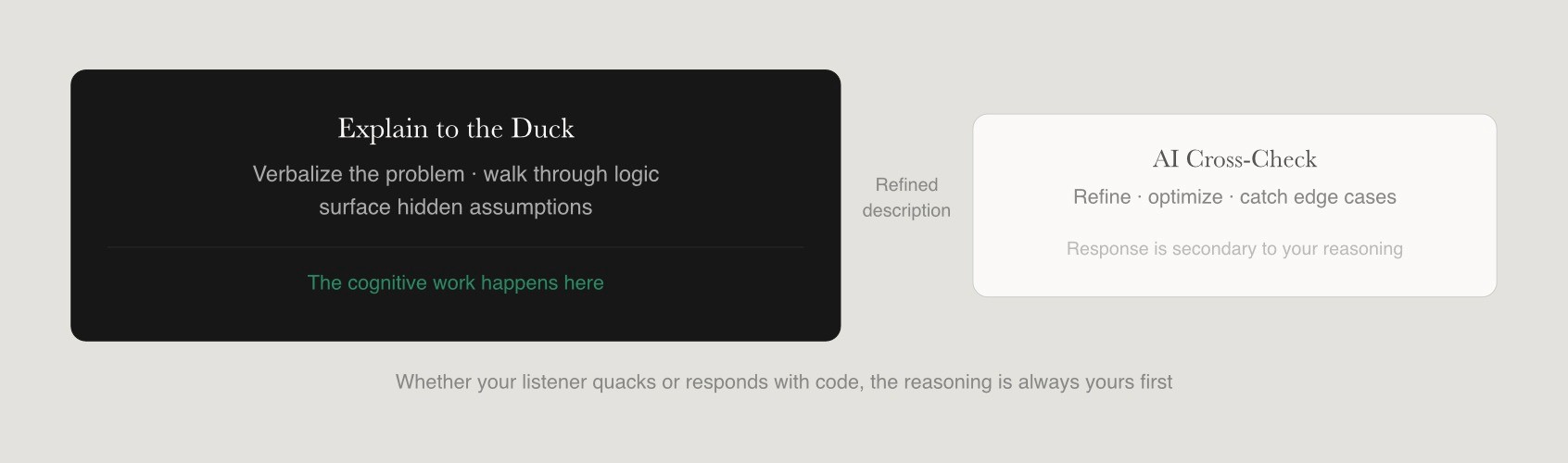
Despite this evolution, a simple rubber duck remains valuable because it encourages deep thinking without dependency on an internet connection or external service. Developers can combine rubber ducking with AI by explaining the problem out loud first, then pasting a refined description into an AI tool for additional insight.
Can AI Replace the Rubber Duck?
AI tools such as ChatGPT or Claude can sometimes feel like supercharged ducks because they respond with code examples and analysis. However, the core benefit of rubber duck debugging is the act of explanation itself, which still happens before any AI generates a response.
Relying exclusively on AI can lead to shallow understanding, while a rubber duck encourages developers to build their own reasoning skills. A balanced approach involves first attempting to reason through the bug with a duck, then using AI to cross-check, refine, or optimize the solution.
Rubber duck debugging is based on the premise that explaining a problem to someone else helps you understand it better and can lead to finding a solution more effectively. Whether your listener is a duck that cannot quack back or an AI that offers suggestions, the cognitive work of explanation remains yours.
Building a Debugging Culture in Teams
Teams can normalize rubber duck debugging by providing ducks to new hires, mentioning it in onboarding docs, or placing a shared duck in the workspace. Leaders should frame duck debugging as a serious technique with a playful surface, not as something childish or unprofessional.
Distributed teams working through platforms like Fonzi or other remote setups can still adopt the habit of using virtual ducks or mascots in chat channels. A culture that values clear explanations, whether to ducks, humans, or AI, usually produces more maintainable and reliable code.
Conclusion
Rubber duck debugging is ultimately about explaining code clearly, not about the duck itself. The real value comes from forcing yourself to slow down, articulate assumptions, and walk through logic step by step. That process often reveals hidden bugs, flawed reasoning, or gaps in understanding much faster than passive debugging. Whether you use a literal rubber duck, an action figure, or simply apply the technique mentally, the method remains one of the simplest and most reliable ways to improve debugging clarity.
A practical way to build the habit is to keep a small object near your workstation and deliberately use it during your next difficult debugging session. Teams can also incorporate rubber duck debugging into pair programming, onboarding, or incident review workflows to encourage clearer technical communication. For recruiters and engineering leaders, these kinds of debugging and reasoning habits are often strong indicators of engineering maturity. Platforms like Fonzi increasingly help surface candidates who demonstrate practical problem-solving ability and clear technical thinking, not just strong interview performance or keyword-heavy resumes.
FAQ
What is rubber duck debugging and where did the concept come from?
Why does explaining your code out loud help you find bugs?
How do developers actually practice rubber duck debugging day to day?
Can AI tools like ChatGPT or Claude replace the rubber duck for debugging?
What other debugging techniques work well alongside rubber duck debugging?


