Best Code Collaboration Tools
By
Ethan Fahey
•

Modern software development is deeply collaborative, especially as remote and hybrid engineering teams have become the norm. Dedicated coding collaboration and code review tools help teams reduce review bottlenecks, share knowledge more efficiently, and coordinate complex development work across time zones and specialties. These platforms bridge the gap between individual contribution and collective execution by enabling real-time collaboration, asynchronous code management, and integrated communication directly inside development workflows.
Rather than promoting a single vendor, the goal is to help recruiters, engineering leaders, and AI practitioners understand the major tool categories, tradeoffs, and real-world use cases shaping collaborative software development in 2026. As engineering workflows become increasingly AI-assisted, platforms like Fonzi are also becoming part of the broader ecosystem by helping companies identify engineers who can work effectively in collaborative, fast-moving, AI-native development environments where communication and systems thinking matter as much as coding ability alone.
Key Takeaways
Collaborative coding tools combine real-time editing, version control, and code review tools so distributed teams can work on the same codebase efficiently.
The best collaborative coding tools fall into three main categories: IDE extensions, browser-based collaborative coding platforms, and repository-centric platforms like GitHub and GitLab.
AI coding tools and coding assistants now sit inside many collaboration workflows, helping with code reviews, refactors, and documentation, but not replacing human review.
Picking the best tools for coding collaboration depends on team size, tech stack, security needs, and whether work is mostly real-time pairing or asynchronous reviews.
A practical evaluation framework covering features, workflow fit, and measurable impact matters more than marketing claims when choosing tools.
Types of Coding Collaboration Tools and When to Use Them
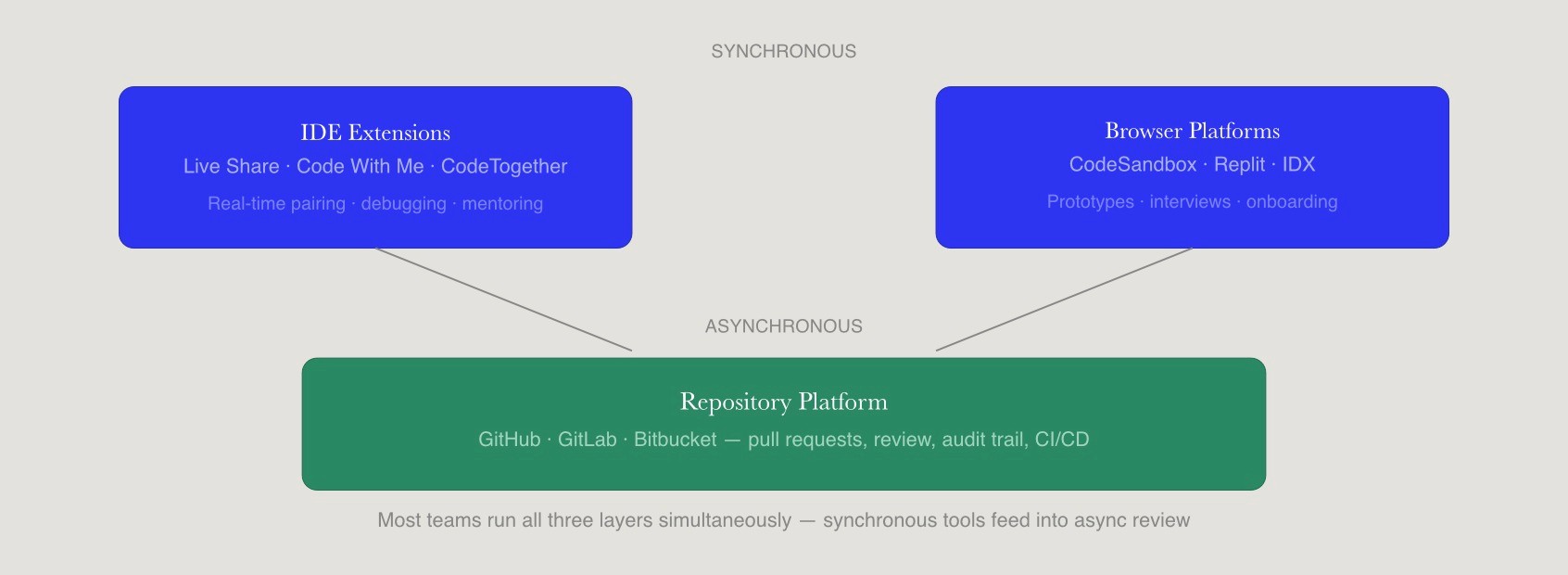
Collaborative coding tools are platforms that let multiple developers work on the same codebase through real-time collaboration, version control, and structured code reviews. Real-time collaboration tools allow multiple developers to work on the same codebase simultaneously, enhancing communication and problem-solving capabilities. Collaborative coding enhances code quality through peer reviews and error detection, leading to more efficient and successful projects.
There are three primary categories: IDE extensions for live sharing, browser-based collaborative coding platforms, and repository-centric platforms that focus on pull requests and code reviews. Collaborative coding tools can be categorized into IDE extensions, version control systems, browser-based editors, and real-time interview tools, each serving different collaboration needs.
Category | Typical Use Cases | Strengths | Common Limitations |
IDE Extensions | Pair programming, debugging, mentoring | Low latency, full IDE features, familiar environment | Requires matching IDE/extensions, network-dependent |
Browser-based Platforms | Onboarding, prototypes, interviews, workshops | Zero local setup, shareable URLs, rapid prototyping | Limited offline support, potential compliance gaps |
Repository-centric Platforms | Large-scale reviews, open source, compliance workflows | Traceable history, branch protection, audit trails | No real-time editing, async only |
Many teams mix and match tools. For example, using VS Code Live Share for debugging sessions alongside GitHub pull requests and AI code review tool integrations for asynchronous workflows is common. Integration between code repos like GitHub, task management like Jira, and chat like Slack keeps all team members updated automatically. Selection should be driven by current workflows, security requirements, and the level of real-time collaboration the team actually needs.
IDE Extensions for Real-time Pair Programming
IDE-centric collaboration features live inside your existing editor. Visual Studio Live Share, JetBrains Code With Me, and Windsurf’s shared sessions are options that integrate with popular code editors. Real-time collaboration tools like Visual Studio Code Live Share and JetBrains Code With Me allow multiple developers to edit the same codebase simultaneously, enhancing pair programming and collaborative debugging experiences.
Typical features include shared cursors, synchronized debugging sessions, shared terminals with terminal access, and optional audio integration for remote pair programming. Real-time pairing helps onboard new engineers faster and fosters a culture of shared ownership.
Ideal use cases include remote pair programming, complex debugging, mentoring junior developers, and incident response sessions where rapid feedback is critical. Limitations involve dependency on a specific IDE family, potential performance issues on slow networks, and the need for compatible extensions across the team.
Browser-based Collaborative Coding Platforms
Tools like CodeSandbox, Replit, CodeSandbox Live, and IDX by Google function as full cloud-based development environments accessible via any browser-based editor. Browser-based development environments, such as Replit and CodeSandbox, enable instant collaborative coding without local setup, making them popular for teaching, prototyping, and quick projects.
These platforms handle environments, dependencies, and sharing through links, which simplifies onboarding for new collaborators and external partners. They support multiple languages and frameworks, making them versatile for JavaScript projects and beyond.
Use cases include quick prototypes, interviews, classroom settings, hackathons, and cross-company collaboration, where giving direct repo access is not ideal. Tradeoffs include limited offline support, less control over existing infrastructure, and potential security or compliance concerns for regulated industries handling proprietary code.
Repository-centric Platforms and Code Review Tools
Platforms like GitHub, GitLab, and Bitbucket focus on asynchronous collaboration through pull requests, merge requests, and structured code reviews. These platforms serve as the backbone for managing structured code changes and high-quality peer reviews. Version control systems like GitLab and Bitbucket support asynchronous collaboration through merge requests and pull requests, allowing teams to maintain code quality while working across different time zones.
Built-in code review tools, inline comments, branch protections, and required reviewers turn version control into a collaborative coding platform. Pull requests are a fundamental part of asynchronous collaboration in software development, allowing developers to propose changes to a codebase and enabling team members to review and discuss these changes at their convenience.
This model is preferred in larger teams, open source projects, and enterprise organizations that need a clear approval trail and compliance-friendly workflows. Additional code review tools and integrations, such as Gerrit, Crucible, or AI code review tools like CodeQL or Sourcegraph Cody, extend review depth and automation.
Best Collaborative Coding Tools for Real-time Pairing and Mob Sessions
This section focuses on concrete collaborative coding tools that support real-time coding sessions, remote pair programming, and mob programming. Top coding collaboration tools include GitHub for version control, Visual Studio Live Share for real-time pair programming, and Jira for project management. The tools are grouped by primary context (IDE-based versus browser-based) so readers can quickly identify options that fit their stack.
Visual Studio Live Share (VS Code and Visual Studio)
Visual Studio Live Share is Microsoft’s real-time multiplayer editing extension for VS Code and Visual Studio, widely used since its general availability in 2019. Visual Studio Code Live Share allows multiple developers to edit the same codebase simultaneously, making it an excellent tool for real-time pair programming and collaborative debugging. Visual Studio Code Live Share enables real-time collaboration by allowing multiple developers to edit the same codebase simultaneously, share terminal sessions, and debug together.
Key capabilities include shared editing, synchronized debugging, shared servers and terminals, and optional integrated audio for voice chat during sessions. Collaborators retain their own themes, keybindings, and extensions while viewing and editing the host workspace securely.
Live Share is free to use with a Microsoft or GitHub account for most scenarios as of 2026. Ideal use cases include remote pair programming, fast incident resolution sessions, and helping new hires navigate a large codebase. It accelerates development by distributing tasks among team members, allowing for faster completion of projects.
JetBrains Code With Me
Code With Me is JetBrains’ built-in collaborative coding tool for IDEs like IntelliJ IDEA, PyCharm, and WebStorm. JetBrains Code With Me integrates directly into JetBrains IDEs, enabling teams to start pair programming sessions without changing their development environment, maintaining full IDE functionality during collaboration.
Features include real-time editing, voice and video calls, shared debugging, and role-based access from view only to full editing. Code With Me keeps project files on the host machine by default, which can appeal to teams with strict code residency requirements or zero code retention policies.
Code With Me is included in many JetBrains subscriptions, with some limits for free users. Best-fit scenarios include JVM-heavy shops, companies standardizing on JetBrains IDEs, and teams that want built-in collaboration without context switching to different editors.
CodeTogether and Cross-IDE Collaboration
CodeTogether targets mixed-IDE teams by enabling shared sessions across Eclipse, VS Code, and JetBrains IDEs, with browser-based joining options. This flexibility addresses the capability gap when teams cannot standardize on a single IDE but still want real-time collaborative coding.
Key features include independent navigation, following another developer’s view, and session moderation options controlling who can edit and when. CodeTogether is a collaborative coding tool that supports remote pair programming across different IDEs, allowing participants to work independently while still sharing the same project.
A free tier supports time-limited sessions, while Pro or Teams plan options remove caps and add admin controls. Custom pricing is available for enterprise teams requiring additional collaboration features.
Browser IDEs: CodeSandbox Live, Replit, and IDX by Google
CodeSandbox Live, Replit, and IDX by Google are leading browser-based collaborative coding platforms that support simultaneous editing and live previews. Shared strengths include instant environment creation, shareable URLs for pair programming, built-in terminals, and support for popular languages and frameworks across the entire codebase.
CodeSandbox Live excels at frontend prototypes with live Hot Module Replacement for React and Vue. Replit’s Multiplayer feature allows multiple users to work in the same workspace simultaneously, making it a popular choice for teaching, prototyping, and quick collaborative projects. Replit serves over 10 million students globally. IDX by Google leverages Project IDX with Gemini AI for containerized workspaces, excelling in full-stack prototypes and offering a powerful browser based ide experience.
Pricing ranges from free tiers to typical paid plans in the single-digit to low double-digit dollars per user each month. These cloud-based environments are especially useful for external collaborators, interviews, workshops, and situations where a local setup would waste time.
Repository-centric Collaboration: GitHub, GitLab, Bitbucket, and Code Review Tools
Repository-centric platforms drive most day-to-day collaborative coding through pull requests, merge requests, and structured code reviews. Asynchronous collaboration tools, such as GitHub and GitLab, allow distributed teams to work together effectively by enabling code reviews and discussions without requiring all team members to be online simultaneously. While real-time collaborative coding tools handle synchronous work, repository-centric tools excel at traceable, asynchronous collaboration across large teams.
GitHub and Pull Request Workflows
GitHub is the most widely used collaborative coding platform for public and private repositories. GitHub is the most widely used platform for collaborative software development, hosting over 100 million developers and more than 420 million repositories, facilitating asynchronous collaboration through pull requests. GitHub is the industry standard for Git repository hosting, supporting large-scale open-source and professional team projects by maintaining a clear history of all changes.
Key code collaboration features include protected branches, required reviews, inline comments, review suggestions, and status checks tied to CI pipelines. GitHub supports code review tools and AI enhancements such as GitHub Copilot, GitHub Actions, and GitHub Advanced Security with CodeQL scanning over 500 vulnerability patterns for security vulnerabilities and security scanning. The use of pull requests in platforms like GitHub and GitLab supports asynchronous workflows, allowing developers in different time zones to contribute to projects without needing to coordinate their schedules.
Typical use cases include open source projects, cross-team platform work, and regulated environments that need detailed audit trails for code changes. Collaborative coding can help prevent errors and security vulnerabilities through proactive code reviews and shared knowledge.
GitLab and Bitbucket for Integrated Collaboration
GitLab and Bitbucket combine repository hosting, issue tracking, code review tools, and CI/CD in a single interface. GitLab emphasizes integrated DevSecOps, including merge request approvals, security scans with deeper semantic analysis, security analysis, and compliance reports tied directly to code reviews.
Bitbucket is often chosen by teams already using Atlassian tools like Jira and Confluence, enabling tight integration between tasks and code changes. It supports Azure DevOps integration and project management workflows. Both platforms offer self-hosted options for enterprises with strict data residency requirements or compliance certification needs.
Dedicated Code Review Tools and AI Code Review Assistants
Specialized code review tools such as Gerrit, Crucible, or Phabricator offer deeper review workflows than basic pull requests. These focused tool options provide code-based analysis and detailed diff analytics for enterprise organizations.
AI coding tools and ai coding assistants now provide automated code reviews. GitHub CodeQL, Amazon CodeGuru Reviewer, Snyk Code, and Sourcegraph Cody are examples in active use by 2026. These tools check for security vulnerabilities, performance issues, style violations, and potential maintainability problems.
AI complements human reviewers by handling repetitive checks and summarizing complex diffs, while humans remain responsible for architecture, product context, and final approval. Collaborative coding fosters creativity and innovative solutions by allowing multiple perspectives to contribute to problem-solving.
How AI Coding Tools Enhance Collaborative Coding
AI tools and coding assistants increasingly sit inside editors and code review tools, turning collaborative coding into a three-way interaction between developers, code, and AI. AI coding tools use AI to help you write, edit, understand, and navigate code, turning natural language prompts into working applications and workflows. Research indicates that 84% of developers now use AI coding tools, which have become standard features in development workflows, enhancing productivity and collaboration.
Leading AI tools include GitHub Copilot, Cursor, Windsurf, Claude Code, and Tabnine. AI coding tools are increasingly integrated into existing development environments, allowing developers to maintain their workflows while benefiting from AI-assisted coding assistance. Teams should treat AI as an AI assistant that surfaces options and explanations, not as an autonomous decision maker for merge decisions.
AI Coding Assistants Inside IDEs
Tools like GitHub Copilot, Cursor, Windsurf, and Amazon Q Developer integrate with IDEs to provide code completion, inline chat, and multi-file refactoring suggestions. AI coding tools have evolved from basic autocomplete features to include agentic capabilities, allowing them to handle multi-file operations and execute tasks autonomously. The best AI coding tools understand your codebase, not just the file you have open, and can see across multiple files and understand project structure, dependencies, and codebase context.
Collaboration benefits include faster exploration of implementation options during pair programming sessions and easier onboarding when junior developers can ask AI for explanations without interrupting teammates. Persistent project context and repository-wide awareness let AI tools suggest consistent patterns across a codebase, which reduces friction during code reviews and enables better knowledge transfer.
Privacy and security considerations include options for self-hosted or zero-retention deployments where vendors like Tabnine or self-managed open-source models are used. Some organizations require zero-code retention policies to protect proprietary code.
AI-powered Code Review Tools and PR Assistants
AI code review tools analyze pull requests to flag defects, risky changes, and style issues before or during human review. GitHub Copilot’s PR summaries can parse diffs into bullet changes, while Sourcegraph Cody provides cross-repo reasoning, and Snyk Code integrates security scanning into review workflows.
Collaboration gains include reduced review latency, fewer clarification comments, and more time for senior reviewers to focus on design and architectural tradeoffs. Studies show 26% faster reviews with AI assistance from tools like Sourcegraph. Code generation suggestions help developers work with code snippets more efficiently.
Limitations include false positives, gaps in understanding domain-specific rules, and the need for clear review ownership so that AI suggestions do not create confusion during human review.
Where AI Fits in a Healthy Collaboration Culture
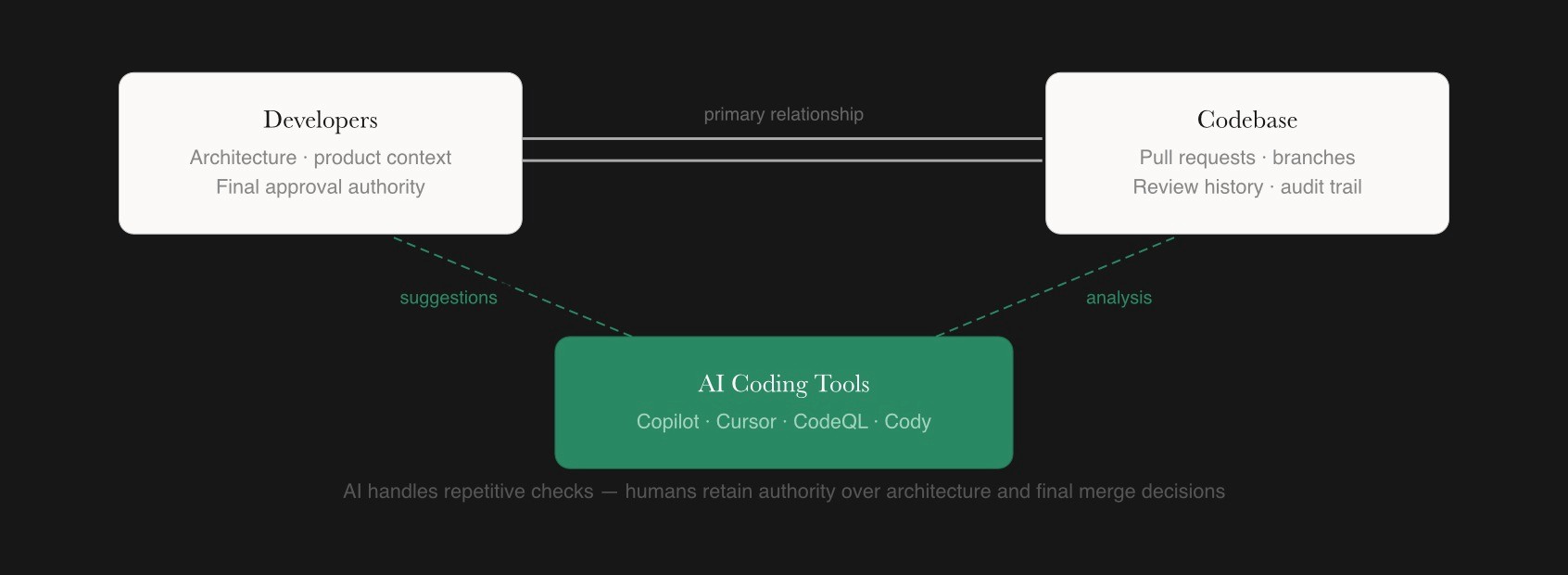
AI should augment existing collaborative coding practices like pair programming, code reviews, and documentation rather than replace them. It improves communication and accountability within teams, leading to better alignment on project goals and expectations when used appropriately.
Recommend explicit team agreements on how to use AI coding tools, including rules for when to accept suggestions, when to escalate to humans, and how to document AI-generated changes. Tracking concrete metrics such as review time, escape defects, and PR rework rates helps evaluate whether AI is improving collaboration quality or only increasing churn.
Teams can also collaborate with curated marketplaces like Fonzi for engineering talent when they want developers who are already comfortable with AI-augmented workflows and understand how two or more developers work together effectively with AI assistance.
How to Choose the Best Collaborative Coding Tools for Your Team
There is no single best collaborative coding tool. Effectiveness depends on your team’s workflow, stack, team size, and compliance needs. Take into consideration your team’s real-time collaboration, asynchronous reviews, AI integration, and security considerations across major platforms.
Map Tools to Collaboration Scenarios
Categorize common scenarios: day-to-day feature development, remote pair programming, large refactors, cross-team reviews, and onboarding sessions. Different scenarios require different core features from your collaboration tools.
For real-time debugging, use Live Share or Code With Me. For code reviews with multiple users, GitHub or GitLab provides the traceable history needed. For interviews or workshops, browser IDEs eliminate local setup friction and support rapid prototyping. Developers work most effectively when tools match their development workflow.
Advise teams to pilot tools with a small group for a few weeks before organization-wide rollout, collecting feedback on usability and impact on delivery metrics. Platforms like Fonzi can connect teams with engineers experienced in remote-first, tool-heavy collaboration, which can accelerate the adoption of new collaboration practices.
Evaluate Integrations, Security, and Compliance
Integration with existing tools, including issue trackers, CI/CD pipelines with automated testing, chat platforms, and SSO providers, is critical to avoid fragmented workflows. Look for seamless connection to your existing editor and existing infrastructure.
Security and compliance checks should cover repository access controls, audit logs, encryption, data residency, and options for self-hosting or private cloud deployments. Many enterprise teams require compliance certifications before adoption.
AI-powered tools should be evaluated for data retention policies, training data usage, and support for air-gapped or VPC deployments when needed. Involve security, legal, and data teams early when adopting new collaborative coding platforms, especially those that process proprietary code.
Measure Impact on Delivery and Collaboration
Define baseline metrics before adopting new collaborative coding tools: lead time for changes, PR cycle time, and review backlog size. A GitHub and Accenture-controlled study across 4,800 developers found that AI coding assistance produced 55% faster task completion on bounded, well-defined tasks.
Track changes after introducing tools: look for reduced review latency, clearer ownership, fewer production defects, and improved onboarding times. Studies show onboarding time is reduced by 40% with Live Share adoption.
Avoid vanity metrics like the number of AI suggestions or time spent in live sessions that do not correlate directly with outcomes. Periodic retrospectives help teams discuss how tools affect collaboration culture, knowledge sharing, and developer satisfaction. When multiple developers access the codebase simultaneously, measure whether collaboration improves or creates friction.
Conclusion
Effective collaborative coding is less about any single platform and more about creating a workflow where real-time collaboration tools, structured code review systems, and AI coding assistants work together smoothly. The right setup depends heavily on a team’s size, technical stack, development pace, and operational constraints. In practice, small pilot programs and focused experiments usually reveal far more about a tool’s real impact than long feature comparison checklists or vendor demos.
A strong starting point is to audit your current development workflow, identify one major collaboration bottleneck, and test a targeted tool or AI-assisted workflow designed to address that specific issue. Engineering leaders are increasingly discovering that improvements in communication, review velocity, and knowledge sharing can have as much impact as improvements in raw coding speed. For teams scaling quickly or building distributed AI and engineering organizations, platforms like Fonzi can also help by connecting companies with experienced remote engineers who already understand modern collaborative development practices and AI-native workflows.
FAQ
What are the best tools for coding collaboration across engineering teams?
What AI-powered code review tools are worth using for collaborative coding?
How do code collaboration tools differ from version control platforms like GitHub?
What should I look for in a code collaboration tool for a remote engineering team?
Can AI code review tools replace human reviewers or do they just assist them?


