How to Use Vectors in C++
By
Samara Garcia
•

std::vector is probably the most-used container in C++. It gives you a resizable array with fast random access and automatic memory management, which handles most cases where you'd otherwise use a plain C-style array.
This guide covers how to use vectors in C++: the core methods, memory behavior, iteration, and patterns worth knowing. To get started, include <vector> and declare something like std::vector<int> numbers. The container manages its own memory as you push, pop, or resize.
Key Takeaways
std::vector is a dynamic array container found in the C++ Standard Library and is declared as std::vector<T> v, where T is the data type of the elements.
std::vector stores vector elements in contiguous memory, which makes direct access with square brackets fast while still supporting resizing.
Core member functions such as push_back, insert, erase, at, size, and empty make it simple to add, access, and remove elements.
Capacity, reallocations, and iterator invalidation matter because growing a vector may move all the elements to a new memory block.
Vectors scale from beginner exercises to production code, and many modern C++ roles, including projects sourced through Fonzi, expect familiarity with std::vector.
Declaring, initializing, and accessing elements in std::vector
A vector can start as an empty vector, a prefilled collection, or a copy of another range. Vectors in C++ can be initialized in several ways, including using an initializer list or by specifying a size and a default value.
Basic declarations:
#include <vector>
#include <string>
std::vector<int> numbers;
std::vector<std::string> names; // not std::vectorstd::string names
std::vector<int> primes {2, 3, 5, 7};
Size and default value:
std::vector<int> v(5, 12); // five values, each 12
const int count = 3;
std::vector<int> flags(count, 1);
Copying from other vectors or arrays:
std::vector<int> copy = v;
int raw[] = {10, 20, 30};
std::vector<int> fromArray(raw, raw + 3);
To access vector elements, use the subscript operator [ ] or the at ( ) member function. The [ ] operator provides fast, unchecked access and does not perform bounds checking. The at ( ) function accesses an element at a specified index and throws an exception if the index is out of bounds, making it a safer alternative.
#include <iostream>
#include <vector>
#include <stdexcept>
int main() {
std::vector<int> values {4, 8, 15};
std::cout << values[0] << "\n"; // first element
std::cout << values.at(1) << "\n"; // second element
values[2] = 16; // third element
try {
std::cout << values.at(9); // specified index
} catch (const std::out_of_range&) {
std::cout << "out of range\n";
}
}
The front() function returns a reference to the first element of the vector, while the back() function returns a reference to the last element. Check empty() before calling them, because front() and back() on an empty vector are invalid. The empty() member function checks whether the vector is empty, returning true if it contains no elements and false otherwise.
Comparing vectors to C-style arrays and other sequence containers
The following example compares the most common sequence containers. Unlike C arrays, vectors know their own vector size through the size() member function, can grow with push_back, and automatically destroy their contents when they go out of scope.
Container type | Resizable | Memory layout | Typical use case | Example syntax |
C array | No | Contiguous | Small fixed-size buffers | int arr[10]; |
No | Contiguous | Fixed-size data with STL support | std::array<int, 10> arr; | |
Yes | Contiguous | Dynamic sequences and general storage | std::vector<int> v; | |
Yes | Segmented blocks | Frequent insertion at both ends | std::deque<int> dq; |
The vector container is typically the default choice. Use std::array when the number of elements is known at compile time, and use std::deque when you frequently insert elements at the front and back. In professional C++ work, clear use of std::vector is expected compared to raw arrays.
Core member functions for adding, accessing, and removing elements
The std::vector interface is built around practical member functions for various operations. These functions let you work with one element, many elements, or all the elements without manually creating and deleting.
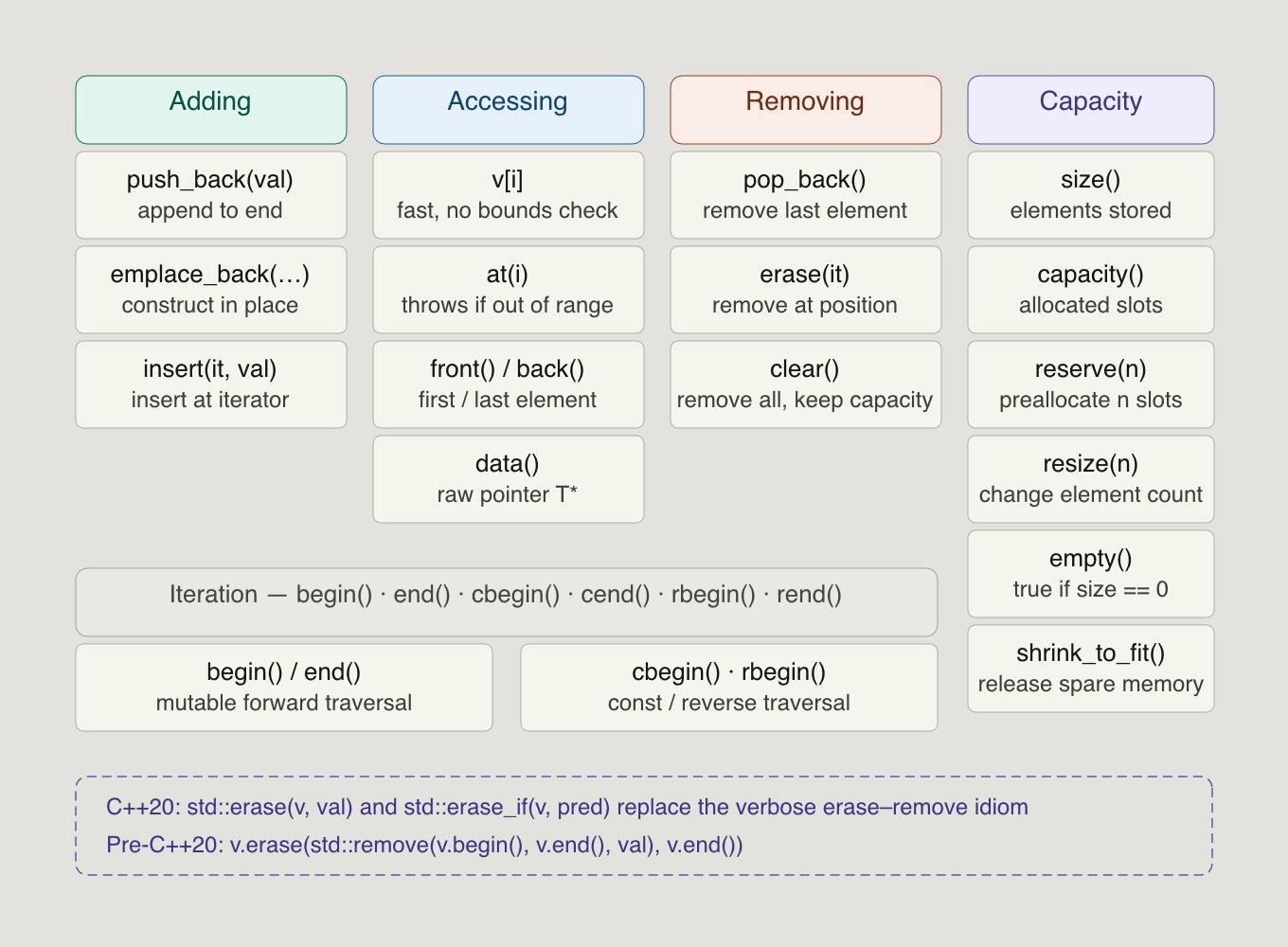
Adding values:
To add a single element to a vector, the push_back() function is used, which appends the element to the end of the vector.
The emplace_back() function constructs an element in place at the end of the vector, which can be more efficient than push_back() in certain scenarios.
The insert() function allows for adding elements at specific positions within a vector. Use it with an iterator pointing to the specified position.
operator[] gives fast direct access by index number.
at() checks the specified index.
front() and back() access the first and last values.
The data() member function returns a pointer to the underlying array serving as the element storage for the vector, allowing direct access to the elements.
Removing values:
The pop_back() function removes the last element from a vector, effectively reducing its size by one.
The erase() function removes elements from specified positions.
The clear() function removes all elements from a vector, but does not free the memory allocated for the vector.
Here is a compact example that uses common vector methods that Cot std::vectorstd::string names++ learners often need:
#include <iostream>
#include <vector>
int main() {
std::vector<int> nums {10, 20};
nums.push_back(30);
nums.emplace_back(40);
std::cout << nums.at(2) << "\n"; // output element
nums.insert(nums.begin() + 1, 15); // new value
nums.erase(nums.begin() + 2);
for (const auto& n : nums) {
std::cout << n << " ";
}
}
In the above example, inserting and erasing in the middle move the following items. That work takes linear time, so repeated middle insertion or removing elements can become expensive.
Capacity, size, and performance of std::vector
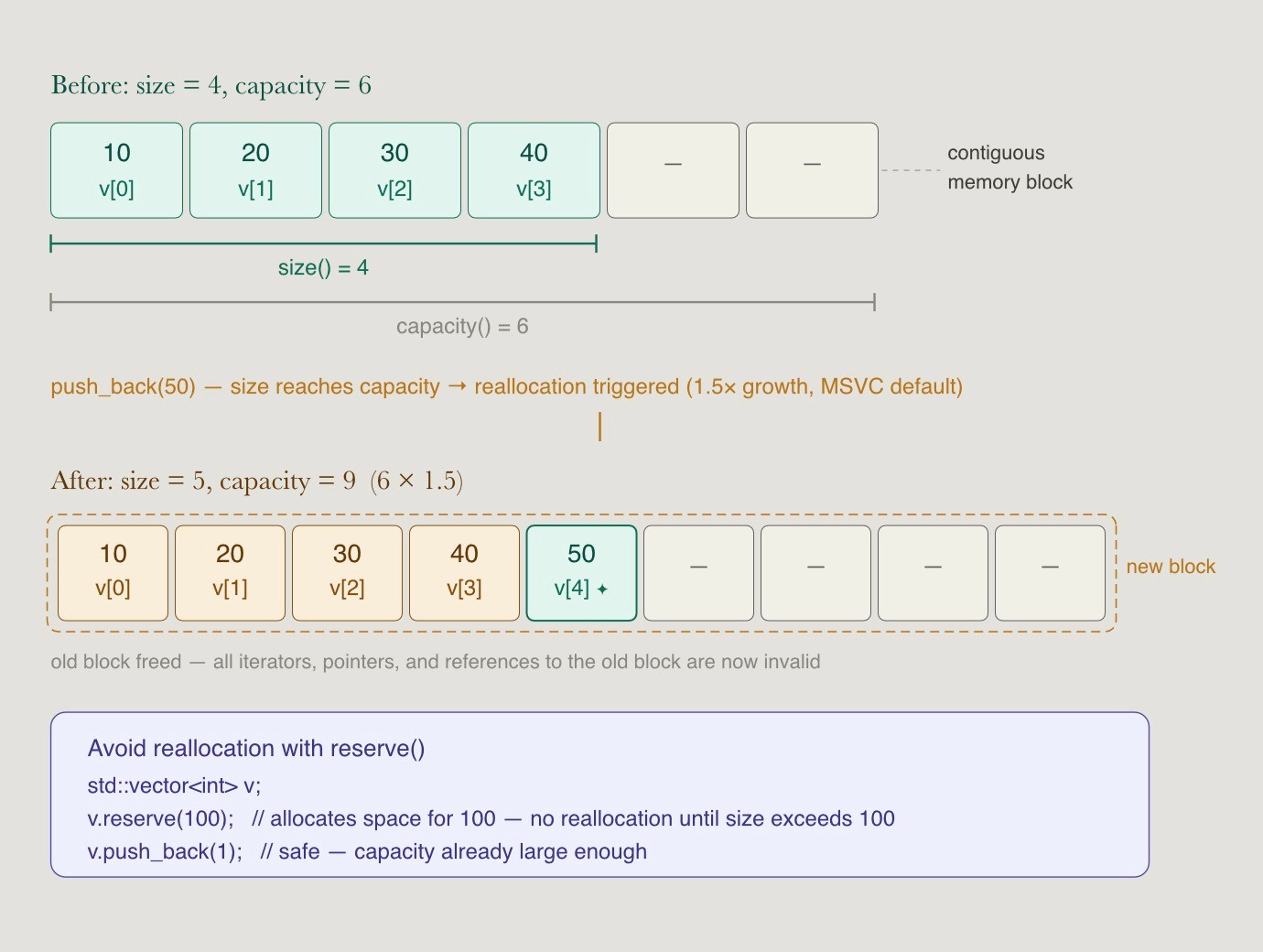
A vector tracks both how many elements it stores and how much memory is ready for future growth.
The size() member function returns the number of elements currently stored in the vector.
The capacity() member function of a vector returns how many elements the vector can store before it needs to allocate more memory, while size() returns the number of elements currently stored in the vector.
The reserve() member function allows you to preallocate memory for a specified number of elements, which can help avoid multiple reallocations as elements are added.
The resize() member function changes the number of elements stored in the vector, and if the new size is larger, new elements are default-initialized.
The max_size() member function returns the maximum number of elements that a vector can hold, which is determined by the system’s memory limits.
clear() removes all elements from the vector without changing the capacity.
When size() reaches current capacity, the next append may allocate a larger block, move existing vector elements, and release the old block. According to cppreference, this can invalidate iterators, references, and pointers. If a long-lived vector container will not grow again, shrink_to_fit() can request reduced capacity, or swapping with a temporary vector can release storage.
Iterating over vectors and using iterators effectively
You can loop over a vector with indices, range-based loops, or explicit iterators. Pick the form that makes the code easiest to read.
Index-based loop, useful when you need both index and value:
for (int i = 0; i < static_cast<int>(v.size()); ++i) {
std::cout << v[i] << "\n";
}
Range-based loop, preferred for simple traversal:
for (const auto& value : v) {
std::cout << value << "\n";
}
Iterator loop:
std::vector<int>::iterator iter = v.begin();
for (; iter != v.end(); ++iter) {
std::cout << *iter << "\n";
}
Vector iterators work similarly to pointers and are used to traverse vector elements. begin() points to the first element, while end() points just past the last element. Const iterators like cbegin() and cend() prevent modification, while rbegin() and rend() iterate in reverse. Standard algorithms such as std::sort, std::find, and std::accumulate work directly with iterator ranges like [v.begin(), v.end()).
Iterator invalidation and safety tips
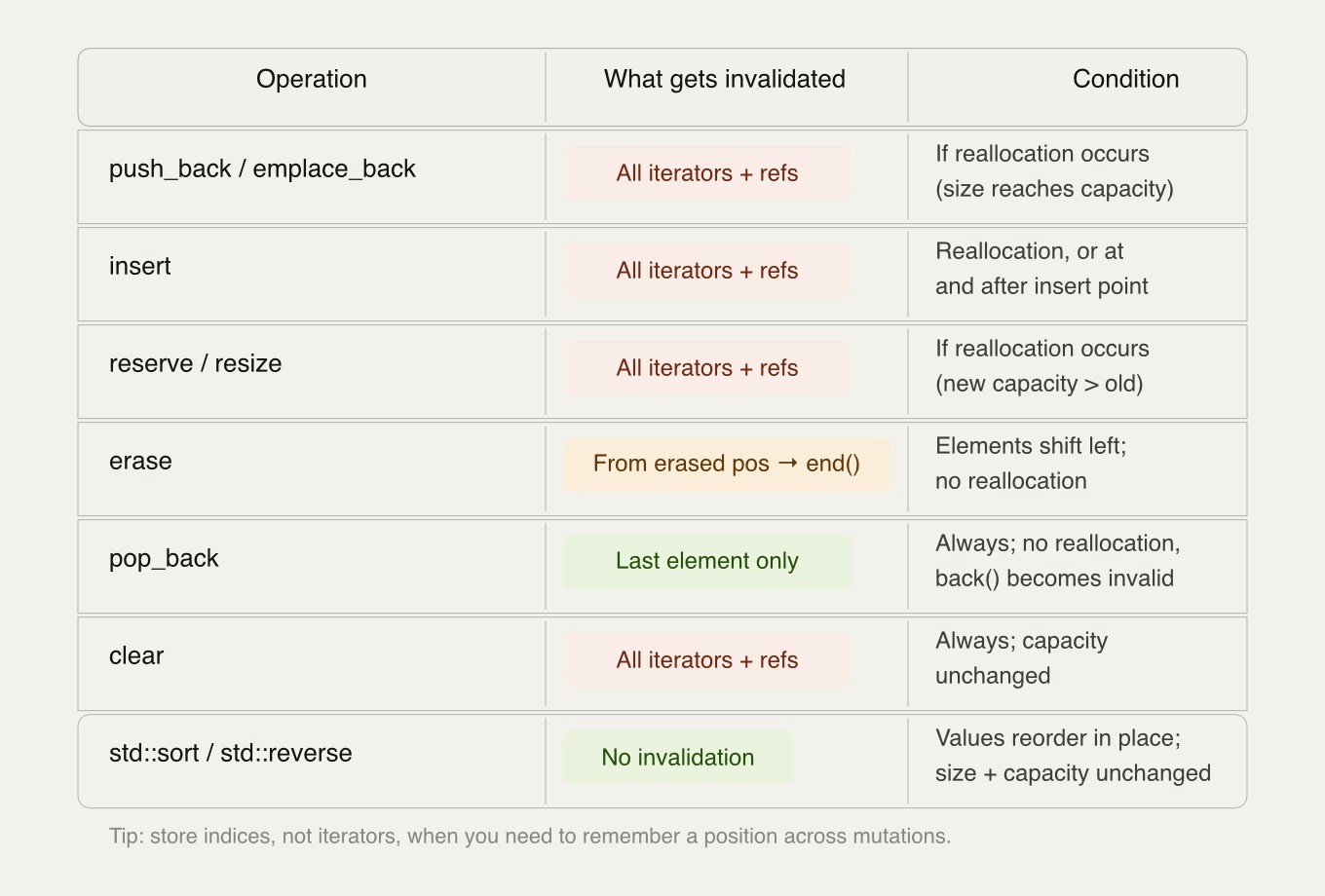
Iterator invalidation is one of the most common vector bugs. It happens when an operation changes the storage or position of vector elements while old references still exist.
push_back, insert, reserve, or resize may reallocate, which invalidates pointers, references, and iterators to vector elements.
erase invalidates iterators from the erased position to end().
pop_back invalidates references and iterators to the removed last element.
Do not store raw pointers from data() across operations that might reallocate.
Use indices when you need to remember a position across mutations.
Algorithms that reorder in place, such as std::sort or std::reverse, do not change size, but they do change which value appears at each position.
Advanced std::vector usage: algorithms, multidimensional vectors, and best practices
Once basic vector methods and C syntax feel comfortable, std::vector becomes a powerful tool for algorithms, matrices, buffers, and application data. Many best practices come down to avoiding unnecessary copies and choosing the right layout.
#include <algorithm>
#include <numeric>
#include <vector>
std::vector<int> scores {5, 1, 3, 3, 9};
std::sort(scores.begin(), scores.end());
std::erase(scores, 3); // C++20
int total = std::accumulate(scores.begin(), scores.end(), 0);
For pre-C++20 codebases, the classic erase-remove idiom remains common: v.erase(std::remove(v.begin(), v.end(), value), v.end());. In C++20, std::erase and std::erase_if make this cleaner for removing elements by value or predicate.
For two-dimensional data, implementing vectors in C++ usually means using nested vectors:
std::vector<std::vector<int>> matrix(3, std::vector<int>(4, 0));
matrix[1][2] = 7;
Nested vector vectors are useful for grids, adjacency lists, and dynamic tables where rows can have different lengths. For performance-heavy numeric code, a flattened std::vector<int> with manual indexing like row * cols + col often has better locality than nested vectors.
A few style rules help keep code clean:
Prefer std::vector over manual dynamic arrays in most code.
Pass read-only vectors as const std::vector<T>&.
Pass mutable vectors as std::vector<T>&.
Return a temporary vector by value when ownership should move to the caller.
Use emplace_back for complex objects when construction in place is clearer.
Avoid std::vector<bool> unless you specifically want its packed proxy behavior.
Remember that the initial vector can be created by the default constructor, then filled later.
Summary
std::vector is the container most C++ developers reach for first. It's a resizable array backed by contiguous memory, so you get dynamic sizing without giving up fast element access or cache-friendly layout.
The core API is small: push_back(), insert(), erase(), size(), and at() cover most of what you need day-to-day. But there's more going on under the hood. This guide covers how vectors actually manage memory, when reallocations happen, how to iterate safely, and patterns that matter in production code; capacity management, iterator invalidation, range-based loops, multidimensional vectors, and where standard algorithms fit in.
If you're interviewing for backend, AI infrastructure, or robotics roles, vectors come up constantly. A surface-level understanding gets you through toy problems. Knowing the internals is what separates a good answer from a great one.
FAQ
Is std::vector faster than a C-style array?
When should I use std::array instead of std::vector?
Can I pass a std::vector to a function efficiently?
How do I convert a std::vector to a raw C array pointer?
What happens to capacity when I clear a vector?


