Claude Agent SDK Overview and How to Start Building With It
By
Samara Garcia
•

As AI agents move from simple chat interfaces to systems that can write code, use tools, and complete multi-step workflows, developers need frameworks that make those capabilities easier to build and manage. The Claude Agent SDK is Anthropic’s library for creating Claude-powered agents in TypeScript and Python, giving developers a programmable way to run agent workflows that can read files, execute commands, use tools, and continue working until a task is complete.
Built on top of Claude Code, the SDK exposes the underlying agent loop through code. Claude Code provides the execution engine, Claude agents define the behavior, and the SDK supplies the developer interface for orchestrating everything. Since evolving from the earlier Claude Code SDK in late 2025, it has added support for custom tools, subagents, session persistence, and Model Context Protocol integrations.
Common use cases include autonomous coding assistants, documentation workflows, internal developer platforms, Discord bots, evaluation pipelines, and other applications that require reliable, repeatable agent execution. The main advantage is reducing orchestration complexity so teams can focus on building useful AI-powered workflows rather than managing agent infrastructure.
Key Takeaways
The Claude agent SDK wraps Claude Code into a programmable agent runtime that manages tools, context, prompt caching, and execution loops for you.
The SDK provides two primary modes of operation: query() for one-off tasks and ClaudeSDKClient for continuous conversations.
Developers can connect MCP servers, register custom tools, define subagents, and control tool usage with permissions, hooks, and a system prompt.
Sessions can be saved, resumed, forked, tagged, and inspected, which makes the SDK practical for evals, debugging, and production agents.
Production use should start with conservative permissions, read-only tools, file checkpointing, and clear handling for the AskUserQuestion tool.
Core Concepts: Agent Loop, Tools, and System Prompts
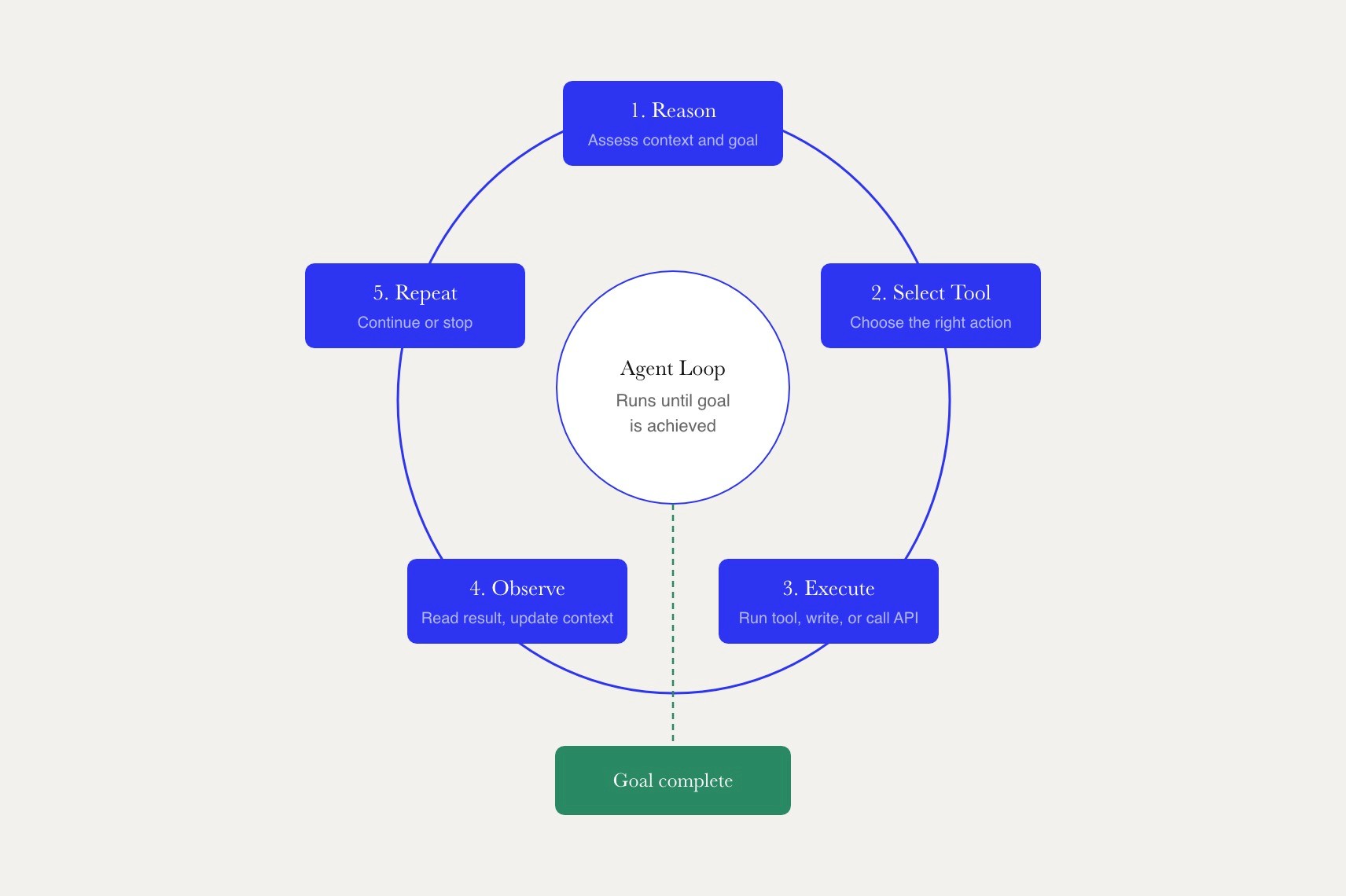
The agent loop is the center of the SDK. The autonomous loop runs a continuous cycle: reasoning, selecting a tool, executing, observing results, and repeating until the goal is achieved. The Agent Loop manages multi-step reasoning, execution, and validation cycles automatically, which is why many teams prefer the SDK over rebuilding the agent loop manually with raw HTTP calls.
The SDK provides a full toolset, including Read, Write, Edit, Bash, and others, which can be configured using allowed_tools and disallowed_tools for permission management. Built-in tools include Read, Write, Edit, Bash, Glob, Grep, WebSearch, WebFetch, NotebookEdit, Monitor, task management tools, and MCP resource tools. These available tools appear in the message stream as tool calls, tool use blocks, and tool results, so developers can audit what the agent did.
How the Agent Loop Works in Practice
In basic usage, query() starts a new session, sends the first user message, streams assistant messages, executes tool calls when Claude requests them, and returns a final result. The query() function creates a new session for each interaction with Claude Code by default, returning an async iterator that yields messages as they arrive.
A user message is the input you send. Assistant messages are Claude’s responses. Tool use blocks describe the specific tools Claude wants to call, and ToolResultBlock items carry the tool results back into the same session. Developers often inspect ResultMessage fields for token counts, cost, model choice, and task usage metrics.
The SDK functions as a long-running, stateful process that can read files, execute shell commands, and iteratively fix problems. It also provides fine-grained control over autonomous reasoning, memory, tool integration, and orchestration, including ThinkingConfig and EffortLevel style controls that influence depth of reasoning, latency, and cost.
System Prompts and Defaults
The SDK ships with a default Claude code system prompt that teaches the agent how to behave in a terminal environment, when to ask for clarification, and how to use tools safely. A SystemPromptPreset can extend that default, while a custom prompt or fully custom system prompt can replace it for specialized workflows.
Teams often standardize the system prompt in a settings file, CLAUDE.md, SKILL.md, or a .claude directory, because shared instructions reduce drift across runs. The SDK loads project settings, additional instructions, environment variables, and discovered skill definitions based on setting sources. A fully custom prompt can be useful, but it may skip some dynamic filesystem context that Claude Code normally injects.
The Claude Agent SDK supports subagent architectures, allowing a lead agent to delegate specialized tasks to isolated sub-agents that run within independent context windows. This hierarchical structure isolates tool permissions, prevents context pollution, and coordinates parallel workflows across a codebase.
Basic Usage Patterns: query, ClaudeSDKClient, and Session Persistence
The Claude Agent SDK offers two primary interaction patterns. query() is designed for short, independent tasks, while ClaudeSDKClient maintains session state across multiple exchanges, making it better suited for interactive agent workflows.
For TypeScript, install the @anthropic-ai/claude-agent-sdk package. Python developers can use pip install claude-agent-sdk. Authentication is handled through the ANTHROPIC_API_KEY environment variable, and both SDKs include the Claude Code binary, eliminating the need for a separate CLI installation.
By default, each query() call starts without prior context unless conversation continuity is explicitly enabled. Session IDs can be used to resume previous interactions, and sessions are typically stored on disk for later reuse, though persistence can be disabled for temporary workflows.
Choosing Between Stateless Query and Stateful Client
Use query() for batch jobs, CI checks, evaluations, and simple scripts where conversation history is not important. Use ClaudeSDKClient for chatbots, IDE integrations, code reviews, and other multi-turn workflows that benefit from session memory.
The client simplifies advanced configuration by letting you reuse settings such as MCP servers, hooks, working directories, permissions, tools, output formats, and session IDs. It also supports session management features, including forking conversations, reviewing message history, renaming sessions, and tagging runs for debugging, analytics, or experiment tracking.
Example Configuration Table: Key Options at a Glance
Option name | What it controls | Typical value | When to use it |
output_format | Shape of the response | text or JSON schema | Use structured output for evals, reports, and automation. |
How tools are approved | readOnly or acceptEdits | Start safe, then allow the agent to edit code after testing. | |
betas | How to enable beta features | native extended context-1m variants | Use when the extra context window size is worth the added cost and latency. |
Whether history is stored | true or false | Disable it for private, temporary, or CI workflows. | |
resume and fork_session | Session continuity and branching | session ID or fork target | Reuse analysis while tracking storage and cost implications. |
max_budget_usd | Session spending cap | Small in dev, higher in production | Prevent runaway tool calls or overly expensive runs. |
setting_sources | Project instructions and skills | CLAUDE.md, SKILL.md, .claude | Keep team behavior consistent across projects. |
Working with Tools, MCP Servers, and Custom Integrations
Tool orchestration is a major advantage of the Claude Agent SDK. Instead of managing execution loops, context, and tool calls manually, the SDK handles much of that complexity automatically.
MCP integration allows agents to connect with external systems through the Model Context Protocol. Developers can register MCP servers, expose tools, monitor server health, and track tool usage across systems. Custom tools can also be created from Python functions with defined schemas, permissions, and expected outputs.
Permission Modes and Security
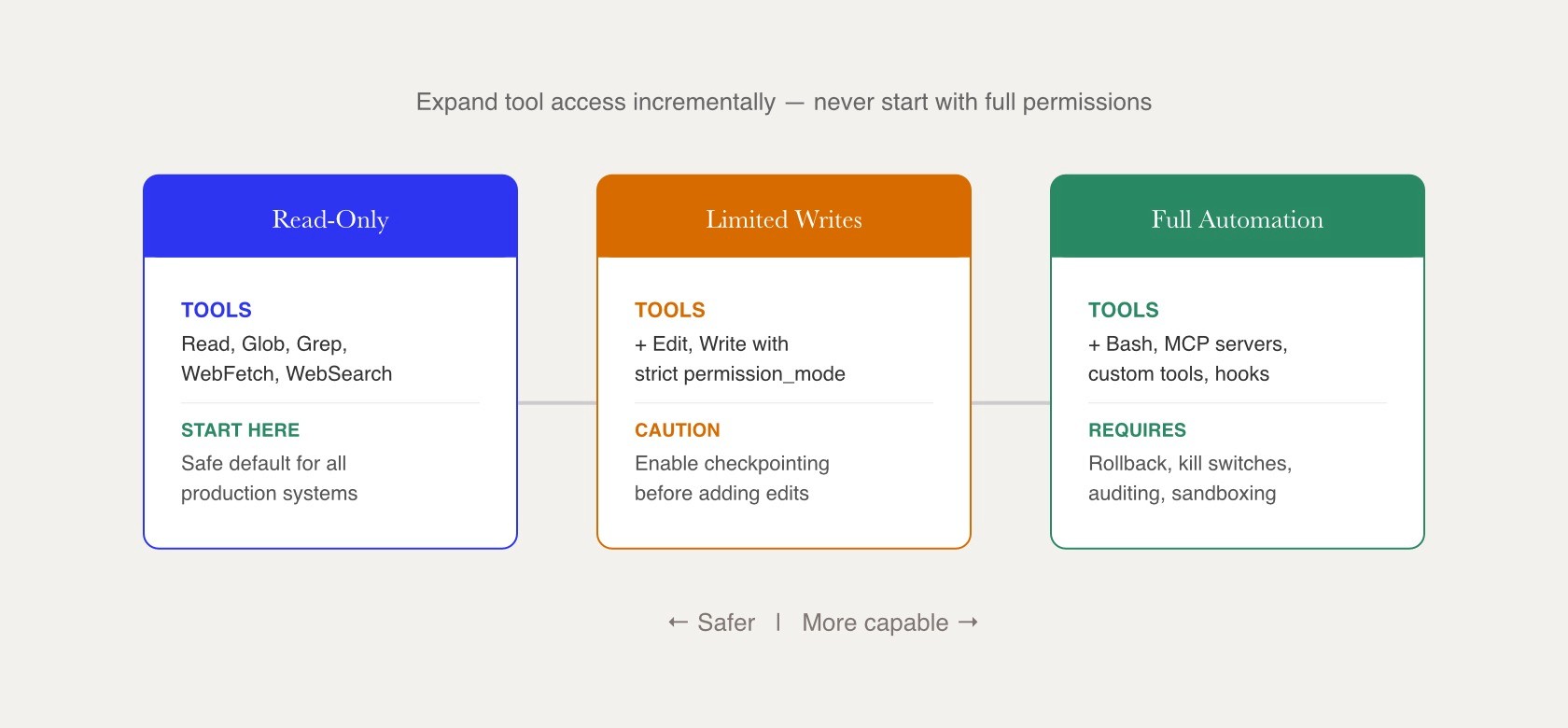
Permission settings control what an agent can read, write, execute, or access. Most production environments should default to read-only access and explicitly allow trusted tools. Hooks and permission callbacks can enforce security policies, block risky actions, and restrict access to approved MCP tools. Checkpointing features also make it easier to roll back file changes when agents modify code or generated content.
Custom Tools and User Interaction
Well-designed tools should have clear names, predictable behavior, and documented inputs and outputs. Common examples include calculators, internal API wrappers, authentication services, and validation utilities. For interactive workflows, the AskUserQuestion tool lets agents request clarification, while automated systems can define default responses to prevent CI jobs and evaluation runs from stalling.
Managing Sessions, Errors, and Observability
Reliability work starts with knowing what the agent did. Session persistence, message logs, and task events make it possible to inspect an agent, compare a previous run, and decide whether a new feature behaved correctly.
The main error types include ClaudeSDKError, CLINotFoundError, CLIConnectionError, ProcessError, and CLIJSONDecodeError. AssistantMessageError, RateLimitEvent, and RateLimitInfo can support retries, backoff, and user-friendly error messages. Observability can also include OpenTelemetry traces, TaskStartedMessage, TaskProgressMessage, TaskNotificationMessage, and logs of tool usage.
Cost and Budget Control
ResultMessage usage fields and TaskUsage metrics show token consumption by the main agent and background tasks. Budget controls such as max_budget_usd and task_budget help stop runaway sessions, especially when agents use WebFetch, long context, or many MCP calls.
For development, keep budgets small and alert when an agent frequently reaches the cap. In staging, test beta features and large context windows before enabling them for your own customers, since tool-heavy agents can increase both latency and cost.
Putting It All Together: Practical Steps to Start Building with the Claude Agent SDK
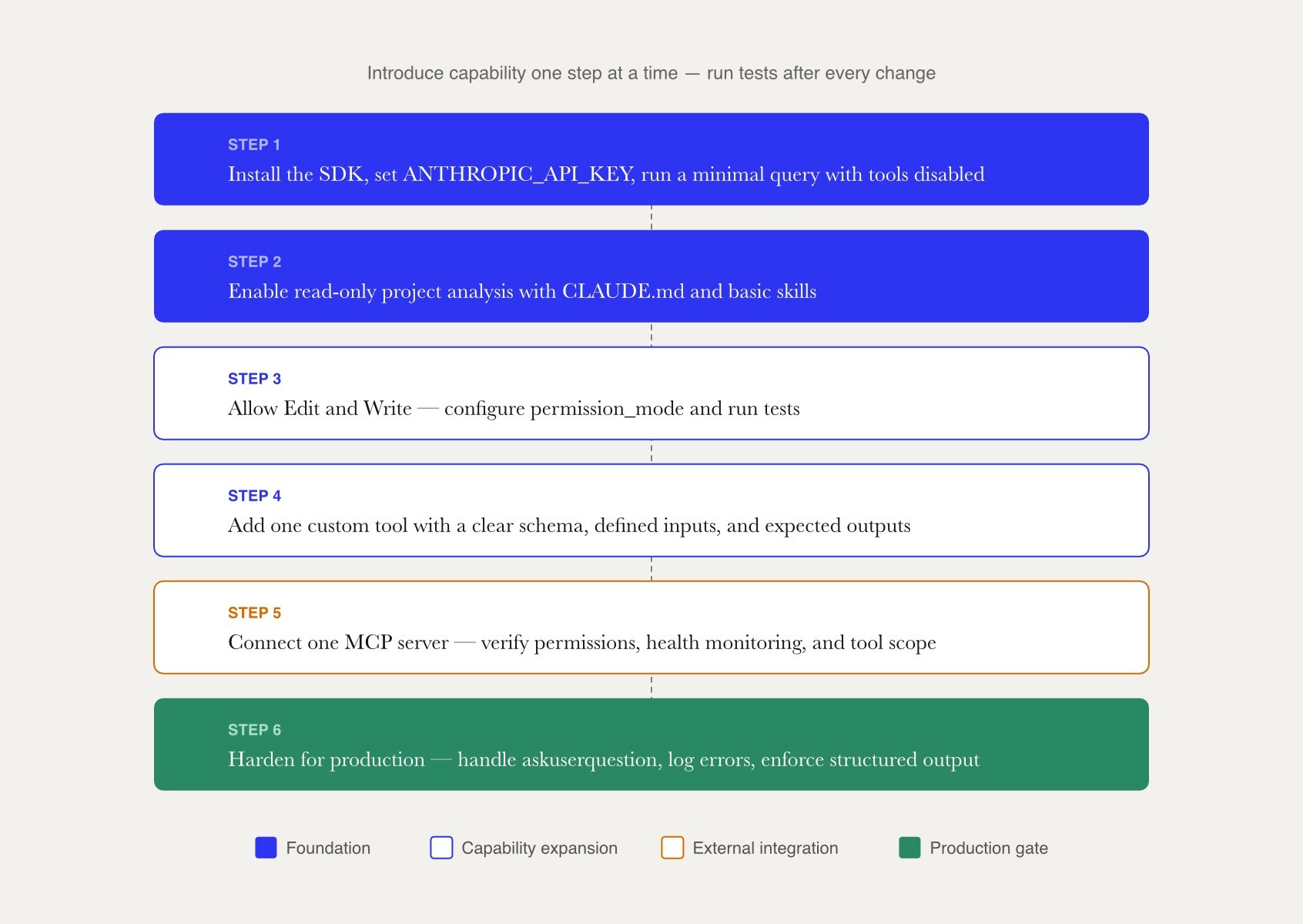
Start small. Install the SDK package, configure ANTHROPIC_API_KEY, create a temporary working directory, and run a minimal query with tools disabled. This behaves much like a standard chat completion API, but you are already using the same runtime that can later power products with more capable agents.
Next, point the agent at a repository and enable read-only project analysis with setting_sources for CLAUDE.md and basic skills. Then, gradually allow Edit and Write, configure permission_mode, add one custom tool, connect one MCP server, and run tests after every change. This incremental deployment model transitions the implementation from a basic chat interface to an autonomous orchestration runtime capable of managing workflows across complex local codebases.
Avoid rebuilding the loop, enabling Bash too early, or relying heavily on beta features before staging tests.Production setups must handle the askuserquestion tool explicitly, enforce structured output schemas for critical validation steps, log runtime errors, and review all tool permissions. When complex agent teams or secure MCP integrations are involved, experienced Claude engineers from networks such as Fonzi can help accelerate implementation without replacing internal review.
Finding Claude Agent SDK Talent with Fonzi
As organizations move from simple AI prototypes to production agent workflows, the demand for engineers who understand agent orchestration, tool integrations, MCP servers, observability, and secure AI infrastructure continues to grow. Building reliable Claude Agent SDK applications requires more than basic prompt engineering. Teams need developers who can manage agent permissions, design custom tools, integrate external systems, monitor costs, and deploy scalable agent architectures in production environments.
Fonzi helps companies connect with pre-vetted AI engineers, platform engineers, machine learning specialists, and technical leaders experienced with Claude, OpenAI, Anthropic tooling, MCP integrations, agent frameworks, and developer infrastructure. Through Fonzi's AI-powered screening and human review process, hiring teams can quickly identify candidates with the technical skills needed to build coding assistants, autonomous workflows, internal developer platforms, and enterprise AI systems.
Fonzi's Match Day program further accelerates hiring by introducing companies to qualified engineers actively seeking AI-focused opportunities. Whether you're building a Claude-powered coding assistant, a multi-agent workflow, or a secure enterprise automation platform, access to specialized AI talent can help reduce implementation risk and shorten the path from prototype to production.
Summary
The Claude Agent SDK gives developers a programmable way to build Claude-powered agents that can use tools, execute commands, manage files, and complete multi-step workflows. Built on top of Claude Code, it handles much of the underlying agent orchestration, including reasoning loops, tool execution, session management, prompt handling, and MCP integrations. Developers can choose between simple one-off tasks with query() or stateful applications using ClaudeSDKClient, while adding custom tools, subagents, and permission controls as needed.
For production deployments, success depends on careful management of permissions, observability, session persistence, and cost controls. Teams should start with read-only access, add tools gradually, monitor agent behavior, and implement safeguards around actions and external integrations. As organizations expand from AI prototypes to full agent-based platforms, hiring engineers with experience in agent orchestration, MCP servers, developer infrastructure, and AI systems becomes increasingly important. Fonzi helps companies connect with pre-vetted AI and software engineers who can accelerate the development of Claude-powered applications and agent workflows.
FAQ
Which language should I use first for building with the Claude Agent SDK?
How is the Claude Agent SDK different from the standard Claude client SDK?
Can I connect existing MCP servers directly to a Claude agent?
How should I handle AskUserQuestion when there is no human in the loop?
What is the safest way to enable code-editing tools in production?


