What Is Static Code Analysis and the Best Tools to Use
By
Samara Garcia
•

Static code analysis is now a core part of secure and reliable software delivery in 2026, especially as teams ship faster and use AI-generated code more often. Static code analysis examines source code without executing it, which helps developers find defects earlier than most tests. Static and dynamic analysis both matter, but static analysis has become a default expectation for professional engineering teams because it gives fast feedback before code reaches production.
Key Takeaways
Static code analysis inspects source code without running it to catch bugs, security issues, code smells, and style problems early.
Combining static and dynamic analysis with other testing methods gives broader coverage than any single testing approach.
Static code analysis can run in CI/CD pipelines, IDEs, and pre-commit hooks to improve code quality without slowing the development process.
AI-generated code increases the need for static analysis because subtle bugs and security vulnerabilities can spread at machine speed.
Modern static analysis tools reduce false positives and let teams customize analysis rules for each programming language and project.
What Is Static Code Analysis and How Does It Work?
Static code analysis, also called source code analysis or static application security testing, is the automated inspection of source code, bytecode, binaries, or configuration files without running the program. In simple terms, static code analysis examines source code without execution so developers can catch security flaws, coding errors, compliance issues, and style violations before code execution.
A static analyzer usually parses source code into Abstract Syntax Trees, control flow graphs, and data flow graphs. The analysis process checks structural models against predefined rules or algorithms to detect anomalies in code structure, insecure patterns, unused variables, unreachable code, input validation errors, logical errors, and overly complex functions.
Manual code reviews are also a form of static analysis because humans inspect code without running it. The difference is scale. Automated code reviewers process code at machine speed, and automated efficiency in static code analysis saves human reviewers time by catching basic mistakes automatically. Manual code reviews still matter for product intent, architecture, and business logic, but automated tools reduce oversight gaps in the code review process.
Static analysis performed early in the development lifecycle is usually cheaper than fixing defects later. Early defect detection is significantly faster and cheaper than debugging later in the testing phases, when the issue may be buried behind integration work, test data, or external systems.
Core Techniques Used in Static Code Analysis
Modern code analysis tools usually combine several techniques:
Lexical analysis segments source code into tokens for easier processing.
Syntax analysis builds tree structures so that later checks can understand the program.
Semantic analysis checks types, symbol references, API usage, invalid casts, and undeclared variables.
Control flow analysis maps all possible execution paths in code using a control flow graph, which helps detect missing checks, dead branches, and unreachable code.
Data flow analysis tracks how data moves through the code. Data flow analysis tracks how values are assigned, passed, and consumed across code paths to detect uninitialized variables, null dereferences, and improper data handling.
Taint analysis identifies user-controlled input reaching sensitive functions, which helps detect SQL injection vulnerabilities early, cross-site scripting (XSS), unsafe deserialization, and insecure data handling practices in code.
Pattern matching is a method used to check tree structures against known bad practices, such as hard-coded credentials in source code, unsafe cryptography, or buffer overflow vulnerabilities.
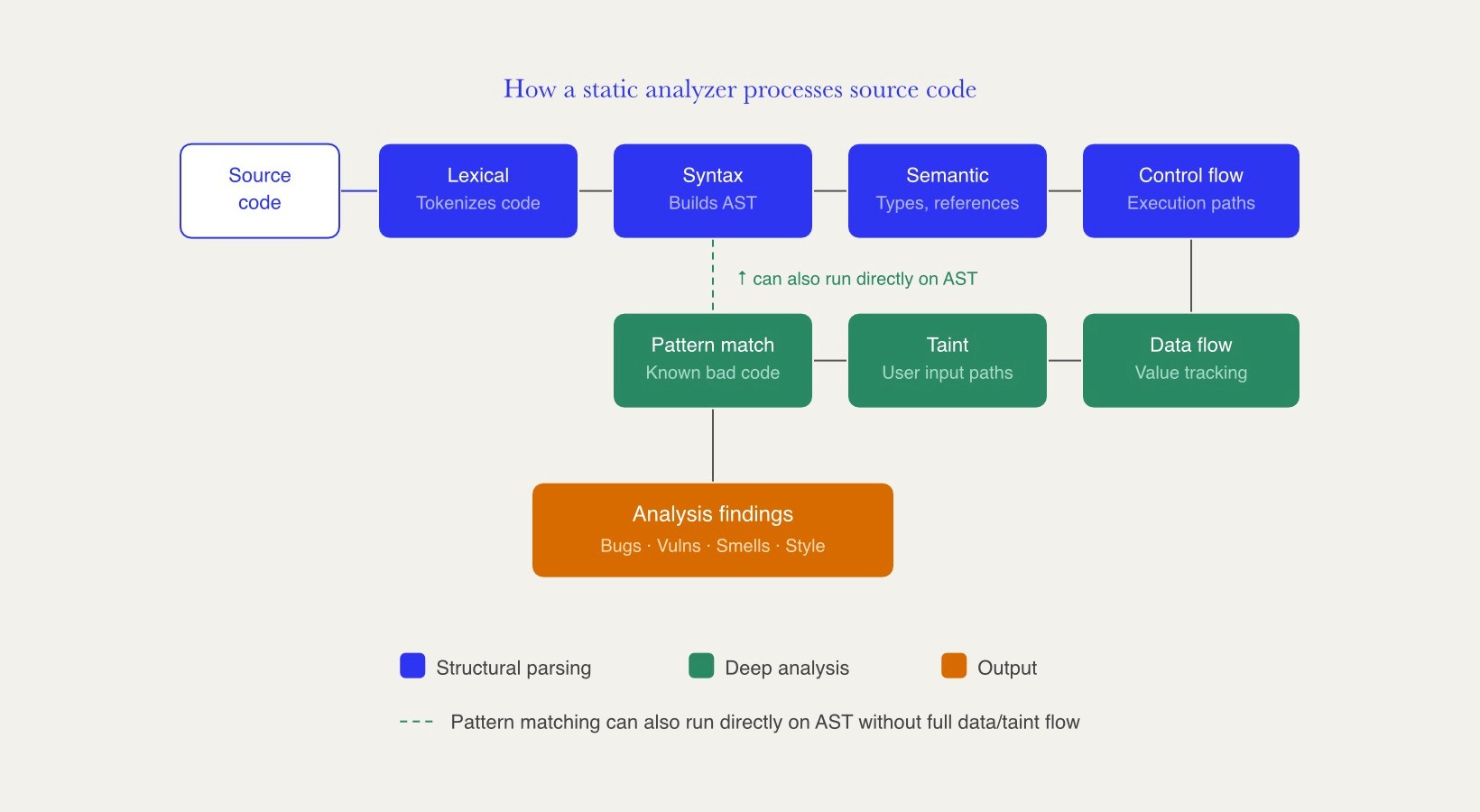
Some advanced static analysis solutions add symbolic execution, AI-assisted triage, and path feasibility checks to reason about deeper execution paths and complex security vulnerabilities.
Static vs Dynamic Code Analysis
Static and dynamic analysis are complementary strategies. Static analysis is performed before execution, while dynamic analysis requires running software in a real or simulated environment. Dynamic code analysis, dynamic application security testing, fuzz testing, and runtime profiling are useful because they observe what the software actually does.
Static analysis finds structural issues, code smells, standard violations, potential security bugs, and maintainability problems. Dynamic analysis tools are better for memory leaks, runtime errors, performance bottlenecks, concurrency issues, and environment-dependent defects. While some static analyzers can model potential memory leaks through data flow analysis, runtime tools typically provide higher confidence for detecting actual memory leaks in execution environments.
A robust quality assurance process should combine static analysis with unit tests, integration tests, dynamic analysis, software composition analysis, and other testing methods. Software composition analysis checks third-party dependencies, while dynamic application security testing checks a running application. Together, these testing methods offer stronger coverage across the software development lifecycle.
What Problems Does Static Code Analysis Detect and How Does It Improve Code Quality?
Static code analysis tools identify security vulnerabilities, bugs, compliance issues, and style violations before they become expensive. They help improve code quality by making code more predictable, testable, and consistent across a large codebase.
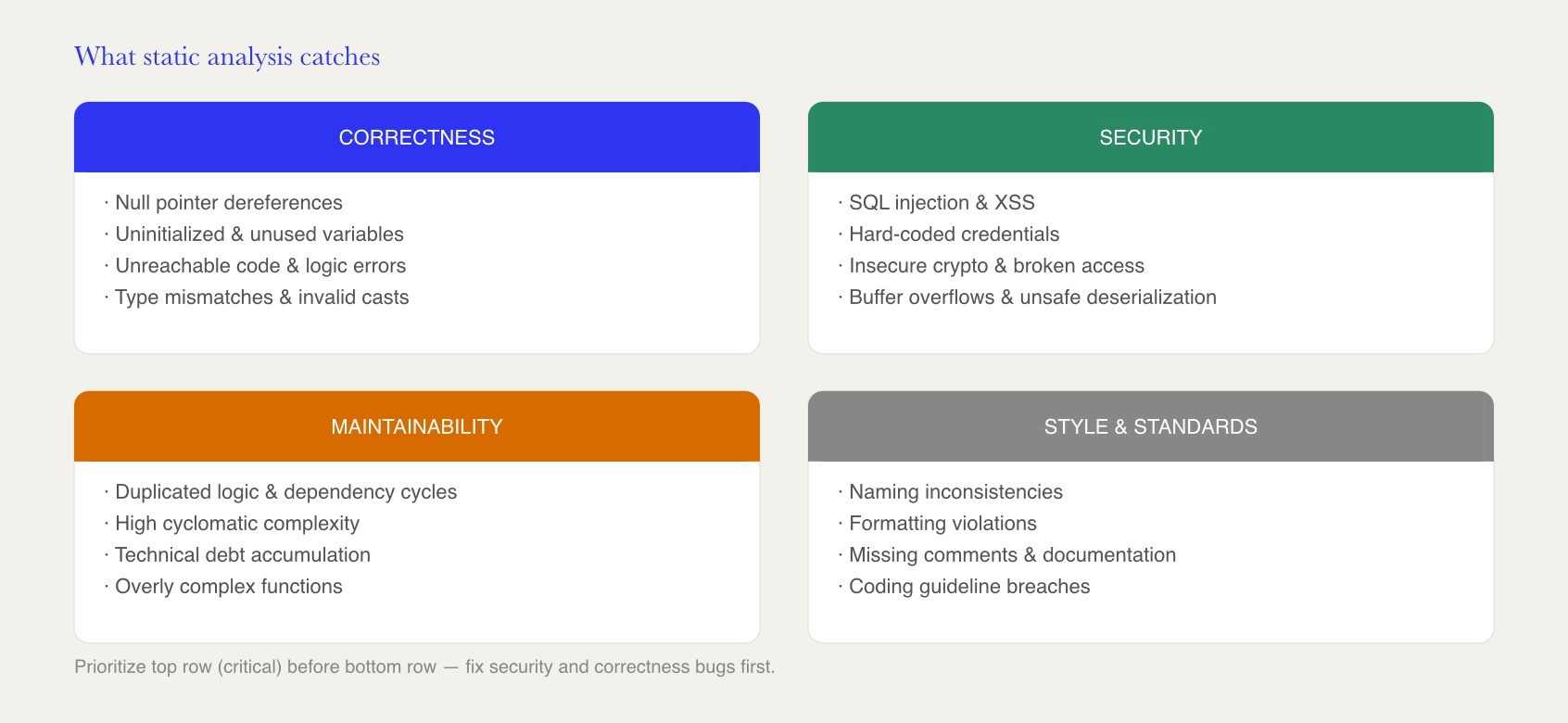
Common findings include:
Correctness bugs, such as null pointer risks, uninitialized variables, unused variables, unreachable code, logic errors, and other errors.
Security issues, such as SQL injection, XSS, hard-coded credentials, insecure data handling, unsafe cryptography, broken access checks, and buffer overflow vulnerabilities.
Maintainability issues, such as duplicated logic, dependency cycles, high complexity, and technical debt.
Style problems, such as naming inconsistencies, formatting violations, missing comments, and coding guidelines that are not followed.
Use static analysis tools to enforce coding standards automatically, improving maintainability, especially across teams working in multiple languages, repositories, and time zones.
Static analysis also supports regulatory compliance. Many organizations use analysis data to map findings to the OWASP Top 10 for LLM Applications for teams dealing with AI-generated code, CWE, ISO 26262, MISRA C, and sector-specific regulations. This matters in a security development lifecycle where traceability and repeatable checks are required.
Continuous scanning reduces technical debt by identifying issues early. Small problems can be fixed quickly, instead of becoming major refactoring work later in the development cycle.
Managing False Positives and False Negatives
False positives happen when static analysis tools flag safe code as risky, such as warning about SQL injection in a query that is already safely parameterized. Static analysis tools can generate false positives if misconfigured, which can reduce developer trust.
False negatives are missed issues, such as a vulnerability hidden behind reflection, configuration, or framework behavior that the static analysis engine does not fully understand. Teams should review missed findings from incidents, penetration tests, and production bugs, then refine analysis rules.
To reduce noise, customize rule sets to match your team's coding standards. Disable irrelevant checks, tune severity levels, use baselines for legacy findings, and prioritize addressing critical vulnerabilities before minor issues. Modern tools increasingly use LLM-assisted triage, contextual AI prioritization, and agentic remediation workflows to suppress noise and surface actionable findings. Research on LLM-assisted path feasibility has shown large reductions in false positives while preserving many true findings, according to recent static bug detection research.
How and When to Perform Static Code Analysis in the Development Lifecycle
Static analysis works best when it is part of the normal software development lifecycle, not a one-off security scan. Static code analysis occurs early in the development lifecycle, allowing developers to fix issues automatically or manually while the code is still fresh.
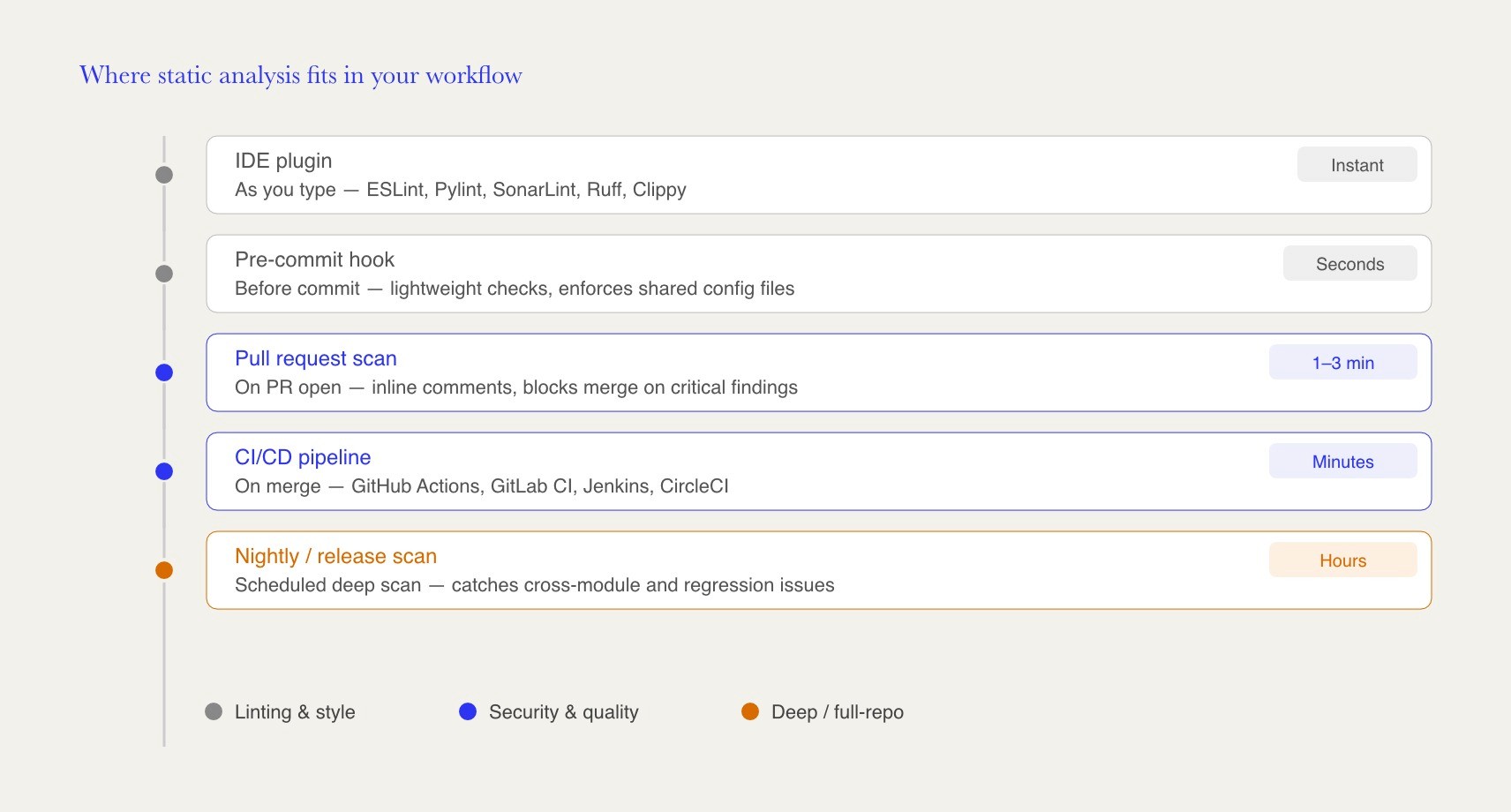
A common workflow is simple: use pre-commit hooks to enforce lightweight static checks, run fast checks inside an integrated development environment, trigger scans on pull requests, and run deeper analysis in CI/CD. Integrate static analysis into your CI/CD pipeline and automate static analysis in CI/CD for rapid feedback. Static code analysis can run in CI/CD pipelines, and teams should schedule regular static analysis scans throughout the project lifecycle.
Distributed teams, including teams assembled through platforms like Fonzi, benefit from consistent automated rules that do not depend on one reviewer’s preferences.
Static Analysis in IDEs and Local Development
IDE plugins give feedback as developers type. ESLint scans JavaScript and TypeScript for syntax errors and style issues. Pylint analyzes Python code for errors and enforces coding standards. SonarLint, Ruff, Clippy, and golangci-lint serve similar roles in other programming languages.
Store shared configuration files in the repository, such as .eslintrc, .pylintrc, or EditorConfig. This keeps analysis rules consistent across contributors and helps junior developers learn secure development practices through actionable messages.
Static Analysis in Code Reviews and CI/CD Pipelines
Integrate static analysis tools with version control systems so every pull request can trigger a scan. A typical workflow adds inline comments on changed lines, posts a summary in the build log, and blocks merges only for high-severity security flaws or critical vulnerabilities.
Integrate tools into your CI/CD pipeline for automation using GitHub Actions, GitLab CI/CD, Jenkins, CircleCI, or similar systems. Post-merge or nightly scans can catch cross-module problems that a single pull request may miss.
Customizing Analysis Rules for Your Team
Effective static analysis almost always requires tuning. Customize analysis rules by risk level, framework, language support, and coding standards. Start with critical security checks and obvious correctness bugs, then add maintainability, performance, and style rules over time.
Many code analysis tools support organization-level policies with per-service overrides. This helps larger engineering groups enforce a shared baseline while allowing each service to handle framework-specific needs.
Best Practices to Use Static Code Analysis Effectively
Treat static analysis as part of normal software development, not as a policing activity. The goal is to help developers fix issues faster, reduce rework, and improve software quality.
A practical checklist:
Adopt static analysis early, before quality problems spread.
Combine static analysis with tests, runtime monitoring, and software composition analysis.
Prioritize critical vulnerabilities before cosmetic warnings.
Track metrics such as open findings, time to fix issues, false positives, and repeated rule violations.
Look for tools that provide actionable reports for developers, not just long lists of warnings.
Integrate Static Analysis with Other Testing Methods
Static analysis can reason about possible paths, while tests validate specific behaviors. Combine static analysis with dynamic analysis, unit tests, integration tests, fuzzing, manual code reviews, and software composition analysis for broad coverage.
Static analysis findings can also guide test design. For example, if control flow analysis finds a risky branch, add a test that exercises that branch.
Triaging, Prioritization, and Technical Debt Management
Create a weekly triage routine with clear owners for each part of the codebase. Security-critical findings should have strict service-level targets, while low-severity style issues can be grouped into scheduled cleanup work.
Use static analysis results to identify technical debt through complexity, duplication, maintainability indexes, and repeated coding errors. Legacy findings can be managed with baselines, deferred tickets, or explicit waivers so developers focus on new regressions.
Training Developers to Use Static Analysis Well
Static analysis results are only useful when developers understand them. Short workshops using real findings from the team’s own source code are often more effective than generic training.
Document common false positives, approved exceptions, and preferred fixes. Teams can also bring in experienced engineers, including specialists found through Fonzi, to help design rule sets and training materials.
Finding Engineering Roles That Value Code Quality
As static code analysis becomes a standard part of modern software development, companies increasingly look for engineers who understand secure coding practices, CI/CD automation, code review workflows, testing strategies, and long-term maintainability. Experience with tools such as SonarQube, CodeQL, Semgrep, ESLint, and other code quality platforms can help candidates stand out, particularly for backend, platform, infrastructure, DevSecOps, and security-focused engineering roles where reliability and code quality are critical.
Fonzi helps software engineers connect with companies seeking developers who can build and maintain high-quality production systems. Through Fonzi's Match Day, vetted candidates can be introduced directly to employers hiring for roles that value strong engineering fundamentals, including software quality, automation, security, and scalable system design. For engineers who have invested in improving development processes and reducing technical debt, Match Day can provide a more direct path to opportunities where those skills are recognized and rewarded.
The Best Static Code Analysis Tools to Consider in 2026
There is no single best static code analysis solution. The right choice depends on programming languages, deployment model, compliance needs, workflow, and how much security depth the team needs. Evaluate tools in a proof-of-concept project and compare false positives, scan speed, report clarity, and developer adoption.
Static Code Analysis vs Dynamic Analysis vs Other Methods
Method | When it runs | Strong at finding | Common tools or examples |
Static code analysis | On non-running source code, bytecode, binaries, or configs | Security vulnerabilities, bugs, compliance issues, style violations, code smells | SonarQube, CodeQL, Semgrep, ESLint, Pylint |
On executed code in a real or simulated environment | Memory leaks, runtime errors, performance bottlenecks, concurrency bugs | DAST tools, profilers, fuzzers | |
Manual code reviews | Before merging, usually in a version control system | Architecture issues, product logic, readability, maintainability | Pull request reviews |
Software composition analysis | During development, CI/CD, or release checks | Vulnerable dependencies and license risks | SCA platforms and dependency scanners |
Popular Static Code Analysis Tools and Their Focus Areas
Linters for style and syntax are usually the first layer. ESLint is common for JavaScript and TypeScript, Pylint and Ruff are common for Python, and similar tools exist for Go, Rust, Ruby, and other ecosystems. They are fast, easy to run locally, and useful for enforcing coding standards automatically.
Deep SAST engines focus more on security and vulnerability analysis. Checkmarx, CodeQL, and Semgrep analyze flows, framework patterns, and sensitive data movement. GitHub Advanced Security is especially relevant for teams already using GitHub, while Snyk is often relevant for cloud-native startups that want code, dependency, container, and infrastructure scanning in one workflow.
SonarQube spans both categories. SonarQube provides comprehensive analysis for code quality, security, and maintainability across many programming languages. Fortify SCA is primarily enterprise and on-premise, often used where audit trails, regulatory compliance, and older application stacks matter.
Teams often use more than one tool, such as a linter for style and a SAST platform for identifying security vulnerabilities.
Criteria for Choosing the Right Static Code Analysis Tool
Choose tools that support your programming languages, frameworks, build systems, and CI/CD platform. Select tools with customizable rule sets for specific needs, and evaluate tools based on their accuracy and false-positive rates.
Also, review whether each tool supports actionable remediation guidance, dashboards, trend tracking, and reports for auditors. Pricing matters too. Some vendors use seat-based pricing in USD ($), while others use consumption pricing models based on repositories, lines of code, scans, or developers. Weigh licensing against the time saved in debugging, code reviews, and incident response.
Some buyers mistake 'SCA' for static code analysis, though the acronym widely refers to software composition analysis. Keeping this distinction clear ensures teams select the appropriate tooling for scanning source code versus external dependencies.
Summary
Static code analysis is the automated inspection of source code without running it, helping developers detect bugs, security vulnerabilities, code smells, compliance issues, and maintainability problems early in the software development lifecycle. By analyzing code structure, control flow, data flow, and common vulnerability patterns, static analysis provides fast feedback in IDEs, pull requests, pre-commit hooks, and CI/CD pipelines. As AI-generated code becomes more common, static analysis has become a critical safeguard for maintaining code quality, security, and consistency across modern engineering teams.
The most effective approach combines static analysis with dynamic testing, code reviews, and software composition analysis for broader coverage. Popular tools in 2026 include SonarQube for overall code quality, CodeQL and Semgrep for security-focused analysis, ESLint and Pylint for language-specific linting, and enterprise platforms such as Fortify and Checkmarx. Successful adoption depends on tuning rules to reduce false positives, integrating scans into developer workflows, prioritizing critical findings, and using analysis results to manage technical debt and improve long-term software reliability.
FAQ
How often should static code analysis be run on an active codebase?
Can static code analysis replace manual code reviews?
How can teams reduce false positives from static analysis tools?
Is static code analysis useful for small projects or startups?
Does static code analysis support infrastructure-as-code and configuration files?


