
React knowledge that still matters (and what interviews test to find top-notch React engineers)
By
Pavan Kumar
•
Article Content

You read the title, yeah? So you got me? You want to position yourself as a top-notch engineer?
What Makes You Top-Notch
An agent + skills.sh already performs 80–90% of the tactical work that average seniors used to do:
eliminate waterfalls
cut barrel imports
add cache()
move "use client"
clean useEffects
So why hire a human?
Agents still cannot see the physics. AGENTS.md is a finite set of local rewrites: “if you see this pattern, rewrite it as that.”
The real system is a constrained concurrent machine defined by hard laws, and engineering bulletproof React components. Most components are built for the happy path. They work until they don’t. The real world is hostile. We need to stress the code we wrote. Harden the system. Just harass the software you wrote. Server rendering. Hydration. Multiple instances. Concurrent rendering. Async children. Portals... Your component could face all of them. The question is whether it survives? at hardcore edge case?
The real test isn’t whether your component works on your current page. It’s whether it works when someone else uses conditions you didn’t plan for. That’s when fragile components break. But how do we engineer bulletproof React components?
Bulletproof Components === Restoration of these 5 invariants. A component is correct if every observable behaviour is a consequence of the system invariants and never relies on an assumption the runtime may invalidate.
1. Environment Ownership Law
Server and client are two completely different machines
A function that is total on one machine is almost always partial on the other
When you read localStorage, window, or document during render, you are calling a function whose domain only exists on the client. On the server that call is undefined. This is not a style issue, it is a domain error.
$$\operatorname{dom}(f_{\text{render}}) \subseteq \text{ServerEnv}$$
// Violation
function ThemeProvider({ children }) {
  const [theme, setTheme] = useState(
    localStorage.getItem('theme') || 'light' // partial on Server
  )
  return <div className={theme}>{children}</div>
}

// Correct
function ThemeProvider({ children }) {
  const [theme, setTheme] = useState('light') // total on both environments

  useEffect(() => {
    setTheme(localStorage.getItem('theme') || 'light')
  }, [])

  return <div className={theme}>{children}</div>
}
Server and client are two completely different machines
A function that is total on one machine is almost always partial on the other
When you read localStorage, window, or document during render, you are calling a function whose domain only exists on the client. On the server that call is undefined. This is not a style issue, it is a domain error.
$$\operatorname{dom}(f_{\text{render}}) \subseteq \text{ServerEnv}$$
// Violation
function ThemeProvider({ children }) {
  const [theme, setTheme] = useState(
    localStorage.getItem('theme') || 'light' // partial on Server
  )
  return <div className={theme}>{children}</div>
}

// Correct
function ThemeProvider({ children }) {
  const [theme, setTheme] = useState('light') // total on both environments

  useEffect(() => {
    setTheme(localStorage.getItem('theme') || 'light')
  }, [])

  return <div className={theme}>{children}</div>
}
Server and client are two completely different machines
A function that is total on one machine is almost always partial on the other
When you read localStorage, window, or document during render, you are calling a function whose domain only exists on the client. On the server that call is undefined. This is not a style issue, it is a domain error.
$$\operatorname{dom}(f_{\text{render}}) \subseteq \text{ServerEnv}$$
// Violation
function ThemeProvider({ children }) {
  const [theme, setTheme] = useState(
    localStorage.getItem('theme') || 'light' // partial on Server
  )
  return <div className={theme}>{children}</div>
}

// Correct
function ThemeProvider({ children }) {
  const [theme, setTheme] = useState('light') // total on both environments

  useEffect(() => {
    setTheme(localStorage.getItem('theme') || 'light')
  }, [])

  return <div className={theme}>{children}</div>
}
2. Description vs Reality Law
React Server Components (via Flight) do not send HTML.
They send a pure description (D) of what the tree should look like.
The only correct program is the one that keeps that description identical to the actual painted host tree at every moment after hydration, even under adversarial timing (slow networks, concurrent updates, interruptions).
Any mutation that happens after the browser has already painted creates a transient divergence. That divergence is the source of hydration mismatches, flashes, and subtle visual bugs.
$$\forall t \geq t_{\text{hydration}},\; D \equiv H_t$$
// Violation – description and reality diverge after paint
function ThemeProvider({ children }) {
  const [theme, setTheme] = useState('light')
  useEffect(() => {
    setTheme(localStorage.getItem('theme') || 'light')
  }, [])
  return <div className={theme}>{children}</div>
}

// Correct – force reality to match the description before React hydrates
function ThemeProvider({ children }) {
  const id = useId().replace(/:/g, '')
  return (
    <>
      <div id={id}>{children}</div>
      <script
        dangerouslySetInnerHTML={{
          __html: `
            try {
              const t = localStorage.getItem('theme') || 'light';
              document.getElementById('${id}').className = t;
            } catch {}
          `,
        }}
      />
    </>
  )
}
React Server Components (via Flight) do not send HTML.
They send a pure description (D) of what the tree should look like.
The only correct program is the one that keeps that description identical to the actual painted host tree at every moment after hydration, even under adversarial timing (slow networks, concurrent updates, interruptions).
Any mutation that happens after the browser has already painted creates a transient divergence. That divergence is the source of hydration mismatches, flashes, and subtle visual bugs.
$$\forall t \geq t_{\text{hydration}},\; D \equiv H_t$$
// Violation – description and reality diverge after paint
function ThemeProvider({ children }) {
  const [theme, setTheme] = useState('light')
  useEffect(() => {
    setTheme(localStorage.getItem('theme') || 'light')
  }, [])
  return <div className={theme}>{children}</div>
}

// Correct – force reality to match the description before React hydrates
function ThemeProvider({ children }) {
  const id = useId().replace(/:/g, '')
  return (
    <>
      <div id={id}>{children}</div>
      <script
        dangerouslySetInnerHTML={{
          __html: `
            try {
              const t = localStorage.getItem('theme') || 'light';
              document.getElementById('${id}').className = t;
            } catch {}
          `,
        }}
      />
    </>
  )
}
React Server Components (via Flight) do not send HTML.
They send a pure description (D) of what the tree should look like.
The only correct program is the one that keeps that description identical to the actual painted host tree at every moment after hydration, even under adversarial timing (slow networks, concurrent updates, interruptions).
Any mutation that happens after the browser has already painted creates a transient divergence. That divergence is the source of hydration mismatches, flashes, and subtle visual bugs.
$$\forall t \geq t_{\text{hydration}},\; D \equiv H_t$$
// Violation – description and reality diverge after paint
function ThemeProvider({ children }) {
  const [theme, setTheme] = useState('light')
  useEffect(() => {
    setTheme(localStorage.getItem('theme') || 'light')
  }, [])
  return <div className={theme}>{children}</div>
}

// Correct – force reality to match the description before React hydrates
function ThemeProvider({ children }) {
  const id = useId().replace(/:/g, '')
  return (
    <>
      <div id={id}>{children}</div>
      <script
        dangerouslySetInnerHTML={{
          __html: `
            try {
              const t = localStorage.getItem('theme') || 'light';
              document.getElementById('${id}').className = t;
            } catch {}
          `,
        }}
      />
    </>
  )
}
3. Fiber Identity & Side-Effect Ownership Law
Every fiber is a unique owner of its effects.
If a fiber performs a side effect that escapes its own lifetime (global CSS, event listeners on the wrong window, non-unique IDs, secrets, etc.), that effect must come with an explicit inverse.React will never clean up what it does not own.
If you do not provide the inverse, the effect becomes a permanent leak in the system.
$$\exists\, \sigma^{-1} \text{ such that } \sigma^{-1}(\sigma(s)) = s$$
// Violation – effect escapes and has no inverse
function DarkTheme({ children }) {
  return (
    <>
      <style>{`:root { --bg: #000; --fg: #fff; }`}</style>
      {children}
    </>
  )
}

// Correct – effect is fully owned and invertible
function DarkTheme({ children }) {
  const ref = useRef(null)

  useLayoutEffect(() => {
    const style = ref.current
    if (!style) return

    style.media = 'all'               // σ
    return () => {
      style.media = 'not all'         // σ⁻¹
    }
  }, [])

  return (
    <>
      <style ref={ref}>{`:root { --bg: #000; --fg: #fff; }`}</style>
      {children}
    </>
  )
}
Every fiber is a unique owner of its effects.
If a fiber performs a side effect that escapes its own lifetime (global CSS, event listeners on the wrong window, non-unique IDs, secrets, etc.), that effect must come with an explicit inverse.React will never clean up what it does not own.
If you do not provide the inverse, the effect becomes a permanent leak in the system.
$$\exists\, \sigma^{-1} \text{ such that } \sigma^{-1}(\sigma(s)) = s$$
// Violation – effect escapes and has no inverse
function DarkTheme({ children }) {
  return (
    <>
      <style>{`:root { --bg: #000; --fg: #fff; }`}</style>
      {children}
    </>
  )
}

// Correct – effect is fully owned and invertible
function DarkTheme({ children }) {
  const ref = useRef(null)

  useLayoutEffect(() => {
    const style = ref.current
    if (!style) return

    style.media = 'all'               // σ
    return () => {
      style.media = 'not all'         // σ⁻¹
    }
  }, [])

  return (
    <>
      <style ref={ref}>{`:root { --bg: #000; --fg: #fff; }`}</style>
      {children}
    </>
  )
}
Every fiber is a unique owner of its effects.
If a fiber performs a side effect that escapes its own lifetime (global CSS, event listeners on the wrong window, non-unique IDs, secrets, etc.), that effect must come with an explicit inverse.React will never clean up what it does not own.
If you do not provide the inverse, the effect becomes a permanent leak in the system.
$$\exists\, \sigma^{-1} \text{ such that } \sigma^{-1}(\sigma(s)) = s$$
// Violation – effect escapes and has no inverse
function DarkTheme({ children }) {
  return (
    <>
      <style>{`:root { --bg: #000; --fg: #fff; }`}</style>
      {children}
    </>
  )
}

// Correct – effect is fully owned and invertible
function DarkTheme({ children }) {
  const ref = useRef(null)

  useLayoutEffect(() => {
    const style = ref.current
    if (!style) return

    style.media = 'all'               // σ
    return () => {
      style.media = 'not all'         // σ⁻¹
    }
  }, [])

  return (
    <>
      <style ref={ref}>{`:root { --bg: #000; --fg: #fff; }`}</style>
      {children}
    </>
  )
}
4. Lane Lattice Law
React’s scheduler does not treat all updates as equal.
Priority is a 31-bit Boolean lattice. Every update is assigned a specific set of bits. When you put a non-urgent update on a high-priority lane (or the reverse), you change the observable interleaving of work under concurrent rendering.
The UI starts behaving differently in ways that are extremely hard to debug later.
$$\ell \in \{0,1\}^{31}$$
// Violation – non-urgent update on the wrong lane
function ThemeSettings() {
  const [showAdvanced, setShowAdvanced] = useState(false)
  return (
    <button onClick={() => setShowAdvanced(v => !v)}>
      Toggle
    </button>
  )
}

// Correct – explicit transition lane
function ThemeSettings() {
  const [showAdvanced, setShowAdvanced] = useState(false)
  return (
    <button
      onClick={() =>
        startTransition(() => setShowAdvanced(v => !v))
      }
    >
      Toggle
    </button>
  )
}
React’s scheduler does not treat all updates as equal.
Priority is a 31-bit Boolean lattice. Every update is assigned a specific set of bits. When you put a non-urgent update on a high-priority lane (or the reverse), you change the observable interleaving of work under concurrent rendering.
The UI starts behaving differently in ways that are extremely hard to debug later.
$$\ell \in \{0,1\}^{31}$$
// Violation – non-urgent update on the wrong lane
function ThemeSettings() {
  const [showAdvanced, setShowAdvanced] = useState(false)
  return (
    <button onClick={() => setShowAdvanced(v => !v)}>
      Toggle
    </button>
  )
}

// Correct – explicit transition lane
function ThemeSettings() {
  const [showAdvanced, setShowAdvanced] = useState(false)
  return (
    <button
      onClick={() =>
        startTransition(() => setShowAdvanced(v => !v))
      }
    >
      Toggle
    </button>
  )
}
React’s scheduler does not treat all updates as equal.
Priority is a 31-bit Boolean lattice. Every update is assigned a specific set of bits. When you put a non-urgent update on a high-priority lane (or the reverse), you change the observable interleaving of work under concurrent rendering.
The UI starts behaving differently in ways that are extremely hard to debug later.
$$\ell \in \{0,1\}^{31}$$
// Violation – non-urgent update on the wrong lane
function ThemeSettings() {
  const [showAdvanced, setShowAdvanced] = useState(false)
  return (
    <button onClick={() => setShowAdvanced(v => !v)}>
      Toggle
    </button>
  )
}

// Correct – explicit transition lane
function ThemeSettings() {
  const [showAdvanced, setShowAdvanced] = useState(false)
  return (
    <button
      onClick={() =>
        startTransition(() => setShowAdvanced(v => !v))
      }
    >
      Toggle
    </button>
  )
}
5. Browser Cost Functions Law
After the commit phase, React’s own cost becomes almost irrelevant.
The real costs are the physics of the browser:
Layout thrashing scales with the size of the dirty subtree
Inline-cache misses scale with polymorphism
Long tasks scale with main-thread work
$$\begin{aligned} \text{layout thrashing} &\propto |\text{dirty subtree}| \\ \text{IC misses} &\propto \text{polymorphism} \\ \text{long tasks} &\propto \text{main-thread work} \end{aligned}$$
// Violation – optimising React cost while ignoring browser cost
function List({ items }) {
  const filtered = useMemo(() => items.filter(...), [items])
  return filtered.map(...)
}

// Correct – attack the actual dominant cost
function List({ items }) {
  return (
    <div style={{ contentVisibility: 'auto' }}>
      {items.map(...)}
    </div>
  )
}
I once watched a production ThemeProvider that looked perfect. It used useEffect, useId, everything. But it attached a keydown listener to window instead of ownerDocument.defaultView. When the same component was opened inside a pop-out window, the shortcut silently died. Two senior engineers spent a day debugging it. One violation of Environment Ownership + Fiber Ownership was enough.
This makes the laws feel real, not theoretical :)
Think 1000x times before writing react components and how to audit any component against the 5 laws:
Does any pure render path touch browser APIs?
Does every escaping side effect have an explicit inverse?
Are non-urgent updates going through startTransition?
Are you optimising React cost while the real cost is in the browser?
Can this component be rendered twice, inside a portal, and inside <Activity> without breaking?
Any MD file lists symptoms. It has no representation of the global state space that makes those symptoms inevitable.
These are the law-like invariants that agents can't mimic the physics of React.
The agent can therefore produce locally perfect code that still has the following weirdness :(
has the wrong ownership graph
ships secrets across the Flight boundary (v ∉ S)
attaches listeners to the wrong window
treats useMemo as a semantic guarantee
optimises re-renders while the real cost is a Client boundary that should never exist
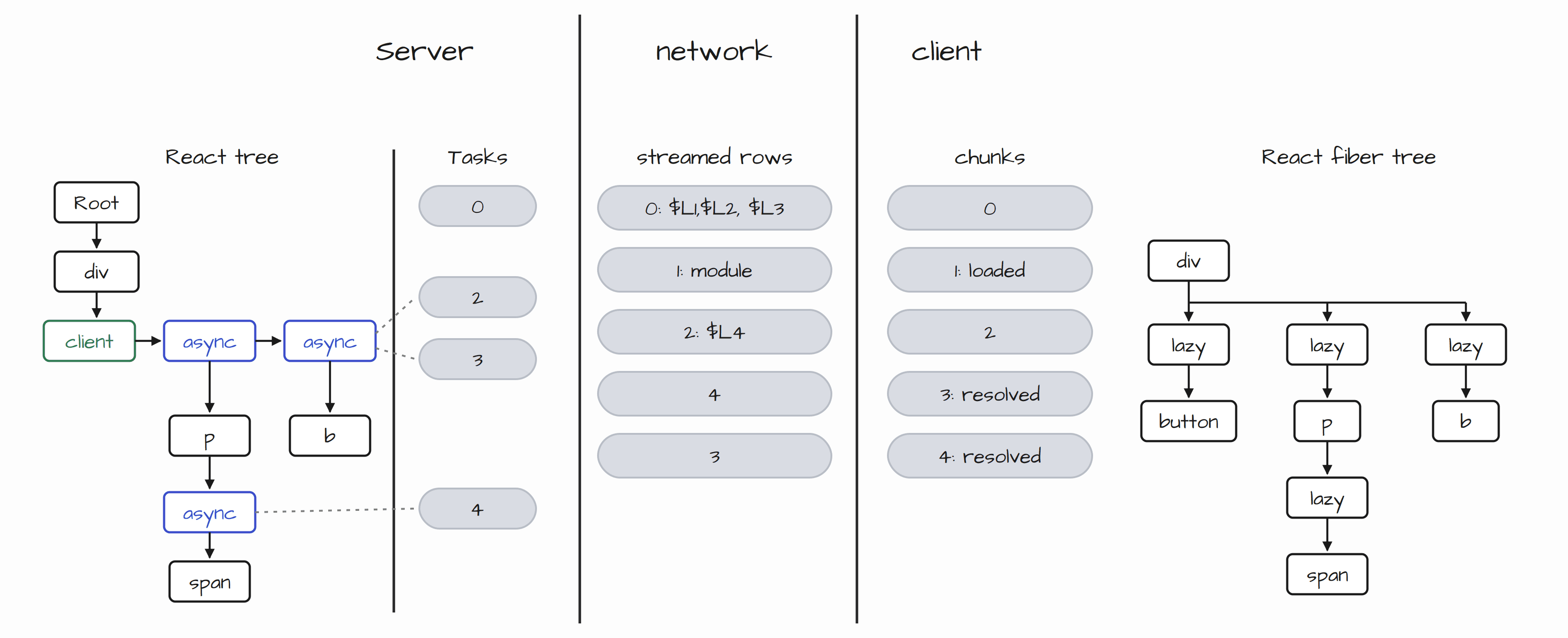
Look at the following diagram. If an interviewer points to a particular part and asks, “What’s happening here?” Can you reason about it?”
If you can’t, you really need to understand how React works. This is just a basic diagram of how server components work, so you really need to know React’s internals and their following mechanisms. This isn't any time-wasting thing or over-engineering. This lets you build your own patterns instead of blindly following random patterns. You’ll be able to reason about React and push it to its peak performance in the browser.
If you want to play with how rsc-works in browsers try this: RSC Explorer built by dan. Both the server and client parts of RSC run in the browser so you can inspect the Flight stream step by step.
After the commit phase, React’s own cost becomes almost irrelevant.
The real costs are the physics of the browser:
Layout thrashing scales with the size of the dirty subtree
Inline-cache misses scale with polymorphism
Long tasks scale with main-thread work
$$\begin{aligned} \text{layout thrashing} &\propto |\text{dirty subtree}| \\ \text{IC misses} &\propto \text{polymorphism} \\ \text{long tasks} &\propto \text{main-thread work} \end{aligned}$$
// Violation – optimising React cost while ignoring browser cost
function List({ items }) {
  const filtered = useMemo(() => items.filter(...), [items])
  return filtered.map(...)
}

// Correct – attack the actual dominant cost
function List({ items }) {
  return (
    <div style={{ contentVisibility: 'auto' }}>
      {items.map(...)}
    </div>
  )
}
I once watched a production ThemeProvider that looked perfect. It used useEffect, useId, everything. But it attached a keydown listener to window instead of ownerDocument.defaultView. When the same component was opened inside a pop-out window, the shortcut silently died. Two senior engineers spent a day debugging it. One violation of Environment Ownership + Fiber Ownership was enough.
This makes the laws feel real, not theoretical :)
Think 1000x times before writing react components and how to audit any component against the 5 laws:
Does any pure render path touch browser APIs?
Does every escaping side effect have an explicit inverse?
Are non-urgent updates going through startTransition?
Are you optimising React cost while the real cost is in the browser?
Can this component be rendered twice, inside a portal, and inside <Activity> without breaking?
Any MD file lists symptoms. It has no representation of the global state space that makes those symptoms inevitable.
These are the law-like invariants that agents can't mimic the physics of React.
The agent can therefore produce locally perfect code that still has the following weirdness :(
has the wrong ownership graph
ships secrets across the Flight boundary (v ∉ S)
attaches listeners to the wrong window
treats useMemo as a semantic guarantee
optimises re-renders while the real cost is a Client boundary that should never exist
Look at the following diagram. If an interviewer points to a particular part and asks, “What’s happening here?” Can you reason about it?”
If you can’t, you really need to understand how React works. This is just a basic diagram of how server components work, so you really need to know React’s internals and their following mechanisms. This isn't any time-wasting thing or over-engineering. This lets you build your own patterns instead of blindly following random patterns. You’ll be able to reason about React and push it to its peak performance in the browser.
If you want to play with how rsc-works in browsers try this: RSC Explorer built by dan. Both the server and client parts of RSC run in the browser so you can inspect the Flight stream step by step.
After the commit phase, React’s own cost becomes almost irrelevant.
The real costs are the physics of the browser:
Layout thrashing scales with the size of the dirty subtree
Inline-cache misses scale with polymorphism
Long tasks scale with main-thread work
$$\begin{aligned} \text{layout thrashing} &\propto |\text{dirty subtree}| \\ \text{IC misses} &\propto \text{polymorphism} \\ \text{long tasks} &\propto \text{main-thread work} \end{aligned}$$
// Violation – optimising React cost while ignoring browser cost
function List({ items }) {
  const filtered = useMemo(() => items.filter(...), [items])
  return filtered.map(...)
}

// Correct – attack the actual dominant cost
function List({ items }) {
  return (
    <div style={{ contentVisibility: 'auto' }}>
      {items.map(...)}
    </div>
  )
}
I once watched a production ThemeProvider that looked perfect. It used useEffect, useId, everything. But it attached a keydown listener to window instead of ownerDocument.defaultView. When the same component was opened inside a pop-out window, the shortcut silently died. Two senior engineers spent a day debugging it. One violation of Environment Ownership + Fiber Ownership was enough.
This makes the laws feel real, not theoretical :)
Think 1000x times before writing react components and how to audit any component against the 5 laws:
Does any pure render path touch browser APIs?
Does every escaping side effect have an explicit inverse?
Are non-urgent updates going through startTransition?
Are you optimising React cost while the real cost is in the browser?
Can this component be rendered twice, inside a portal, and inside <Activity> without breaking?
Any MD file lists symptoms. It has no representation of the global state space that makes those symptoms inevitable.
These are the law-like invariants that agents can't mimic the physics of React.
The agent can therefore produce locally perfect code that still has the following weirdness :(
has the wrong ownership graph
ships secrets across the Flight boundary (v ∉ S)
attaches listeners to the wrong window
treats useMemo as a semantic guarantee
optimises re-renders while the real cost is a Client boundary that should never exist
Look at the following diagram. If an interviewer points to a particular part and asks, “What’s happening here?” Can you reason about it?”
If you can’t, you really need to understand how React works. This is just a basic diagram of how server components work, so you really need to know React’s internals and their following mechanisms. This isn't any time-wasting thing or over-engineering. This lets you build your own patterns instead of blindly following random patterns. You’ll be able to reason about React and push it to its peak performance in the browser.
If you want to play with how rsc-works in browsers try this: RSC Explorer built by dan. Both the server and client parts of RSC run in the browser so you can inspect the Flight stream step by step.
Example Common Interview Questions
“Explain React Fiber / how does React’s concurrent rendering work?”
Generic answer (what 95% of candidates say):
“Fiber is the new reconciliation algorithm introduced in React 16. It breaks rendering into small units of work so React can pause, resume, or abort work. This prevents the UI from freezing and allows prioritization of updates.”
Really Good Engineer answers like this:
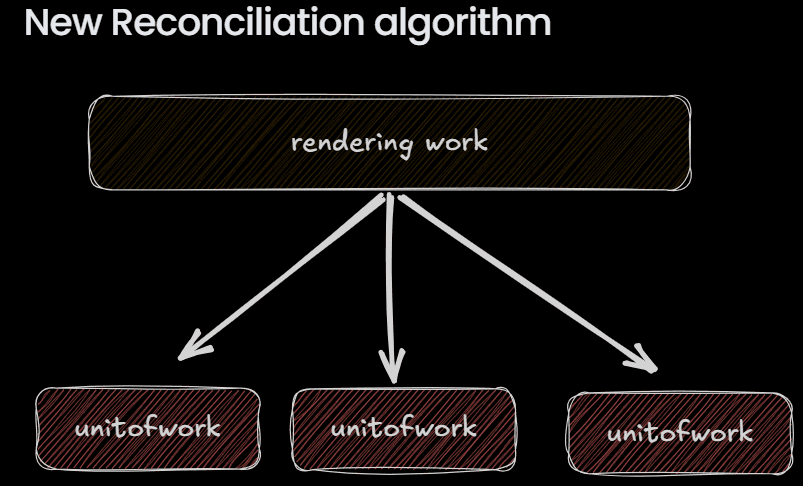
Fiber is both a data structure and a unit of work.
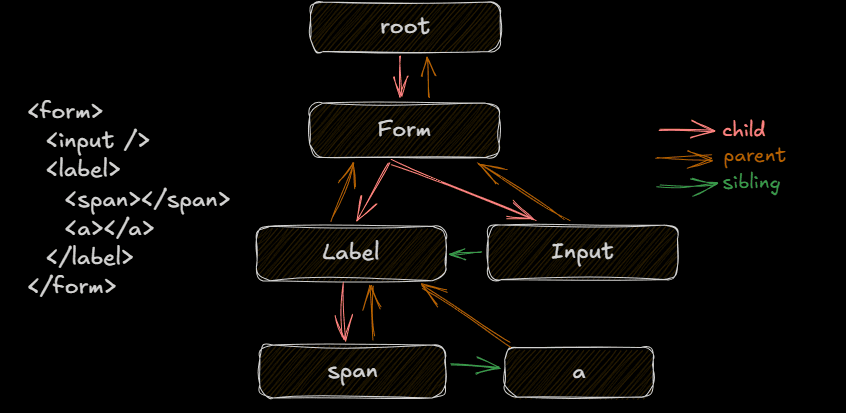
const fiber = {
  type, key, stateNode,
  child, sibling, return,   // linked list
  alternate,                // double buffer (current ↔ workInProgress)
  lanes, childLanes,        // 31-bit priority lattice
  flags, subtreeFlags,      // effect list
  memoizedState, updateQueue
}
2. Every component becomes a Fiber node with child / sibling / return pointers (a linked list, not a recursive tree) plus an alternate pointer that implements double buffering between the current tree and the work-in-progress tree.
3. Priority is encoded as a 31-bit lane bitmask. When an update happens, React marks the fiber’s lanes and bubbles childLanes up to the root so it can skip entire subtrees that have no pending work. The render phase walks this linked list, building the WIP tree and constructing an effect list via flags. Because the render phase is pure, React can time-slice it (yield every ~5 ms) and abandon the WIP tree if a higher-priority lane arrives.
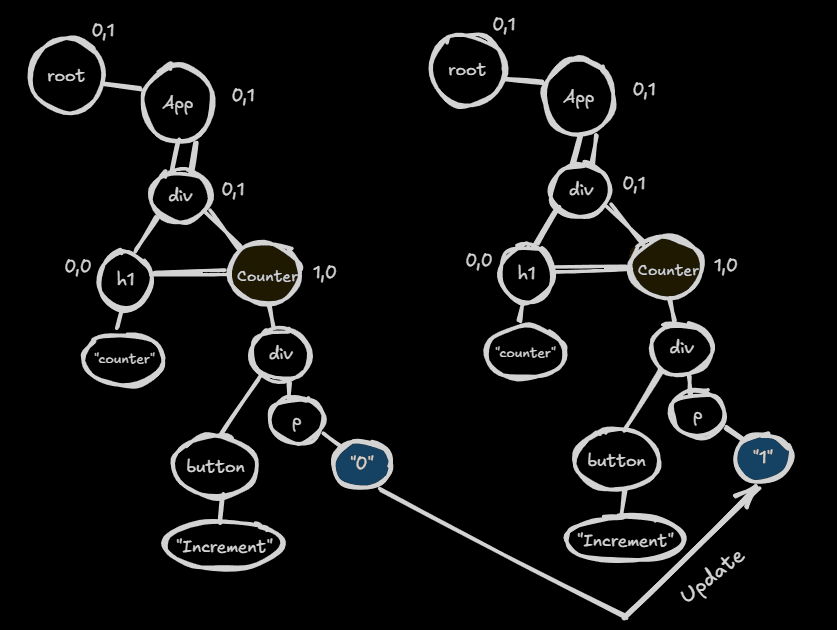
4. Only the commit phase is synchronous and atomic. It applies the mutations and runs layout effects. Passive effects are scheduled after paint. This is why startTransition, Suspense retries, and useDeferredValue work: they simply assign lower-priority lanes. The current tree stays consistent the entire time because we never mutate it during the interruptible phase.
“Explain React Fiber / how does React’s concurrent rendering work?”
Generic answer (what 95% of candidates say):
“Fiber is the new reconciliation algorithm introduced in React 16. It breaks rendering into small units of work so React can pause, resume, or abort work. This prevents the UI from freezing and allows prioritization of updates.”
Really Good Engineer answers like this:
Fiber is both a data structure and a unit of work.
const fiber = {
  type, key, stateNode,
  child, sibling, return,   // linked list
  alternate,                // double buffer (current ↔ workInProgress)
  lanes, childLanes,        // 31-bit priority lattice
  flags, subtreeFlags,      // effect list
  memoizedState, updateQueue
}
2. Every component becomes a Fiber node with child / sibling / return pointers (a linked list, not a recursive tree) plus an alternate pointer that implements double buffering between the current tree and the work-in-progress tree.
3. Priority is encoded as a 31-bit lane bitmask. When an update happens, React marks the fiber’s lanes and bubbles childLanes up to the root so it can skip entire subtrees that have no pending work. The render phase walks this linked list, building the WIP tree and constructing an effect list via flags. Because the render phase is pure, React can time-slice it (yield every ~5 ms) and abandon the WIP tree if a higher-priority lane arrives.
4. Only the commit phase is synchronous and atomic. It applies the mutations and runs layout effects. Passive effects are scheduled after paint. This is why startTransition, Suspense retries, and useDeferredValue work: they simply assign lower-priority lanes. The current tree stays consistent the entire time because we never mutate it during the interruptible phase.
“Explain React Fiber / how does React’s concurrent rendering work?”
Generic answer (what 95% of candidates say):
“Fiber is the new reconciliation algorithm introduced in React 16. It breaks rendering into small units of work so React can pause, resume, or abort work. This prevents the UI from freezing and allows prioritization of updates.”
Really Good Engineer answers like this:
Fiber is both a data structure and a unit of work.
const fiber = {
  type, key, stateNode,
  child, sibling, return,   // linked list
  alternate,                // double buffer (current ↔ workInProgress)
  lanes, childLanes,        // 31-bit priority lattice
  flags, subtreeFlags,      // effect list
  memoizedState, updateQueue
}
2. Every component becomes a Fiber node with child / sibling / return pointers (a linked list, not a recursive tree) plus an alternate pointer that implements double buffering between the current tree and the work-in-progress tree.
3. Priority is encoded as a 31-bit lane bitmask. When an update happens, React marks the fiber’s lanes and bubbles childLanes up to the root so it can skip entire subtrees that have no pending work. The render phase walks this linked list, building the WIP tree and constructing an effect list via flags. Because the render phase is pure, React can time-slice it (yield every ~5 ms) and abandon the WIP tree if a higher-priority lane arrives.
4. Only the commit phase is synchronous and atomic. It applies the mutations and runs layout effects. Passive effects are scheduled after paint. This is why startTransition, Suspense retries, and useDeferredValue work: they simply assign lower-priority lanes. The current tree stays consistent the entire time because we never mutate it during the interruptible phase.
Another Interview Question
“How do React Server Components actually work with the bundler?”
Common sub interview questions on this topic:
“How do React Server Components actually work with the bundler?”
“What happens when the server encounters a 'use client' component?”
“Why can’t the server just execute client components?”
“What is the Flight protocol / what does $L1 mean?”
“How does the client know which module to load for a client reference?”
Generic answer (what most people say):
Server Components run on the server, Client Components run on the client. The bundler splits them using the 'use client' directive.
Elite answer (what you should say):
A React UI is a single tree, but under RSC it is compiled from two completely different perspectives.
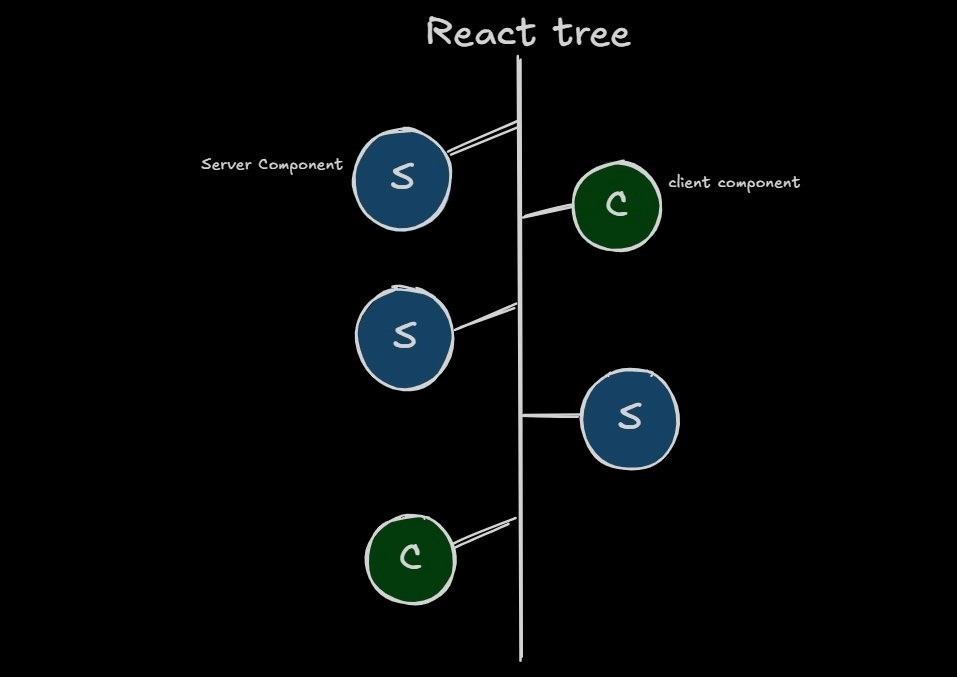
Server build (react-server condition)
Real Server Components are included normally.
When the bundler hits a module with "use client,” a loader replaces the entire module with a stub:
import { registerClientReference } from "react-server-dom-webpack/server";

export default registerClientReference(
  () => { throw new Error("This is a client component"); },
  "./Counter.js",
  "default"
);
The server never sees the real useState or event handlers. When the Flight renderer encounters this stub it emits a reference into the stream instead of rendering:
0:["$","div",null,{"children":[ ... , ["$","$L1",null,{}] ]}]
1:I["./Counter.js",["client"],"default"]
Client build
Compiles the real client components against the normal React runtime.
Emits a client manifest that maps the references ($L1) back to the actual module IDs and chunks.
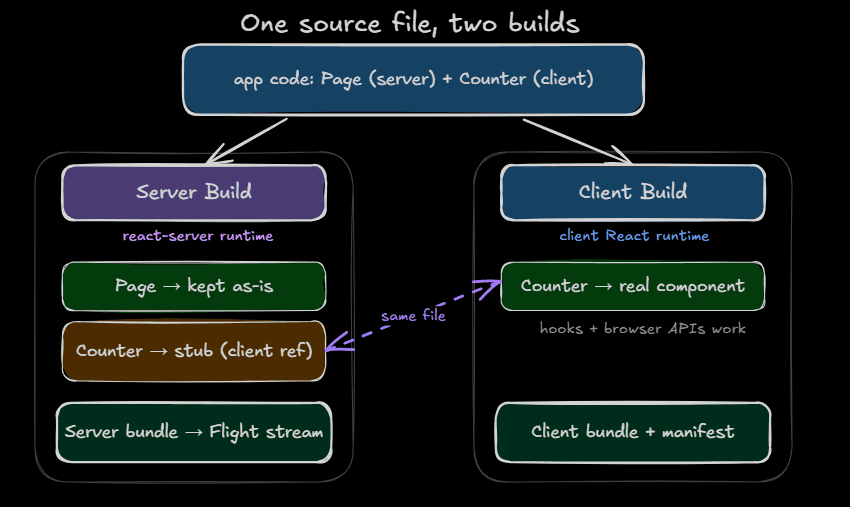
On the client, the Flight consumer reads the stream, sees $L1, consults the manifest, and loads the real component. This is the exact mechanism that enforces the Environment Ownership Law at build time.
This is the level that makes interviewers lean forward.
And also keep in mind before giving any interview mog the interviewer before the interviewer mogs you. You might think, “If I’m smarter than the interviewer, they might not hire me.” That’s the dumb assumption people make all the time. No one wants to hire average or above-average people today; companies want exceptional/elite people.
So, try to position yourself like a mountain, with complete clarity. Then, any engineer in this planet.
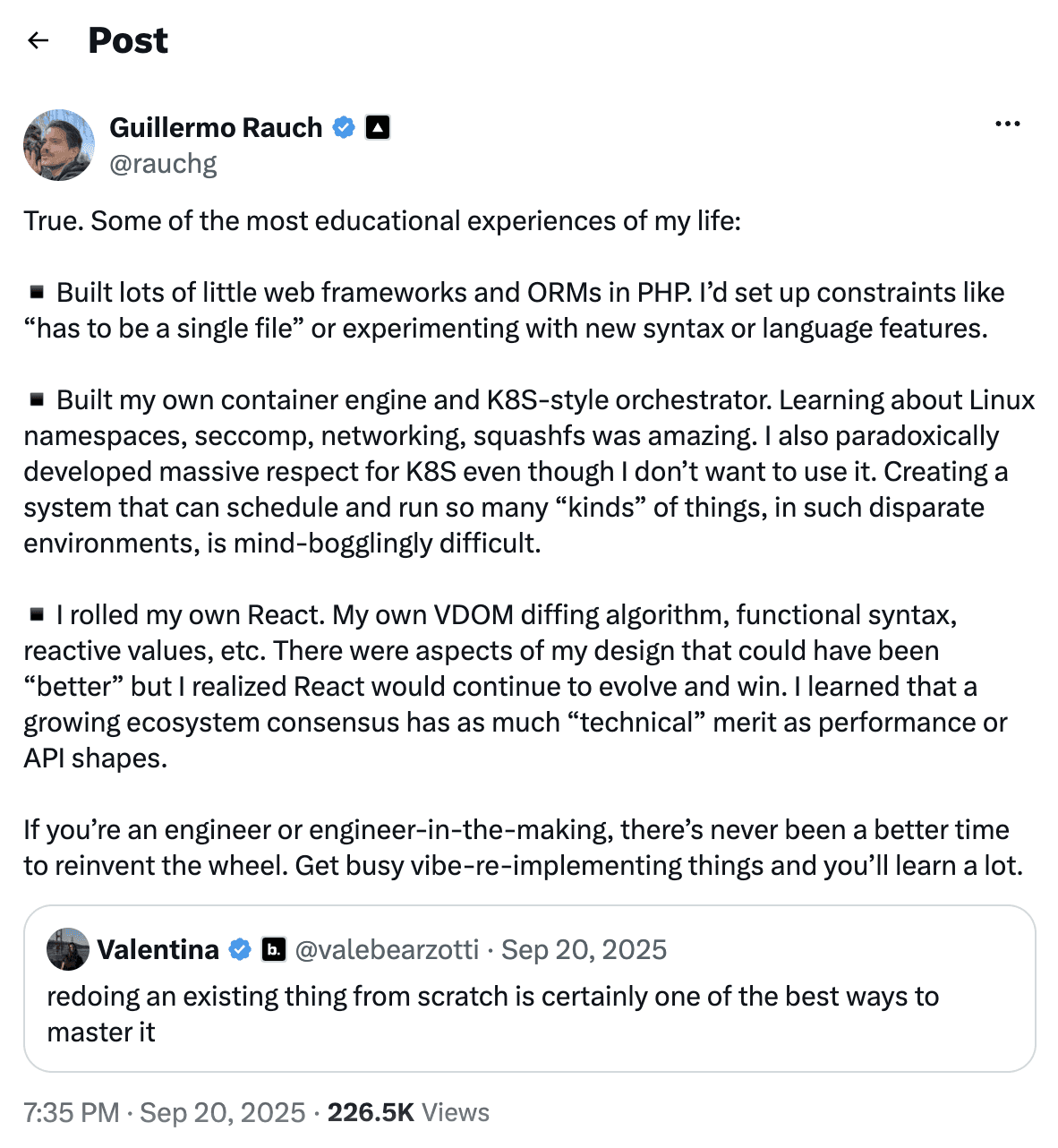
Look at this: the CEO of Vercel himself builds things from scratch. You don’t need to build another Next.js or a “better React”; at least writing the core primitives gives you a clear understanding of the domain.
If you’re confused about which part you need to rewrite, here’s the repository link: raw-bits-to-react written by @infinterenders.
Try recreating what’s mentioned in this repo. Trust me, if you can do even a few of the things in this repo, companies will beg you to join as a web developer. If they don’t, you’re probably looking in the wrong places. Lots of organizations still care deeply about craftsmanship. Even Vercel engineers might ask you to join Vercel. It’s going to happen if you consistently build things in a deterministic, disciplined way.
“How do React Server Components actually work with the bundler?”
Common sub interview questions on this topic:
“How do React Server Components actually work with the bundler?”
“What happens when the server encounters a 'use client' component?”
“Why can’t the server just execute client components?”
“What is the Flight protocol / what does $L1 mean?”
“How does the client know which module to load for a client reference?”
Generic answer (what most people say):
Server Components run on the server, Client Components run on the client. The bundler splits them using the 'use client' directive.
Elite answer (what you should say):
A React UI is a single tree, but under RSC it is compiled from two completely different perspectives.
Server build (react-server condition)
Real Server Components are included normally.
When the bundler hits a module with "use client,” a loader replaces the entire module with a stub:
import { registerClientReference } from "react-server-dom-webpack/server";

export default registerClientReference(
  () => { throw new Error("This is a client component"); },
  "./Counter.js",
  "default"
);
The server never sees the real useState or event handlers. When the Flight renderer encounters this stub it emits a reference into the stream instead of rendering:
0:["$","div",null,{"children":[ ... , ["$","$L1",null,{}] ]}]
1:I["./Counter.js",["client"],"default"]
Client build
Compiles the real client components against the normal React runtime.
Emits a client manifest that maps the references ($L1) back to the actual module IDs and chunks.
On the client, the Flight consumer reads the stream, sees $L1, consults the manifest, and loads the real component. This is the exact mechanism that enforces the Environment Ownership Law at build time.
This is the level that makes interviewers lean forward.
And also keep in mind before giving any interview mog the interviewer before the interviewer mogs you. You might think, “If I’m smarter than the interviewer, they might not hire me.” That’s the dumb assumption people make all the time. No one wants to hire average or above-average people today; companies want exceptional/elite people.
So, try to position yourself like a mountain, with complete clarity. Then, any engineer in this planet.
Look at this: the CEO of Vercel himself builds things from scratch. You don’t need to build another Next.js or a “better React”; at least writing the core primitives gives you a clear understanding of the domain.
If you’re confused about which part you need to rewrite, here’s the repository link: raw-bits-to-react written by @infinterenders.
Try recreating what’s mentioned in this repo. Trust me, if you can do even a few of the things in this repo, companies will beg you to join as a web developer. If they don’t, you’re probably looking in the wrong places. Lots of organizations still care deeply about craftsmanship. Even Vercel engineers might ask you to join Vercel. It’s going to happen if you consistently build things in a deterministic, disciplined way.
“How do React Server Components actually work with the bundler?”
Common sub interview questions on this topic:
“How do React Server Components actually work with the bundler?”
“What happens when the server encounters a 'use client' component?”
“Why can’t the server just execute client components?”
“What is the Flight protocol / what does $L1 mean?”
“How does the client know which module to load for a client reference?”
Generic answer (what most people say):
Server Components run on the server, Client Components run on the client. The bundler splits them using the 'use client' directive.
Elite answer (what you should say):
A React UI is a single tree, but under RSC it is compiled from two completely different perspectives.
Server build (react-server condition)
Real Server Components are included normally.
When the bundler hits a module with "use client,” a loader replaces the entire module with a stub:
import { registerClientReference } from "react-server-dom-webpack/server";

export default registerClientReference(
  () => { throw new Error("This is a client component"); },
  "./Counter.js",
  "default"
);
The server never sees the real useState or event handlers. When the Flight renderer encounters this stub it emits a reference into the stream instead of rendering:
0:["$","div",null,{"children":[ ... , ["$","$L1",null,{}] ]}]
1:I["./Counter.js",["client"],"default"]
Client build
Compiles the real client components against the normal React runtime.
Emits a client manifest that maps the references ($L1) back to the actual module IDs and chunks.
On the client, the Flight consumer reads the stream, sees $L1, consults the manifest, and loads the real component. This is the exact mechanism that enforces the Environment Ownership Law at build time.
This is the level that makes interviewers lean forward.
And also keep in mind before giving any interview mog the interviewer before the interviewer mogs you. You might think, “If I’m smarter than the interviewer, they might not hire me.” That’s the dumb assumption people make all the time. No one wants to hire average or above-average people today; companies want exceptional/elite people.
So, try to position yourself like a mountain, with complete clarity. Then, any engineer in this planet.
Look at this: the CEO of Vercel himself builds things from scratch. You don’t need to build another Next.js or a “better React”; at least writing the core primitives gives you a clear understanding of the domain.
If you’re confused about which part you need to rewrite, here’s the repository link: raw-bits-to-react written by @infinterenders.
Try recreating what’s mentioned in this repo. Trust me, if you can do even a few of the things in this repo, companies will beg you to join as a web developer. If they don’t, you’re probably looking in the wrong places. Lots of organizations still care deeply about craftsmanship. Even Vercel engineers might ask you to join Vercel. It’s going to happen if you consistently build things in a deterministic, disciplined way.
Learning history of web dev and why modern web computation feels over engg?
A lot of people assume modern web engineering is an over-engineered thing.
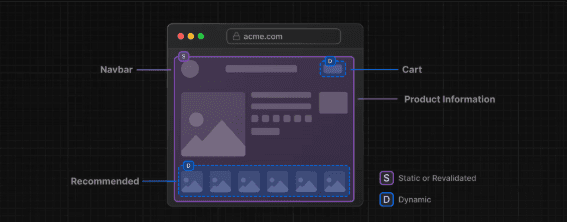
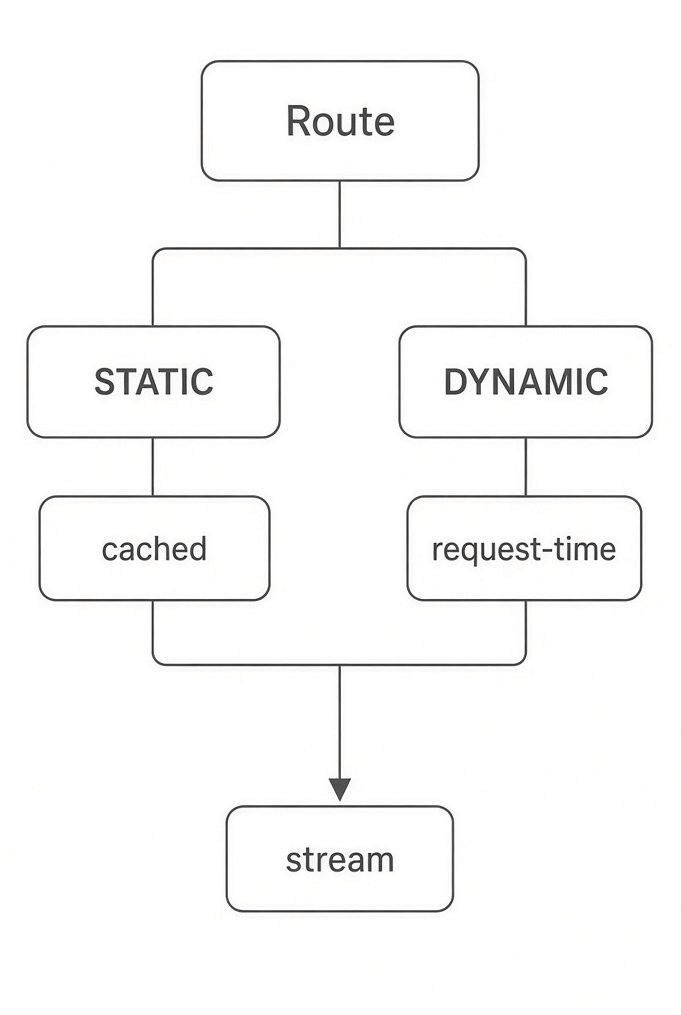
Look at this cute diagram. This was about Next.js’s PPR (Partial Prerendering) feature. Most people hated Partial Prerendering, but Partial Prerendering existed even before Next.js did.
Facebook made a similar PPR-style approach much earlier, in 2010, called big-pipe-from-meta.
But most Next.js developers don’t even know this; they just blame the framework and call it over-engineering.
See this video:
The podcast guest is Vercel’s CPO, who is known as the “godfather of React.” He explains how PPR in Next.js is essentially a successor to BigPipe, and how React Server Components are a generalized successor to ideas that originated at Facebook, including BigPipe and Relay.
And did you get the question: If BigPipe existed, then why didn’t it work?
Here, I’m bringing up all these things just to get to how elite engineers think when building an application at peak-load scale: reasoning about why something failed, what BigPipe didn’t have, and what Next.js has today?
Yes. The deeper question is not simply “BigPipe existed before PPR, so why did Next.js need PPR?” The interesting engineering question is:
What did BigPipe solve, what constraints did it have, and what did the React/Next.js architecture add that made the same underlying idea much more composable?
One correction first: BigPipe did not simply “fail.” It was a real production technique at Facebook. The better framing is that its model did not become the general-purpose programming model for modern React applications. Next.js/React evolved the idea considerably
1. What BigPipe essentially did classic BigPipe idea was roughly:
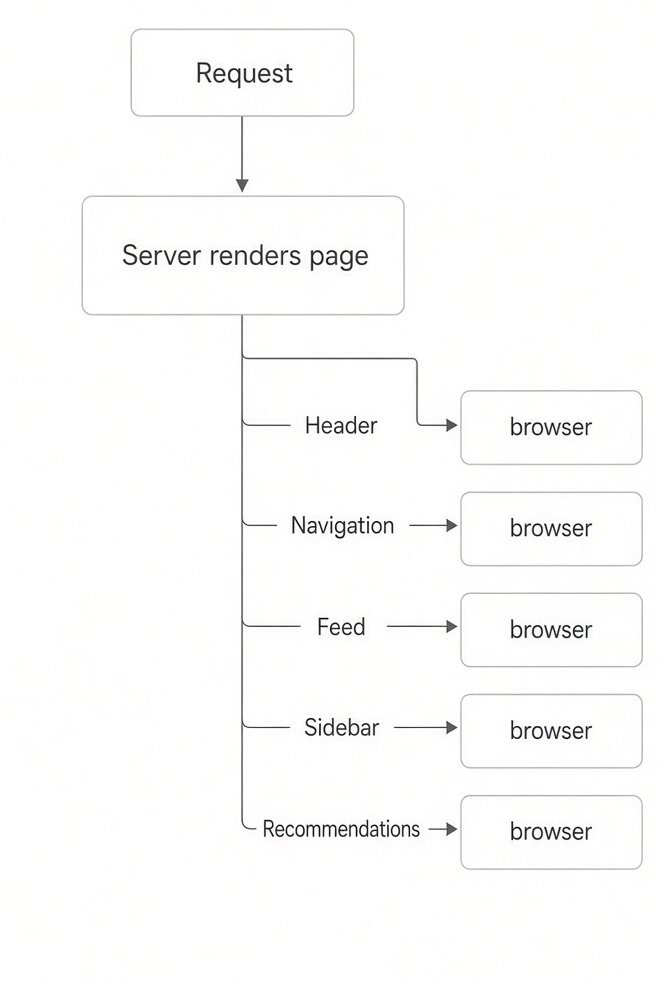
BigPipe already had the fundamental insight:
Don’t make the user wait for the slowest part of the page.
If the page consists of several independent pieces
$$T_{\text{blocking}} = \sum_{i} T_i$$
you ideally want independent work to execute concurrently:
$$T_{\text{parallel}} \approx \max(T_1, T_2, \ldots, T_n)$$
But even that isn't enough. The user doesn't need to wait for the slowest computation before seeing the static UI. That gives you
$$T_{\text{perceived}} \ll T_{\text{complete}}$$
What changed with React + Next.js?
BigPipe : Server → HTML fragments → HTTP stream → DOM
Modern Next.JS : Component tree -> Suspense boundaries → Static + dynamic computation → RSC / HTML streaming → Browser
The major improvement isn't simply “streaming.” BigPipe already had that idea. Improvement is that the component tree becomes the unit of orchestration.
<Suspense fallback={<Skeleton />}>
  <Recommendations />
</Suspense>
PPR's core optimization instead of: Route=all static or: Route=all dynamic
You can conceptually have: Route=Static Shell+Dynamic Boundaries
So the static work can be reused, while request-specific work is resolved later.
I’m bringing up all these things not because I’m a larper. Learning this kind of history gives you a clear understanding of how you need to engineer an application. Understanding the relationship between history and current architecture makes you really cracked at making architectural decisions, not just at getting a job.
For learning React internals: JSer → React Internals Deep Dive / React source-code walkthrough
It goes through React by reading the actual source code, covering Fiber, reconciliation, hooks, Suspense, Scheduler, Lanes, hydration, Server Components, and more. (jser.dev)
https://overreacted.io/ for getting a clear mental model and understanding
So, this is the standard of engineering you need to hold yourself to in order to become a top-notch React developer :)
This article was originally published on X by @infinterenders, sponsored by Fonzi. If you're grinding interviews and want intros to startups hiring right now, text 646-236-3745 or check out Match Day. One cycle, several startups reviewing you at the same time, and they're looking for engineers who actually understand this level of the stack. Click here to see how it works.
A lot of people assume modern web engineering is an over-engineered thing.
Look at this cute diagram. This was about Next.js’s PPR (Partial Prerendering) feature. Most people hated Partial Prerendering, but Partial Prerendering existed even before Next.js did.
Facebook made a similar PPR-style approach much earlier, in 2010, called big-pipe-from-meta.
But most Next.js developers don’t even know this; they just blame the framework and call it over-engineering.
See this video:
The podcast guest is Vercel’s CPO, who is known as the “godfather of React.” He explains how PPR in Next.js is essentially a successor to BigPipe, and how React Server Components are a generalized successor to ideas that originated at Facebook, including BigPipe and Relay.
And did you get the question: If BigPipe existed, then why didn’t it work?
Here, I’m bringing up all these things just to get to how elite engineers think when building an application at peak-load scale: reasoning about why something failed, what BigPipe didn’t have, and what Next.js has today?
Yes. The deeper question is not simply “BigPipe existed before PPR, so why did Next.js need PPR?” The interesting engineering question is:
What did BigPipe solve, what constraints did it have, and what did the React/Next.js architecture add that made the same underlying idea much more composable?
One correction first: BigPipe did not simply “fail.” It was a real production technique at Facebook. The better framing is that its model did not become the general-purpose programming model for modern React applications. Next.js/React evolved the idea considerably
1. What BigPipe essentially did classic BigPipe idea was roughly:
BigPipe already had the fundamental insight:
Don’t make the user wait for the slowest part of the page.
If the page consists of several independent pieces
$$T_{\text{blocking}} = \sum_{i} T_i$$
you ideally want independent work to execute concurrently:
$$T_{\text{parallel}} \approx \max(T_1, T_2, \ldots, T_n)$$
But even that isn't enough. The user doesn't need to wait for the slowest computation before seeing the static UI. That gives you
$$T_{\text{perceived}} \ll T_{\text{complete}}$$
What changed with React + Next.js?
BigPipe : Server → HTML fragments → HTTP stream → DOM
Modern Next.JS : Component tree -> Suspense boundaries → Static + dynamic computation → RSC / HTML streaming → Browser
The major improvement isn't simply “streaming.” BigPipe already had that idea. Improvement is that the component tree becomes the unit of orchestration.
<Suspense fallback={<Skeleton />}>
  <Recommendations />
</Suspense>
PPR's core optimization instead of: Route=all static or: Route=all dynamic
You can conceptually have: Route=Static Shell+Dynamic Boundaries
So the static work can be reused, while request-specific work is resolved later.
I’m bringing up all these things not because I’m a larper. Learning this kind of history gives you a clear understanding of how you need to engineer an application. Understanding the relationship between history and current architecture makes you really cracked at making architectural decisions, not just at getting a job.
For learning React internals: JSer → React Internals Deep Dive / React source-code walkthrough
It goes through React by reading the actual source code, covering Fiber, reconciliation, hooks, Suspense, Scheduler, Lanes, hydration, Server Components, and more. (jser.dev)
https://overreacted.io/ for getting a clear mental model and understanding
So, this is the standard of engineering you need to hold yourself to in order to become a top-notch React developer :)
This article was originally published on X by @infinterenders, sponsored by Fonzi. If you're grinding interviews and want intros to startups hiring right now, text 646-236-3745 or check out Match Day. One cycle, several startups reviewing you at the same time, and they're looking for engineers who actually understand this level of the stack. Click here to see how it works.
A lot of people assume modern web engineering is an over-engineered thing.
Look at this cute diagram. This was about Next.js’s PPR (Partial Prerendering) feature. Most people hated Partial Prerendering, but Partial Prerendering existed even before Next.js did.
Facebook made a similar PPR-style approach much earlier, in 2010, called big-pipe-from-meta.
But most Next.js developers don’t even know this; they just blame the framework and call it over-engineering.
See this video:
The podcast guest is Vercel’s CPO, who is known as the “godfather of React.” He explains how PPR in Next.js is essentially a successor to BigPipe, and how React Server Components are a generalized successor to ideas that originated at Facebook, including BigPipe and Relay.
And did you get the question: If BigPipe existed, then why didn’t it work?
Here, I’m bringing up all these things just to get to how elite engineers think when building an application at peak-load scale: reasoning about why something failed, what BigPipe didn’t have, and what Next.js has today?
Yes. The deeper question is not simply “BigPipe existed before PPR, so why did Next.js need PPR?” The interesting engineering question is:
What did BigPipe solve, what constraints did it have, and what did the React/Next.js architecture add that made the same underlying idea much more composable?
One correction first: BigPipe did not simply “fail.” It was a real production technique at Facebook. The better framing is that its model did not become the general-purpose programming model for modern React applications. Next.js/React evolved the idea considerably
1. What BigPipe essentially did classic BigPipe idea was roughly:
BigPipe already had the fundamental insight:
Don’t make the user wait for the slowest part of the page.
If the page consists of several independent pieces
$$T_{\text{blocking}} = \sum_{i} T_i$$
you ideally want independent work to execute concurrently:
$$T_{\text{parallel}} \approx \max(T_1, T_2, \ldots, T_n)$$
But even that isn't enough. The user doesn't need to wait for the slowest computation before seeing the static UI. That gives you
$$T_{\text{perceived}} \ll T_{\text{complete}}$$
What changed with React + Next.js?
BigPipe : Server → HTML fragments → HTTP stream → DOM
Modern Next.JS : Component tree -> Suspense boundaries → Static + dynamic computation → RSC / HTML streaming → Browser
The major improvement isn't simply “streaming.” BigPipe already had that idea. Improvement is that the component tree becomes the unit of orchestration.
<Suspense fallback={<Skeleton />}>
  <Recommendations />
</Suspense>
PPR's core optimization instead of: Route=all static or: Route=all dynamic
You can conceptually have: Route=Static Shell+Dynamic Boundaries
So the static work can be reused, while request-specific work is resolved later.
I’m bringing up all these things not because I’m a larper. Learning this kind of history gives you a clear understanding of how you need to engineer an application. Understanding the relationship between history and current architecture makes you really cracked at making architectural decisions, not just at getting a job.
For learning React internals: JSer → React Internals Deep Dive / React source-code walkthrough
It goes through React by reading the actual source code, covering Fiber, reconciliation, hooks, Suspense, Scheduler, Lanes, hydration, Server Components, and more. (jser.dev)
https://overreacted.io/ for getting a clear mental model and understanding
So, this is the standard of engineering you need to hold yourself to in order to become a top-notch React developer :)
This article was originally published on X by @infinterenders, sponsored by Fonzi. If you're grinding interviews and want intros to startups hiring right now, text 646-236-3745 or check out Match Day. One cycle, several startups reviewing you at the same time, and they're looking for engineers who actually understand this level of the stack. Click here to see how it works.


Candidates
Hiring
Content
Candidates
Hiring
Content
Candidates
Hiring
Content